Key takeaways
-
Workflow integration is read and write flows between the workflow engine and systems of record, not a middleware project.
-
Native connectors handle the most common 80% of integration needs. APIs and webhooks cover the rest. Middleware is the right answer only for the complex remainder.
-
Workflow integration done right makes the workflow software the orchestration plane. Systems of record stay as the single source of truth.
-
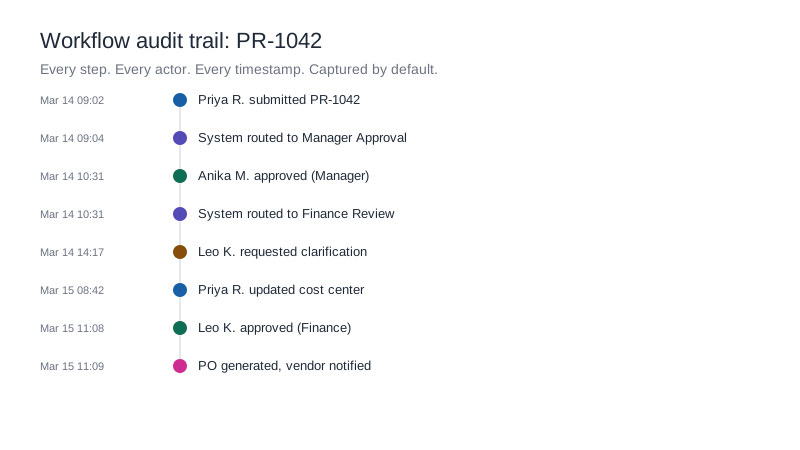
The audit trail must extend across integrations. If integration calls aren't logged in the workflow trail, compliance defensibility breaks.
The procurement workflow needs vendor data from SAP. The integration project is six months out. So procurement uses email and copy-paste in the meantime, and the two systems drift out of sync.
This is how shadow IT starts. And once it starts, it scales faster than IT can govern it.
Workflow integration is the architectural answer. Done right, it lets workflows read and write to systems of record without standing up a middleware project, without writing custom integration code, and without losing the audit trail. Done wrong, it's a parallel ecosystem of point-to-point connections that nobody can maintain.
What workflow integration actually means
Workflow integration is the connection between a workflow engine and the systems of record that hold the data the workflow needs. It covers two flows:
- Read flows: the workflow pulls data from ERP, CRM, or HRMS to populate forms, validate inputs, or drive routing decisions.
- Write flows: the workflow pushes data back to those systems after approval, including creating records, updating fields, or triggering downstream actions.
A good workflow integration looks like a single workflow item that touches multiple systems without the user noticing. A bad one looks like the user logging into three different tools to complete what should have been one process.
The middleware tax
Most enterprises pay a tax on every integration. The tax has three line items.
Build cost
Standing up integration middleware (an ESB, an iPaaS, a custom integration layer) typically costs 3 to 6 months of dedicated developer time per major system connection. Multiply by the number of systems and the cost compounds quickly.
Maintenance cost
Every system upgrade upstream forces a middleware change downstream. ERP updates, API version changes, security patches: all of them push work onto the integration layer. Maintenance is the line item enterprises consistently underestimate.
Opportunity cost
While the middleware project is in flight, business teams find workarounds: email, copy-paste, spreadsheets, manual data entry. These workarounds outlast the project. They get retired only when someone notices they're still happening.
Three approaches to workflow integration
Native connectors
Pre-built connectors for common systems (SAP, Salesforce, Workday, Microsoft 365, Google Workspace, Slack, Jira) ship with the workflow platform. Configuration takes minutes; no developer required.
Native connectors handle the most common 80% of integration needs. They cover authentication, common data structures, and the standard read/write operations.
Limitations: they don't handle highly custom data structures, deeply customized ERP modules, or systems without modern APIs.
API and webhook integration
For systems without a native connector, REST APIs and webhooks provide a configurable but lightweight integration path. The workflow tools exposes API endpoints and consumes external ones; webhooks trigger workflows from external events.
Configuration requires technical skill but not full developer time. Often the IT team or the platform admin can configure these without a separate integration project.
Suitable for: custom internal systems, smaller SaaS tools, and any system that exposes a REST API.
Middleware and ESB integration
For complex many-to-many integration with custom transformation logic, enterprise service bus or iPaaS tools (MuleSoft, Boomi, Workato) sit between the workflow engine and the systems of record.
This is the right answer for heavily customized environments. It's the wrong answer for the common 80% of workflow integrations, where it's overkill that delays the project.
Workflow as the integration layer
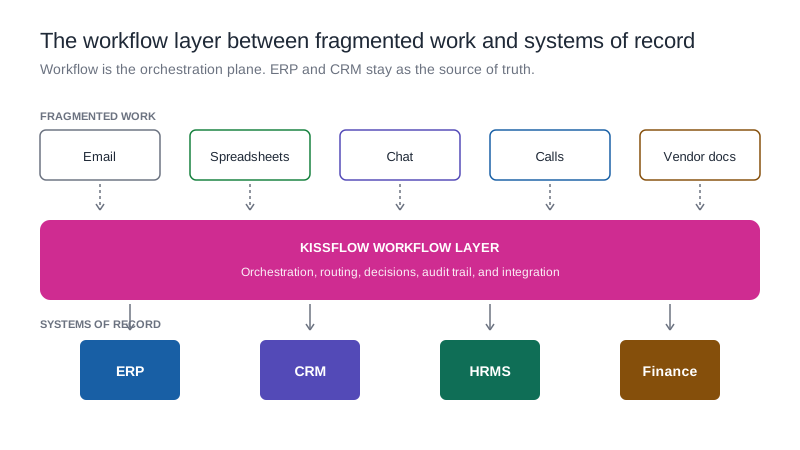
The most useful mental model for workflow integration isn't "how does my workflow tool connect to ERP?" It's "how do I make workflow the orchestration layer between fragmented work and systems of record?"
In this model, systems of record (ERP, CRM, HRMS) stay as the single source of truth. They don't get replaced; they don't get duplicated. The workflow layer reads from them, orchestrates the human and automated steps across departments, and writes back when decisions are finalized.
Fragmented work (email, spreadsheets, chat, calls, vendor PDFs) gets absorbed into the workflow layer. The data and decisions that used to live in inboxes now live in structured, auditable workflows that connect cleanly to the systems of record.
This is what "workflow as the integration layer" actually means. The workflow tool isn't another point of integration. It's the orchestration plane.
Workflow integration use cases across enterprise industries
Banking and financial services
Core banking, CRM, KYC vendor data, and credit bureau APIs. Workflow integration is the layer where customer onboarding actually happens, pulling data from multiple systems and writing back to the core.
Manufacturing
ERP (SAP, Oracle), MES, quality systems, and supplier portals. Workflow integration lets a CAPA workflow pull defect data from MES, push corrective action to the supplier portal, and update the quality record in ERP.
Healthcare
EHR, payer systems, lab integration, and clinical trial systems. Workflow integration mediates the prior authorization process across all of them while preserving the HIPAA audit trail.
Retail
ERP, POS, vendor portals, and e-commerce platforms. Workflow integration handles vendor onboarding from request through ERP record creation and POS catalog update.
Oil and gas
Asset management systems, safety reporting, regulatory submission portals. Permit-to-work integration is regulatory; the workflow has to pull current asset state and write to the safety record.
Insurance
Policy administration, claims systems, payment processors, and partner portals. Claims workflow integration is the operational backbone of the customer experience.
Common integration patterns
Read-then-route
The approval workflow reads data from a system of record and uses it to determine routing. Example: read vendor classification from ERP, route high-risk vendors through enhanced review.
Approve-then-update
The workflow captures the approval, then writes the result back to the system of record. Example: PO approval workflow updates SAP with the approved PO and the approver.
Trigger-then-act
An external event in a system of record triggers a workflow. Example: a new employee record in HRMS triggers the onboarding workflow.
Bidirectional sync
Data flows both ways continuously. Example: a customer record updated in CRM syncs to the customer onboarding workflow, and any updates to the workflow sync back to CRM.
Learn more about approval workflow software
How Kissflow handles workflow integration
Kissflow ships with native connectors for the major enterprise systems (SAP, Salesforce, Workday, Microsoft 365, Google Workspace, Slack, Jira, Oracle, and 50+ others). REST API and webhook support covers everything else. iPaaS connectivity is supported where heavy middleware is the right answer.
Three product behaviors matter for enterprise workflow integration:
- Connectors are configured, not coded. Setup is minutes per integration, not weeks of developer time. IT retains governance through the platform admin role, not through code review.
- The audit trail extends across integrations. Every call to SAP, Salesforce, or any other system is logged in the Kissflow audit trail with the inbound and outbound payload. This is rare in workflow tools and central to compliance defensibility.
- Kissflow doesn't replace systems of record. ERP, CRM, and HRMS stay as the source of truth. Kissflow orchestrates the work that crosses them.
This is the architectural pattern enterprises actually need. Workflow as the integration plane between fragmented work and systems of record, with audit trail and governance built in.
Frequently asked questions
1. What does workflow integration mean?
Workflow integration is the connection between a workflow engine and systems of record like ERP, CRM, and HRMS, enabling the workflow to read data from and write data to those systems without manual entry.
2. Do I need middleware to integrate workflows with SAP?
Not usually. Native SAP connectors handle most use cases. Middleware is needed for highly customized SAP modules or complex many-to-many integration scenarios.
3. How does workflow integration handle data conflicts?
The workflow engine treats the system of record as authoritative. On conflict, the workflow either pulls the current value or surfaces the conflict for human resolution, depending on the workflow design.
4. What's the difference between workflow integration and RPA?
Workflow integration uses APIs and connectors to exchange data at the data layer. RPA automates at the UI layer by mimicking user actions. Most enterprises use both: integration for clean system connections, RPA for legacy systems without APIs.
5. Can workflow integration preserve a compliance audit trail?
Yes, but only if the workflow tool logs integration calls in the audit trail with payload and response. Verify this before selecting the tool; it's a common gap.
.webp)