Key takeaways
-
AI workflow design changes the time from intent to first reviewable draft, not the design ownership.
-
Roughly 40 to 60% of workflow delivery time goes into design, and AI compresses most of that.
-
AI proposes. Humans approve. The governance layer enforces compliance, not the AI.
-
AI design works best for recognizable workflow patterns: approvals, onboarding, change requests. It accelerates the 90% that's templated and leaves the 10% that's specific to your enterprise for human review.
IT used to spend three weeks designing the new vendor onboarding workflow. Two stakeholders, four meetings, and a diagram nobody reviewed in the same room. Now the team describes it in a sentence and reviews what AI returns in seconds. The IT team still owns the design. They just don't start from a blank canvas anymore.
This is what AI workflow design actually changes: the time from intent to first reviewable draft. Not the governance. Not the ownership. The blank-canvas tax.
What is AI workflow design?
AI workflow design is the use of generative AI to propose workflow structures, steps, routing rules, and form fields from a natural-language description of the intended process. A user types or speaks a description of the workflow they want, and the AI returns a working draft that can be reviewed, edited, and published.
It isn't a magic process-writing oracle. It's a structured response to the most expensive step in workflow design: the design step itself.
What AI workflow design typically produces from a single description:
- A sequence of steps with assigned roles.
- A form with field types inferred from the process context.
- Routing rules including value thresholds, role-based branches, and conditional approvals.
- Suggested integrations based on the systems the process appears to touch.
- Notification and reminder logic.
The IT backlog problem AI workflow design solves
The IT workflow backlog has the same structure in most enterprises. Business teams submit requests. IT prioritizes by business impact. The top of the queue moves. The middle stalls. The bottom never gets built.
Three things create the backlog, and AI workflow design addresses two of them.
Design time is the largest cost in workflow delivery
Roughly 40 to 60% of the time spent delivering a new workflow goes into design, not configuration. Discovery meetings, stakeholder interviews, drafting the diagram, reviewing the diagram, and refining the routing rules. The actual build is fast. The design is what takes the weeks.
AI workflow design compresses that 40 to 60% from days to minutes by giving the designer a draft to react to, not a blank canvas to fill.
Most workflows are recognizable patterns
Purchase approvals, leave requests, vendor onboarding, change management. These look similar across companies because they solve similar problems. The differences are in the details: the threshold values, the role names, the integration targets.
An AI trained on workflow patterns can recognize the type from a description and propose a 90% complete draft. The 10% that's specific to your enterprise gets edited in, not designed from scratch.
What AI design does not solve
The third backlog driver is governance review. Security review, legal review, compliance review. AI design doesn't shorten those steps, and it shouldn't. The point of AI design is to deliver more designs to review faster, not to skip review.
How AI generates a workflow from intent
The mechanics of AI workflow design follow the same three-step pattern across most enterprise platforms.
Step 1: Intent capture
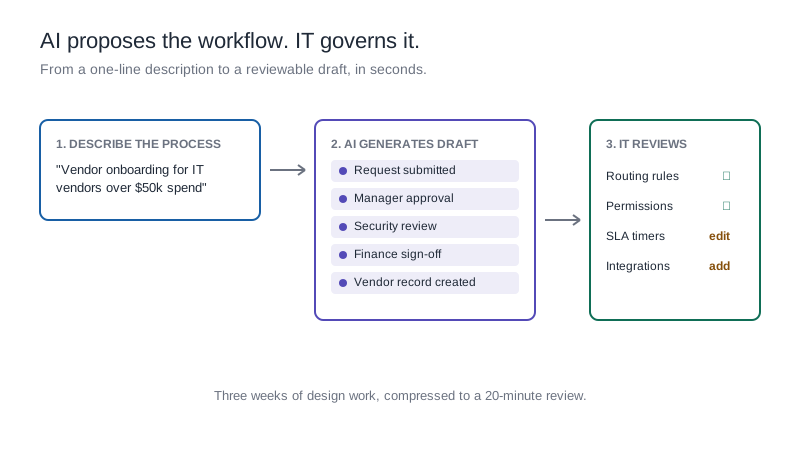
The user describes the workflow in natural language. A description as short as "vendor onboarding for IT vendors with spend over $50,000" is enough for the AI to recognize the workflow type, the rough complexity, and the likely approval chain.
Better descriptions produce better drafts. Including the industry, the rough number of approval steps, and any specific integrations gives the AI more signal.
Step 2: Draft generation
The AI returns a working draft: steps, form fields, routing logic, suggested SLAs, and notification rules. The draft is editable, not read-only. Every element can be removed, renamed, or rerouted.
Drafts also typically include things the user didn't ask for but probably needs: an audit trail step, an exception path, a notification to the requester on completion.
Step 3: Human review and edit
The IT team or process owner reviews the draft. They edit routing thresholds, rename roles to match the org chart, add or remove integrations, and apply workflow governance settings like field-level permissions.
A workflow that would have taken three weeks to design from scratch typically gets to publish-ready in a few hours of focused review.
AI workflow design across enterprise industries
Banking and financial services
Loan adjudication, know-your-customer (KYC) workflows, and dispute resolution where the process patterns are well-established and the AI can propose a strong draft. The edits are in the threshold values and the integration targets.
Manufacturing
Corrective action workflows, vendor qualification, and engineering change orders where the steps are highly templated. AI workflow design lets workflow manufacturing teams launch plant-specific variants without redesigning the workflow from scratch.
Healthcare
Patient intake, prior authorization, and clinical trial enrollment. AI can propose the workflow structure, but the field-level permissions and HIPAA-aligned audit trail need human review for every variant.
Retail
Pricing change approvals, vendor onboarding, and returns authorization. The AI draft handles the bulk of the design; the edits are in cross-departmental routing.
Oil and gas
Permit-to-work, management of change, and incident reporting. AI workflow design compresses the initial draft, but compliance review (regulatory frameworks vary by jurisdiction) requires expert input.
Insurance
Claims triage, underwriting, and policy endorsement workflows. AI design proposes the routing; underwriters review the decision logic.
Governance: keeping AI-generated workflows compliant
The biggest risk in AI workflow design isn't AI making up a step. It's AI proposing a step that looks reasonable but breaks a compliance rule the AI doesn't know about.
Three governance principles keep AI design defensible:
- AI proposes. Humans approve. Every AI-generated workflow automation must go through a human review before publish, with the review attributed in the audit trail.
- Compliance rules sit outside the AI. Field-level permissions, retention policies, and segregation-of-duty rules live in the platform governance layer, not in the AI prompt. The AI proposes a draft; the platform enforces the rules.
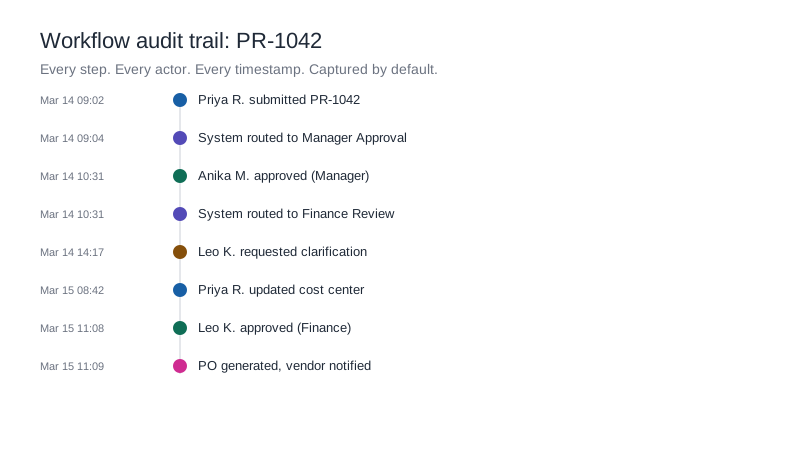
- Every AI-generated workflow is versioned and auditable. The audit trail captures that the workflow was AI-generated, when, by whom, and what was edited before publish.
Common pitfalls in ai workflow design
- Treating the AI draft as final. The draft is a starting point, not a production-ready workflow.
- Prompting too briefly. "Build a leave workflow" produces a generic draft. "Build a leave workflow for an India-based team with 200 employees, escalation after 3 days, integration with our HRMS" produces a much stronger draft.
- Skipping governance review on "simple" approval workflows. The simple workflows are where most compliance findings hide.
- Letting AI design replace conversation with stakeholders. The conversation is still where you find the edge cases.
How Kissflow's AI workflow design works
Kissflow's AI workflow design is built into the process editor. The user describes the process in plain language; AI returns a complete draft including workflow steps, form fields, conditional routing, and suggested integrations. Three product behaviors matter for enterprise teams:
- The AI runs inside the governance layer. Permissions, audit trail, and field-level controls apply to AI-generated drafts the same way they apply to manually built workflows. The AI can't propose something the user wouldn't be allowed to build.
- The AI agent also answers questions about workflows already in production. "Which procurement workflows have cycle times above 5 days?" returns a report inside the same chat surface.
- Every AI-suggested element is editable. The draft is a Kissflow workflow from the moment it's generated, not a separate AI artifact that has to be imported.
This sits inside Kissflow's broader role as the workflow orchestration layer between fragmented work and systems of record. AI workflow design isn't a separate product. It's how the layer gets built faster.
Frequently asked questions
1. What is AI workflow design?
AI workflow design uses generative AI to propose a workflow's steps, form, and routing from a natural-language description, giving designers a draft to review instead of a blank canvas.
2. Does AI workflow design replace workflow designers?
No. AI generates the first draft. Human designers review, edit, and approve. The governance layer enforces compliance regardless of how the draft was created.
3. Can AI-generated workflows pass a compliance audit?
Yes, as long as the audit trail captures that the workflow was AI-generated, who reviewed it, and what was edited before publish. The compliance rules apply to the final workflow, not to how the draft was created.
4. How does AI workflow design fit with citizen development?
AI design lets business teams generate a workflow draft, which IT then governs and publishes. It's the structural answer to citizen development without losing oversight.
5. What's the difference between AI workflow design and RPA?
AI workflow design generates the workflow itself; RPA automates repetitive tasks within an existing workflow. They're complementary, not alternatives.
.webp)