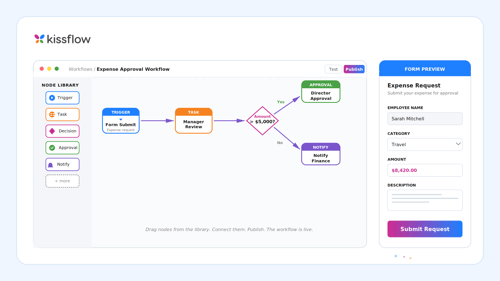
Workflow automation is the use of software and predefined rules to route tasks, data, and communications between people and systems, so repetitive steps run automatically with minimal human intervention. It runs multi-step business processes based on triggers, rules, and data. It replaces manual, repetitive steps such as retyping a form into a CRM or chasing an approval by email. Every automated workflow follows the same chain: a trigger starts it, a condition decides the path, and an action does the work.
TL;DR
- Workflow automation uses software and if-then rules to move work between people and systems without manual handoffs.
- Each workflow follows a trigger, then a condition, then an action, such as a submitted form that sends an email.
- The types range in scope from a single app-to-app task up to governed processes that span the whole enterprise, and most organizations run more than one at once.
- The core benefits are fewer manual errors, faster cycle times, and a visible audit trail for every step.
- Employee onboarding and support-ticket routing are the textbook examples across HR and IT.
Most work does not happen inside any one system. An invoice waits in an inbox, and a laptop request sits in a chat thread. The approval that would release both lives in someone’s email. Workflow automation moves that work between the ERP, CRM, and HR systems that hold the records, and it writes the result back to each one. It does not replace those systems.
How does workflow automation work?
Workflow automation works by watching for an event, checking that event against rules, and then acting on the result. The same chain of trigger, condition, and action runs underneath every platform, from Zapier to enterprise suites.
- Trigger: The trigger is the event that starts the workflow (e.g., a submitted form, an invoice arriving by email, or a Salesforce deal moving to “Closed Won”).
- Condition: The condition is the rule or if-then logic that decides which path the work takes. For example, a purchase request over a set threshold goes to a manager, and a ticket tagged urgent goes to the on-call team.
- Action: The action is the task the software performs once the rule is met (e.g., send an email, update a CRM record, or generate a document).
Here is how the chain runs on a single order. A customer places an order (trigger). The workflow checks whether the amount needs a credit review (condition). It then updates the ERP and emails the confirmation (action).
What happens behind the scenes?
A trigger, a condition, and an action are only the visible part of the workflow. Underneath, the platform does this work in order:
- Map the process: The team documents each step, owner, and decision point before automating anything, because automating a broken process only produces the wrong outcome faster.
- Connect the systems: The platform links the apps involved, such as email, a CRM, an ERP, or an HR system, through APIs or prebuilt connectors.
- Map the data: Fields from one system are matched to fields in the next, so a customer name entered in the CRM lands in the right place in the ERP.
- Execute on the trigger: When the event fires, the workflow evaluates its rules and runs each action in sequence, so nobody copies data by hand.
- Monitor and route exceptions: Dashboards and an audit log show where each item sits. When a rule cannot decide, the workflow pauses and waits for a person to approve, reject, or edit the item.
The last step keeps a human in the lead. The software handles the routine path, and a person owns every decision the rules were never written to make.
What are the types of workflow automation?
Workflow automation is classified by scope, complexity, and technology. The range runs from a single app-to-app task up to processes that span the whole enterprise. Most organizations run more than one type at once. The types below are ordered from simplest to most complex.
1. Task automation
- What it automates: Task automation handles single, repetitive actions passed between two or more apps.
- Examples: Typical cases are saving email attachments to cloud storage, posting new form entries to a team chat, and adding webinar sign-ups to a CRM.
- Platforms: Zapier and Make are the common platforms.
2. Business process automation (BPA)
- What it automates: BPA handles multi-step processes with approvals, routing, and handoffs between people and departments.
- Examples: Typical cases are vendor onboarding, leave requests, and invoice approvals.
- Platforms: Nintex and Pipefy are common platforms.
3. Robotic process automation (RPA)
- What it automates: RPA handles rule-based data entry on screens, using software bots that repeat the clicks and keystrokes a person would make.
- Examples: Typical cases are copying records out of a legacy application, reconciling data between systems that have no API, and filling in web forms.
- Platforms: UiPath and Automation Anywhere are the common platforms.
4. AI or intelligent automation
- What it automates: Intelligent automation handles steps that need judgment on unstructured inputs, combining rules with machine learning or language models.
- Examples: Typical cases are classifying incoming documents, extracting fields from an invoice, and triaging support tickets by intent.
- Platforms: Workato is a common platform.
5. Enterprise workflow automation
- What it automates: Enterprise workflow automation handles governed, cross-department processes that connect systems of record such as SAP, Oracle, Salesforce, and Workday.
- Examples: Typical cases are IT service management, procurement from request to payment, and onboarding that spans HR, IT, and finance.
- Platforms: ServiceNow is a common platform.
Two broader terms sit above these types. Hyperautomation is Gartner’s term for combining automation technologies such as RPA, machine learning, and AI. Workflow orchestration coordinates several automated workflows and systems from one place and writes results back to each of them.
How do enterprise automation patterns map to these types?
Enterprises also sort the same work by the pattern it follows:
- Rule-based automation handles clear, codifiable logic such as approval routing by amount.
- Document-centric automation moves forms, contracts, and records through review, signature, and storage.
- Cross-system orchestration runs processes that span several systems and teams, such as a new hire who needs accounts in the HRIS, Active Directory, and payroll.
Most large organizations need all three patterns. In practice, the patterns sit inside the BPA and enterprise workflow automation types above.
What are the four main types of workflows?
The four main types of workflows are process, case, project, and approval. The type tells you how predictable the path is, and that decides how much of the path rules can handle.
| Type of workflow | How it runs | Example |
|---|---|---|
| Process workflow | Follows the same defined path every time, with every step known in advance | Invoice processing |
| Case workflow | Decides the path as information arrives, so steps vary from case to case | Investigating a complex support ticket |
| Project workflow | Follows a defined sequence toward a one-time goal, with room to adjust tasks | Opening a new office |
| Approval workflow | Routes a request to designated reviewers, who approve, reject, or return it | Leave requests and purchase approvals |
Document workflows are a variant of process and approval workflows in which the document itself is the unit of work. Approval routing has its own depth, covered in the guide to approval workflows.
What are the types of workflows by structure?
The same workflow can also be described by how its steps connect:
- Sequential: Each step waits for the one before it, so Step B cannot begin until Step A is complete.
- Parallel: Independent steps run at the same time, so IT provisions accounts while legal prepares contracts.
- Rules-driven: The data in the request decides the route, so a small expense claim goes straight to payroll and a larger one goes to a manager.
- State machine: The item moves between defined states such as submitted, in review, returned, and approved, and it can move back as well as forward.
What are the benefits of workflow automation?
McKinsey Global Institute research finds that currently demonstrated technologies could, in theory, automate activities accounting for about 57 percent of US work hours. Workflow automation targets the routine coordination inside that work: approvals, handoffs, and data entry between systems.
- Fewer manual errors: Rules and data mapping replace retyping, so a figure entered once stays correct in every system it reaches.
- Time back for higher-value work: Staff stop chasing approvals and copying records, and they spend those hours on exceptions and decisions instead.
- Faster cycle times: Requests move as soon as a rule is met, so approval cycles get shorter.
- Visibility: Dashboards show where each item sits and who holds it, and the audit trail records every step with a timestamp and an actor.
- Scale without proportional headcount: Volume can grow without the team growing at the same rate, because the routine path runs on its own.
The benefit that compounds over time is the record. Every automated step leaves structured data, and later analytics and AI-assisted routing depend on that data.
What are examples of workflow automation by department?
Employee onboarding and support-ticket routing show the pattern well, because both repeat constantly and both cross several teams.
- HR: Employee onboarding sets off account setup, equipment requests, and payroll enrollment once an offer is signed. Timesheet approvals and benefit enrollments run on the same rails.
- IT: Support tickets and service requests route automatically to the right queue by category. Password resets and access requests follow pre-approved paths.
- Finance: Invoice and expense approvals route by amount and cost center. Invoices that match their purchase orders move to payment without a manual check.
- Sales and marketing: New leads route to the right rep by region or segment. The workflow creates follow-up tasks when a deal changes stage.
- Procurement: Purchase requests check the budget before they go for approval. New vendors pass onboarding and compliance checks before the first order is placed.
Each example follows the same trigger, condition, and action chain. Only the rules and the systems change. More scenarios are collected in the workflow examples library.
How is workflow automation different from RPA?
Workflow automation moves work between people and systems through rules and APIs. RPA repeats a person’s keystrokes on a screen. The two solve different problems, and many organizations run both.
| Workflow automation | RPA | |
|---|---|---|
| How it connects | APIs and connectors | Software bots that operate the user interface |
| What it handles | Multi-step processes involving people, approvals, and systems | Repetitive data entry inside applications |
| Strongest fit | Processes that cross teams and need an audit trail | Legacy systems that have no API |
RPA fills the gaps where a system offers no API. Workflow automation carries the process around those gaps. The full comparison is in the guide to RPA.
Who governs workflow rules after they go live?
The riskiest moment in a workflow’s life is the rule change nobody recorded. Approval thresholds move, owners change roles, and teams add new exception paths. Every change needs three answers: who made it, when it was made, and whether it was tested before it reached production. Governance is what makes fast changes safe at enterprise scale. The role of governance in enterprise workflows covers the operating model in full.
These controls answer those questions:
- Role-based access: Roles decide who can build, edit, or approve a workflow.
- Audit logs: Every action is timestamped and attributed to a person.
- Go-live control: An administrator controls what goes live, and each change stays on record.
- Exception routing: When a rule cannot decide, the item goes to a named owner.
Kissflow is an AI-powered enterprise application platform where business teams and IT build, automate, and govern their core work, driven by business logic, not code. Audit logs timestamp and attribute every action, and AI changes use the same audit log as manual edits. Every artifact is a standard Kissflow component a developer can open and read.
Kissflow operates in the business-process layer, segmented from core systems. It handles the structured work that falls at the edges of what the core systems were built to do. Its certifications are SOC 1 Type II, SOC 2 Type II, SOC 3, ISO/IEC 27001, HIPAA, GDPR, and CCPA. Founded in 2012, Kissflow serves over 1,200 customers worldwide.
Production examples include new store opening and retail lifecycle management, oil rig shutdown and turnaround management, and end-to-end procurement and financial consoles.
Which workflow automation tools fit which need?
The right tool depends on the job. Connecting two apps, automating screens, and governing approvals across departments are different problems.
- Zapier: Suited to connecting everyday apps with simple trigger-and-action automations.
- Make: Suited to visual, multi-step scenarios that move data between cloud apps.
- Microsoft Power Automate: Suited to automating tasks inside Microsoft 365.
- UiPath: Suited to automation across systems, with RPA bots for screens that have no API.
- ServiceNow: Suited to IT service management and the workflows IT teams run.
- Kissflow: Kissflow fits organizations that need governed, approval-driven workflows across departments, built by business teams under IT governance.
Zapier may serve a simple app-to-app integration need better. Kissflow is the application and governance layer for processes with approvals, owners, and audit requirements.
See a governed approval workflow in the Kissflow platform tour.
Related terms
- Workflow: A workflow is a repeatable sequence of tasks that moves a piece of work from start to finish.
- Business process management (BPM): BPM is the discipline of designing, measuring, and improving processes, and automation is one part of it.
- iPaaS: An integration platform as a service syncs data between applications.
Frequently asked questions
Do I need coding skills to create automated workflows?
Not necessarily. Task-level tools such as Zapier use simple trigger-and-action automations, and no-code platforms let business teams build approval logic visually. Developers extend the work when the logic gets hard.
What is the difference between workflow and Power Automate?
A workflow is the repeatable sequence of steps that moves work from start to finish. Power Automate is a software tool that automates such sequences, and it suits tasks inside Microsoft 365. One is the process, and the other is a product used to automate it.
Where should you start with workflow automation?
The definition is settled: software and predefined rules carry work from trigger to action between people and systems. What separates a working program from a pile of disconnected automations is who governs the rules after launch. Pick the type that matches the process:
- Task automation for app-to-app chores
- BPA for approvals and handoffs
- RPA only where no API exists
For a next step, list your three highest-volume processes. Mark each step as a trigger, a condition, or an action, and circle every point where a person decides. Those circles are where governance has to hold. For processes that cross departments, the enterprise workflow management guide covers the next layer.
Turn your highest-volume process into a governed workflow with AI Builder and see every change land in one audit log.
Related Articles