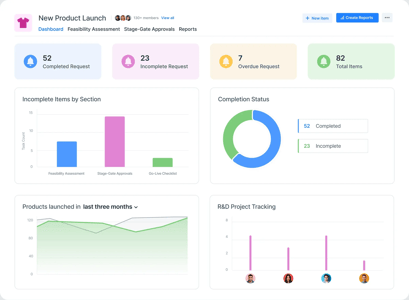
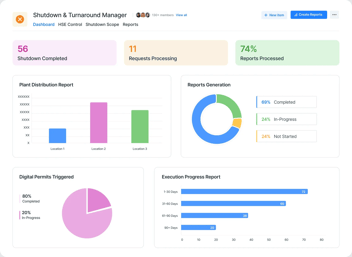
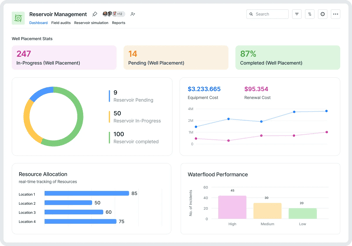
Ask five managers for a project status and you get five formats: a slide, a spreadsheet, a verbal update, a chat message, and silence. None of them line up, so the one person who needs the portfolio view, the leader deciding where to put the next unit of effort, ends up assembling it by hand the night before the steering meeting. Project tracking is the fix for that, not more status requests but one place the status already lives.
Project tracking software is the system a team uses to capture project requests, follow progress against plan, and show status across every project in one live dashboard. It turns scattered, inconsistent updates into a single view that is always current, so the portfolio is something you read rather than something you rebuild.
Why project status never lines up
Status is inconsistent because nothing makes it consistent. Each manager reports in their own format, on their own schedule, against their own idea of what done means. The result is a portfolio that cannot be compared, because no two updates share a structure. The fix is not asking harder for updates. It is capturing the work in one place from the start, so the status is a by-product of the work rather than a separate report.
What project tracking software brings together
A tracking system brings three things into one place: how projects start, how they progress, and how they are reported. Projects enter through a standard intake form so every project begins with the same information. Progress is followed against plan as the work moves. And status rolls up to portfolio dashboards that show every project at once. The same structure that captures the work produces the view of it.
From intake to dashboard: the full path
Good tracking starts before a project does, at intake. A standard intake form means every project arrives with a sponsor, a scope, and a priority, which is what makes the later view comparable. From there, progress updates attach to the project record rather than living in a separate report, and the dashboard reads from those records. Because the path runs from one structured intake to one live view, the portfolio is consistent by design rather than by chasing.
Building project tracking and a portfolio dashboard without code
How a team intakes, tracks, and reports projects is specific to that team, and it changes. A no-code platform lets you build the whole path on a no-code app builder and adjust it as the way you run projects evolves. In Kissflow, you define the intake form, the project record, the progress fields, and the dashboard, all as a readable blueprint that the PMO owns. The platform builds the tracking workflow, automates the updates and reminders, and governs who can see and change what. It pairs well with how agile teams already work and with the resource and capacity views built alongside it.
Where AI helps: summaries and risk flags
AI in project tracking earns its place in the reporting and the early warning. It can draft a status summary from the project record for a manager to review, and it can flag a project that is slipping against plan before the steering meeting does. Kissflow AI maps these into the platform's structure for a person to confirm, with managers in the lead on every status call. The summary is assistance; the judgment about a project stays human.
Setting up intake-to-dashboard tracking in practice
- Stand up a standard intake form so every project starts with the same information.
- Define the project record and the progress fields that matter for your portfolio.
- Connect progress updates to the record rather than to separate reports.
- Roll status up to a live portfolio dashboard.
- Review the portfolio from the dashboard instead of assembling it by hand.
Frequently asked questions
What is project tracking software?
Project tracking software captures project requests, follows progress against plan, and shows status across every project in one live dashboard, replacing scattered, inconsistent updates with a single current view.
What should a project management dashboard show?
A portfolio dashboard should show every project's status, progress against plan, priority, and any risk, in one comparable view, so leaders can see where to focus without assembling reports by hand.
How is project tracking different from resource management?
Project tracking follows how projects are progressing. Resource management tracks the people allocated across those projects. Built on one platform, they share records so status and staffing stay consistent.
How do you standardise project intake?
Standardise intake with a single structured form that every project must pass through, capturing sponsor, scope, and priority, so every project starts with the same information and the portfolio view is comparable.
Related Blog's: