
How to Build a Web App in 12 Simple Steps
A web application is software that runs on a web server and is accessed through a browser — no installation required. Creating one involves 5 steps: define requirements → design UI → choose tech stack → build → test and deploy.
The adage goes, “If it ain’t broke, don’t fix it,” but whoever came up with this saying never had to deal with legacy software systems. Even legacy systems that work well must be replaced with modern ones for a company to outperform its competition and grow. As businesses expand and projects grow more intricate, particularly when dealing with software localization, these tools can swiftly transform into a labyrinth of confusion and exasperation.
In today’s digital world, businesses must use tools that help them to compete in a global business environment. Web application development can help them sell products and services online, share critical company information, increase time to market, and quickly adapt to consumer and market demands. The business has moved online, and web applications help companies to streamline operations and increase productivity and revenue.
What is a web app?
A web application also known as a web app can be accessed through a web browser. Web applications are usually stored on remote servers, and users can access them through web browsers. When accessed via a mobile device, a web app looks and behaves like a mobile app but the two aren’t the same. If you're looking to build your enterprise web application, understanding the distinction between web and mobile apps is crucial.
Using browsers allows web applications to be compatible with most operating systems and standard computers. Additionally, the apps don’t take up memory on a computer’s hard drive and can be accessed from almost any computer or device. Many people can use the same application simultaneously and collaborate.
Some examples of web applications include shopping carts, online forms, spreadsheets, word processors, file conversion programs, video and photo editing software, file scanning tools, and email programs such as Gmail and Yahoo.
User experience (UX) usually dictates web application design. With traditional web design, server-side programmers decide what might enhance usability. But web applications have an application program interface (API) that pulls data from the user side and funnels it into automation.
Is creating a web app easy?
Custom web app development is much easier now than a decade ago. Application development software helps skilled employees to create web apps without coding. If you're wondering how to build a web app, today's technologies make it simpler than ever. Many new app development technologies, from online forms to word processors, are web apps. They help companies to be more productive. Research shows that web forms are the most popular way to capture leads. Every company looking to grow must start building web apps.
How to build a web application
-
A developer first tries to find a solution to a specific problem.
-
Next, they create the web app by choosing the appropriate development framework. During the development stage, the developer engages with the end users to ensure they build the right solution.
-
Lastly, they test the solution and then deploy the web app.
There are two major parts of web-based application development:
- The client side.
- The server side.
The client-side helps users see data from the server, while the server side helps developers store and retrieve data from the database. Enterprise web application development is easier and more affordable than app development for mobile devices.
For internal tools and departmental portals, a no-code web app builder is often faster and more maintainable than a hand-coded solution, especially for non-engineering teams.
How to create a web app - 12 simple steps
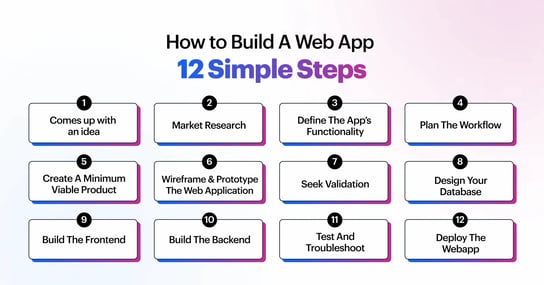
Web app development starts with a clear idea and the right approach. If you're wondering how to develop an application, it involves planning, designing, choosing the best application development tools, and bringing your idea to life step-by-step. Following are the 12 steps to create and build a web application for your business in 2026.
- Come up with an idea
- Market research
- Define the app’s functionality
- Plan the workflow
- Create a minimum viable product (MVP)
- Wireframe and prototype the web application
- Seek validation
- Design your database
- Build the frontend
- Build the backend
- Test and troubleshoot
- Deploy the web app
1. Come up with an idea
You don’t need an app for every business idea. Do your research first, identify the problem you want to solve and try to find solutions. Interview people who experience the problem and ask if they have possible solutions. If you feel a web app development will streamline work, proceed to the next stage.
2. Market research
You must have an accurate understanding of the user, their problem, and the scope of the problem. Research if there are other ways to solve the problem out there. Getting insight into the user and the competition helps inform the technical direction of the web app.
3. Define the app’s functionality
Come up with a list of features that will address the problem. But keep your distance and add only a few functionalities. Apps with more features take longer to build. Only focus on the features that solve your target market's problems.
4. Plan the workflow
If your app has competitors, sign up for their free trials and use the solutions. Pay attention to the workflow and note what’s good and bad. Sit down and sketch different workflows for your app that is better than the competition.
5. Create a minimum viable product (MVP)
First, sketch out the structure of your web app’s user interface—it doesn’t have to be exact. Outline how your app should work, and don’t overcomplicate the design. Next, create a basic but complete version of the app that showcases its main features.
6. Wireframe and prototype the web application
Wireframing means designing your web application’s blueprint, while prototyping means adding an interactive display. You can wireframe and prototype your app using a no-code/low-code platform. Prototyping makes it easier to explain your web app when seeking validation.
7. Seek validation
Join relevant forums and social media groups and present your solution. Find out what you need to change and what to keep. The information you get will help direct the development of your product. If you get great feedback and product validation, start building your web app.
8. Design your database
A database allows you to store data securely to access it later. The data you store, and user functions will determine the type of database required to run your web app.
9. Build the frontend
The frontend is what users see and interact with. It’s the visual element of the application and is developed with coding language. The framework is set up on a no-code/low-code platform, and almost no coding is needed to build a frontend. Not all web applications need frontend frameworks. Best no code tools for app development make it possible to create apps without writing code, using drag-and-drop features and pre-built templates that speed up the development process.
10. Build the backend
The backend manages your data, servers, databases, and everything users can’t see in a web application. Building a backend is a job for skilled developers, but a no-code/low-code tool can take away many of the complexities.
11. Test and troubleshoot
Test the app before you publish it. Use it in run mode and see if it functions as expected. If something is wrong, diagnose the problem using the no-code/low-code platform. Some low-code platforms have a debug mode and issue checker to make your job easy.
12. Deploy the web app
First, choose a host for your web app to make it available on the cloud. Users will be able to access it from anywhere in the world. Next, deploy the web app. This step involves getting your web application from your computer to your cloud hosting.
Choosing the right enterprise app development tools upfront determines how quickly your web app can scale, integrate with existing systems, and be maintained by non-engineers.
What are the different stages in web app
Information gathering
Businesses mostly build web applications to solve problems. They come up with ideas for apps and outline the applications’ goals, features, budgets, visions, and future plans. Developers go through the outline to understand the app’s objectives, goals, focus industry, target audience, and other critical elements.
Discussions and questionnaires help them to get more clarity on project goals. The developers then prepare a proposal to document the deliverables.
Planning the web application development process
Every successful app begins with careful planning. Custom App development planning focuses on setting clear objectives, identifying key features, and outlining the steps needed to turn an idea into a working application. with the insights gathered in the first stage, the developer creates a blueprint that determines the overall structure of the web application. The blueprint includes flowcharts and sketches. Developers keep clients in the loop during this stage to ensure that the application is perfect.
The time spent in this stage depends on the complexity of the web application. A developer creating a Minimum Viable Product might spend around two weeks on this.
Web application design
This stage is all about perfecting the interactive elements of the web application. The developer works with graphics, templates, colour schemes, style guides, and much more to complete the design of the web application. The final mockup is sent to the client for review and feedback. Mockup changes and design iterations go on until the client agrees to everything.
Web application programming
At this stage, developers create the envisioned features. They develop frameworks, deploy APIs, build app features, add security layers, and many other capabilities. For web development companies, Developing complex web applications is more time-consuming, depending on the technologies used. Some technology stacks have capabilities that can be easily tweaked and integrated.
Testing and launch
Testing is the most important part of custom web app development. A million things can go wrong even after the application has been developed correctly. Testing ensures that the web app works as intended and meets organization, industry, and global standards.
Even if everything has been double-tested, it is a good idea to initially launch the web application in the beta version. If resources are few and stakes are high, the application can be released in phases to different audience groups.
Application maintenance
Every digital product needs routine checkups and enhancements, whether it’s a single-page application or a complex web application. As time goes by, you may need to undertake product pivots, integrate new features, and launch the next version.
A modern no-code app maker removes the barriers that traditionally slowed web application development — giving business teams the freedom to build what they need without waiting on IT.
For teams that need to move fast, low-code web application development platforms eliminate boilerplate setup and let developers focus on business logic from day one.
How web apps can help enterprise businesses
With enterprise low code application platform, organizations can build cost-effective and accurate apps and minimize the wastage of resources. Low-code development efforts maximize a company’s available resources.
When a company spends less on professional development, it becomes more innovative and productive. Statista reports that many customer-focused apps built with low-code increase business revenue. Low-code tools allow developers and business users to make their digital ecosystems more robust.
Leverage Kissflow’s app development platform to build powerful enterprise applications faster. It has an intuitive user interface with extensive cross-platform integration to streamline processes, increase productivity and incorporate your regular development workflows. You’ll heighten security with role-based access control and use a highly-visual workflow design to empower citizen developers.
Find out more about the benefits of the Kissflow Platform.
IT Developers and IT Heads need a faster way to build, deploy, and scale enterprise apps. With Kissflow’s low-code platform, coding complexity is reduced while flexibility remains. Learn how IT developers can build faster.
See why enterprises trust the Kissflow Platform for low-code application development and automation.
FAQ - How to build web application
What are the key steps to creating a web application from scratch?
Start with a clear problem statement and requirements—know exactly what the app needs to do before selecting any tools. Map out the user flow and data model. Choose your tech stack based on performance needs and team expertise. Build a working prototype first, get real feedback, and iterate from there. Set up testing environments before moving to production. Deployment should include monitoring from day one so you catch issues before users ever encounter them.
How do you handle security when creating a web application?
Security needs to be designed in from the start, not bolted on after the fact. Start with HTTPS and enforce it everywhere. Use role-based access controls so users only see what they're authorized to access. Sanitize all user inputs to prevent SQL injection and cross-site scripting attacks. Keep dependencies updated to patch known vulnerabilities. For enterprise apps handling sensitive data, regular security audits and penetration testing are non-negotiable parts of the development process.
Can non-technical users build web applications without coding?
Yes, and it's becoming increasingly common. No-code and low-code platforms have matured to the point where business users with no programming background can build functional, production-grade web apps. These platforms handle underlying infrastructure, security, and database management automatically. They work best for internal tools, workflow applications, and departmental solutions where the business logic is well understood and doesn't require highly specialized functionality.
What is the difference between a web application and a website?
A website is primarily informational—it delivers content to visitors. A web application is interactive—users can input data, trigger actions, and receive personalized responses based on their role or history. Think of a company's marketing page as a website and its employee expense management portal as a web application. Most enterprise tools that people use daily—HR systems, project trackers, approval workflows—are web applications, not websites.
What makes a web application enterprise-ready?
Enterprise-readiness means the application can handle scale, security, and governance requirements that consumer apps don't face. Specifically: it authenticates users through SSO or multi-factor authentication, enforces granular role-based access, maintains detailed audit logs, integrates cleanly with existing enterprise systems, performs reliably under the load your user base generates, and complies with relevant industry regulations. Design for these requirements upfront—retrofitting enterprise features into an app built without them is expensive.
Related Articles


9 MINUTES READ
App Development Basics: Step-by-Step Overview
9 MINUTES READ
Build Apps Without Coding - A Step-by-Step Guide for 2026










