How to Develop an App: A Complete Step-by-Step Guide (2026)
Learn how to develop, build, and create applications faster using modern workflows and low-code tools.
To develop an app in 2026, you need a clear process: validate the idea, define requirements, choose the right platform, design the UI/UX, build the app using code or low-code, test, deploy, and continuously improve. This guide covers everything you need to develop or build an application—from essential skills and tools to cost, timeline, and common mistakes to avoid. Whether you're creating your first mobile app or building an enterprise-level application, this step-by-step framework makes the entire development process faster, more structured, and easier to execute. Learn how modern low-code platforms like Kissflow help teams build applications up to 10x faster.
To develop an app, start by validating the idea, defining functional requirements, choosing the right platform (iOS, Android, or web), designing UX, building the application using code or low-code, testing features, deploying to production, and continuously improving based on user feedback. This guide explains the entire app development process step-by-step, plus how low-code platforms like Kissflow help enterprises build applications 10x faster.
What Is App Development?
App development is the process of designing, creating, testing, and deploying a software application. Whether you want to develop an app for mobile, web, or enterprise workflows, the goal is to solve a clear user problem with a functional digital product.
Users often search using variations like “how to build an app,” “how to create an application,” or “how to make an app,” but the intent is the same—learn how to build an application from start to finish.
Requirements for Developing an App
Before you start building an app, you need:
Clear Problem Statement
Identify the problem your app solves and who needs it.
Feature Requirements
List essential features, user flows, roles, and permissions.
Design Requirements
Create wireframes, workflows, and UX guidelines.
Technology Requirements
Choose your approach:
-
Traditional coding
-
Low-code
-
No-code
Budget & Timeline
Define your development capacity and constraints.
Team Skills
Depending on your method, you may need developers, UX designers, QA testers, and DevOps engineers. Low-code reduces dependency on specialized skills.

How to develop an application in 2026
In 2026, how to build software applications centers on using low-code and no-code platforms that let IT teams and business users develop apps faster. Tools like Kissflow simplify workflows, cut development time, and help clear IT backlogs while maintaining governance.

- Come up with an idea
- Know your audience
- Do your research
- Create a concept proof
- Determine the app features
- Create mockups
- Build a marketing plan
- Develop your app
- Testing and feedback
- Launch your app
1. Come up with an idea
Before you begin, clarify how to build software applications that align with your business goals. Define what the app should do, who it serves, and how it adds long-term value.
2. Know your audience
Define who your target audience will be. Create personas so you can better understand who your app’s target users are and what platforms they’re using. Consider what type of app your audience will want to use time and again.
3. Do your research
Conducting market research is essential because with the millions of apps available today, how will your app stand out from the crowd? Knowing what your competitors are already doing can give you an edge and can help you know what you’re potentially going up against.
Start by doing research in your industry or market to find out what apps are already available within your niche. This can also help you determine what features or functionalities can help set your app apart. You can also consider doing interviews or getting feedback from potential users to have an idea of what they need or what their pain points are.
4. Create a concept proof
Concept proofing helps you find out if your app can potentially be a solution to an existing problem. Outline your priorities for the app and sit the team down, making sure that everyone is on the same page concerning your goals.
5. Determine the features you want your app to have
Create a list of possible features you want in your app. Note that these features may change depending on the actual development process and the feedback you get from your testing phase.
6. Create mockups and consider the graphic design aspect
Once you have your list of features, you can start creating mockups of what your app could potentially look like. You can start with a rough sketch before creating an actual mockup. When building a mockup, you must consider how your users will see and interact with your app.
Don’t forget to come up with an eye-catching graphic design for your app. When designing, you may want to work with a graphic designer who has experience with UI/UX.
7. Build a marketing plan
Your marketing plan is an important part of app development. How else will you put your app out there and get users to not only notice it but also download and use it? Ideally, you want to create a marketing plan even before you launch your app. Generate buzz for it by creating a website, sharing your app development journey on your social media channels, or using a pre-launch email list for your visitors or patrons.
8. Develop your app
Once you’ve nailed the basics down, you can start coding. But before you start writing code, you may want to consider several critical components such as the front and back-end development. You will also need to create a test environment for execution.
9. Do repeated testing and get feedback
Repeated testing is crucial if you want your app to be successful. During the testing phase, you’ll have to check for its front-end and back-end functionality, its compatibility with different devices, potential issues with integration, as well as installation and storage matters, such as the size of your app or if will it download correctly to the intended device.
After testing, you’ll need to have test users use your app so you can get user feedback and find out what else your potential customers may need. And getting feedback doesn’t have to stop at the testing phase. You can continue gathering feedback from users even if the app goes live.
10. Launch your app
The final step is the actual launching of your app on your preferred app store. You’ll need to follow your preferred app store’s regulations and requirements before you can successfully launch your app. While you can publish your app on both the Play Store and the Apple App Store, you may also want to focus on publishing on a single platform.
Types of applications you can develop
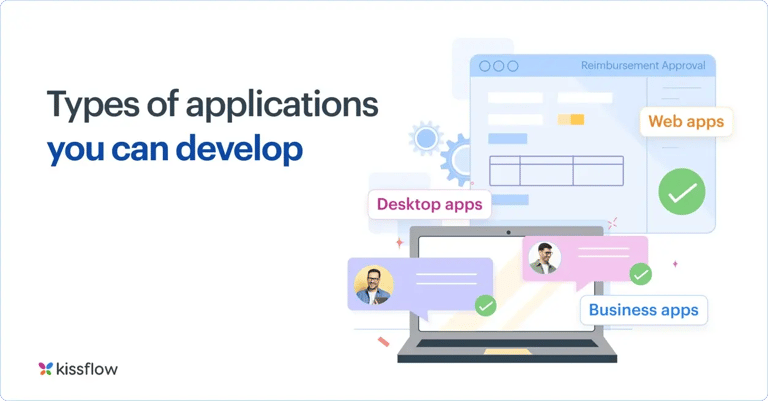
There are plenty of apps available today, such as music apps, database software, team collaboration apps, and multimedia software. While you can explore how to build software applications across these categories, there are three types of application development that you need to prioritize: team apps, departmental apps, and enterprise apps.
Web apps
Web application development uses browsers to perform a function. It facilitates enhanced communication between you and your customers, and they can be customized according to your business’s needs. For example, a web app can help you collect information or complete transactions with your customers. Unlike other app types, creating a web app doesn’t require much maintenance and is accessible anytime, anywhere using a web browser.
Furthermore, custom web applications can be accessed using different platforms, whether your customers are using a desktop or a mobile device. Some common web apps include Google Docs, cloud storage, file conversion programs, and email programs.
Business apps
Creating business apps such as communication apps, time-tracking software, or customer relationship management apps, helps streamline a company’s operations, whether it’s a large enterprise or an SMB. This type of app allows businesses to better manage their teams, finances, schedules, and business data.
Desktop apps
Desktop apps are applications that require a desktop computer to run. These are typically developed to run on specific operating systems, such as Windows or Mac, and any updates should be manually installed by the user. Unlike the other two apps, desktop apps function in an isolated environment, which can give users better security.
3 steps to consider before developing an application
Choosing the right tools can make a big difference when building an app. Best application development tools help streamline the process, improve collaboration, and bring ideas to life faster. Before you set out to build your app, there are three key things you should consider before developing an app:
Your business goals
This might seem surprising, but before building an app, you may want to ask yourself if you need one in the first place. Reassess your business goals. How will developing an app help you reach your goals? What role will it play in your long-term vision for your enterprise?
Your users
Who are you building an app for? Knowing who your target audience is will play a major role in app development, including what features you’ll need to put into it. There’s no point in building an app that has a limited scope.
The app development process
Application development can use up a lot of resources. Even if you have the right team or the skills needed to build the perfect app, you must also consider the testing and debugging aspects as part of the process. Therefore, you will still need to allot time for these steps prior to launch.
Two approaches to app development
When you develop an app, there are two approaches you can follow:
- Traditional
- Modern
Traditional app development
In the traditional approach, such as the waterfall model, only professional developers are involved in the application development process, given that this requires manual programming and writing lines of code from scratch.
Every successful app begins with careful planning. App development planning focuses on setting clear objectives, identifying key features, and outlining the steps needed to turn an idea into a working application.
It also tends to follow a downward flow, from initial planning to the release, which can be expensive and time-consuming. However, it does give developers more control over how they write their code.
Modern app development
With the modern approach, such as the agile methodology, you’re using cloud-native architectures along with other microservices that facilitate faster time to market. It also provides a more flexible way to develop an app, allowing you to recalibrate your application according to your customers’ different needs. The modern approach also allows companies and developers to optimize app development costs and develop an app remotely.
The low-code approach is part of the modern way of developing an app. Here, developers or even business users leverage a low-code platforms like Kissflow with pre-built templates and a visual drag-and-drop editor for application development.
Discover how the Kissflow Low-Code App Development platform can streamline your development process.
For most business applications, the fastest path from idea to deployment is a no-code app builder like Kissflow — it handles the infrastructure while you focus on the logic and user experience.
How application development can be a game changer
Low-code platforms make building apps for businesses more democratic. With apps quickly becoming a central part of people’s lives, understanding how to make an application using alternatives to traditional methods can jumpstart your journey to developing the best app for your needs.
Furthermore, with application development, you don’t need to be a professional developer. You can use app development platform like Kissflow to speed up the process, all while having the flexibility of designing an app that will cater to your audience’s changing needs. Best no code tools for app development make it possible to create apps without writing code, using drag-and-drop features and pre-built templates that speed up the development process.
Kissflow is a low-code, no-code work platform that allows you to do more work within a single platform. It bridges the gap between business users and IT teams while truly embracing the philosophy of simple.
App Development Methods: Coding vs. Low-Code vs. No-Code
| Method | Best For | Pros | Cons |
| Custom Coding | Highly complex apps | Full customization | Slow, costly, dev-heavy |
| Low-Code | Enterprise apps, fast delivery | 10x faster, secure, scalable | Limited deep custom code |
| No-Code | Simple tools/MVPs | Business-friendly | Not suited for complex logic |
How Much Does It Cost to Build an App in 2026?
| App Type | Estimated Cost |
| Simple App | $5,000 – $25,000 |
| Mid-Level App | $25,000 – $100,000 |
| Complex/Enterprise App | $100,000+ |
| Low-Code App (Kissflow) | Up to 10x cheaper |
How Long Does It Take to Develop an App?
| App Type | Time Required |
| Basic App | 2–8 weeks |
| Medium App | 2–6 months |
| Enterprise App | 6–12+ months |
| Low-Code App | 2–8 weeks |
Low-code platforms drastically reduce development cycles.
Common Mistakes to Avoid When Building an App
-
Starting development without idea validation
-
Adding too many features early
-
Choosing the wrong tech stack
-
Ignoring testing or security
-
Poor UI/UX
-
No scalability plan
-
Limited user feedback loops
Build Applications Faster with Kissflow Low-Code
Kissflow empowers business users and developers to collaborate and build applications 10x faster.
With Kissflow, you can:
-
Design forms and screens using drag-and-drop
-
Create workflows visually
-
Connect data with a visual modeler
-
Integrate APIs without custom code
-
Deploy instantly
-
Manage governance and security at scale
Kissflow is built for modern enterprises that need secure, scalable, and fast application development without dependency on full-stack development teams.
FAQ's - How To Develop an Application
Q: How do you develop an application step by step?
A: Define the idea, gather requirements, design, build, test, deploy, and maintain.
Q: How can I make an app without coding?
A: Use a no-code app builder — you design the app visually and publish it without writing code.
Q: How long does it take to develop an app?
A: From weeks to months by hand; a no-code platform can produce a working app in days.
Q: What is the first step in developing an application?
A: Defining the idea and goals — what problem the app solves and for whom.
Q. What do you need to develop an app?
A: To develop an app, you need a clear understanding of its purpose and target audience, well-defined requirements, and the right tools and platforms. This typically includes a development environment such as an IDE or a no-code/low-code platform, design tools for the user interface, and testing tools to ensure the app works correctly. You also need a team of designers, developers, and testers, or a platform that lets non-technical users build apps with minimal coding, plus a solid plan for deployment and maintenance.
-3.webp)

Related Articles

9 MINUTES READ
How to Create a Web Application: Step-by-Step Guide 2026
9 MINUTES READ
Build Apps Without Coding - A Step-by-Step Guide for 2026
9 MINUTES READ
Build an App Fast with RAD: Complete Guide