Why project management is now every IT leader's problem
Most IT leaders did not set out to be project managers. They were developers, architects, or systems analysts who moved into leadership and inherited the project delivery responsibility that comes with it.
That transition is harder than it looks. Technical expertise does not automatically translate into the skills needed to align stakeholders, manage risk across parallel workstreams, and keep a team productive under pressure.
The PMI's Pulse of the Profession 2023 report found that 47 percent of strategic initiatives fail to meet their goals. Budget overruns, missed deadlines, and scope creep are not technology problems. They are project management problems, and they are solvable.
1. Leadership that earns trust, not just authority
The most important skill any project manager can have is the ability to get people to do their best work, not because of a reporting line, but because they trust the person leading the project.
Leadership in a project context means setting a clear direction, protecting the team from distraction, and making the hard calls on scope and priority without waiting for consensus on everything. It also means knowing when to push and when to listen.
The practical test: if you were removed from the project for two weeks, would the team know what to do? If the answer is no, the leadership work is not done.
2. Communication that moves decisions forward
Project communication is not updates. Updates are what you send when nothing needs to happen. Communication is what moves a decision, escalates a blocker, or aligns two teams that have different pictures of where the project stands.
IT projects fail most often at the seams: between technical teams and business stakeholders, between development and operations, between the project team and the executive sponsor. The project manager's job is to manage those seams: translating between contexts, surfacing misalignments early, and making sure the right people have the right information when they need it.
This requires writing clearly, presenting concisely, and knowing which communication channel fits which message. A status email and a risk escalation are not the same thing and should not look the same.
3. Planning that accounts for what you do not know
Good project planning is not about producing a perfect Gantt chart. It is about building a realistic picture of what the project requires, where the uncertainties are, and what needs to happen to move forward despite them.
This means breaking work down into tasks small enough to estimate accurately, identifying dependencies that could cause delays, and building enough buffer into the schedule that a single disruption does not cascade into a missed deadline.
The PMI's research consistently shows that projects with realistic, well-structured plans have dramatically higher delivery rates than those built on optimistic schedules. The temptation to compress timelines to satisfy stakeholder expectations is one of the most reliable predictors of project failure.
4. Team management that matches the right work to the right people
Every project team is a collection of different skills, working styles, and availability levels. Managing that team well means understanding who is best placed to handle each piece of work, not just who is available.
It also means noticing when team members are struggling before it affects delivery, creating an environment where problems surface early rather than late, and protecting the team's focused working time from meeting creep and interruption.
For IT leaders specifically, this skill extends to managing cross-functional teams where some members do not report to you directly. Influence without authority is a different skill than direct management, and it is the one most IT project managers need most.
5. Time management and scheduling that reflects reality
Project schedules that are built to impress rather than to execute are one of the most common sources of project failure. Realistic scheduling requires understanding how long tasks actually take, accounting for the overhead of coordination and review, and building in time for the unexpected.
Effective scheduling also means distinguishing between tasks that must happen in sequence and tasks that can run in parallel. Projects that are sequenced unnecessarily take far longer than they need to. Projects where parallel workstreams create dependencies that are not managed create a different kind of problem.
Modern project management platforms make scheduling significantly easier: visual timeline tools, dependency mapping, and automated reminders reduce the administrative overhead of keeping a schedule current.
6. Task management that keeps the whole team aligned
The difference between a project that is tracked and a project that is managed is the granularity and currency of the task list. A project manager who knows the status of every active task at any given moment can make faster and better decisions than one who has to chase updates.
This is where the right platform matters. Task management tools that give every team member a clear picture of their assignments, deadlines, and dependencies remove the coordination overhead that consumes a significant portion of most project managers' time.
According to Asana's Anatomy of Work report, knowledge workers spend 60 percent of their time on "work about work": coordination, status updates, and searching for information, rather than on the work itself. The right task management system reduces that overhead significantly.
7. Risk mitigation before problems become crises
Experienced project managers identify risks before they become problems. Inexperienced ones discover problems after they have already caused damage.
Risk mitigation is a deliberate practice: at the start of a project, identify the things that could go wrong and assess their likelihood and impact. For the highest-priority risks, build mitigation plans before they are needed. Review the risk log regularly as the project progresses.
The most common risks in IT projects are scope creep, resource contention, integration failures, and stakeholder misalignment. None of these are unpredictable. All of them can be planned for.
8. Negotiation skills that create workable outcomes
Every stakeholder in a project has interests that are not fully aligned with every other stakeholder's. The project manager's job is to find the path through: getting to outcomes that are workable for everyone without requiring full agreement on everything.
This applies to timeline negotiations with sponsors, resource requests with department heads, and scope discussions with product owners. The skill is in understanding what each party actually needs (not just what they are asking for) and finding solutions that address those needs without derailing the project.
9. Critical thinking under pressure
Projects do not go wrong in predictable ways. The risks that materialize are often not the ones that were planned for. Critical thinking, the ability to reason clearly about an unfamiliar problem without the benefit of a playbook, is the skill that separates project managers who handle surprises well from those who freeze or panic.
This means being willing to revise assumptions when the evidence changes, making decisions with incomplete information, and holding the line on what matters while being flexible on what does not.
10. Choosing platforms that do the administrative work
The most effective project managers spend their time on judgment, communication, and leadership, not on updating spreadsheets, chasing status, or reformatting reports.
The right project management platform removes the administrative overhead and gives the project manager and team a single place where all work is visible, all deadlines are tracked, and all decisions are recorded. This is not a convenience feature. It is a governance requirement for any project of meaningful scale.
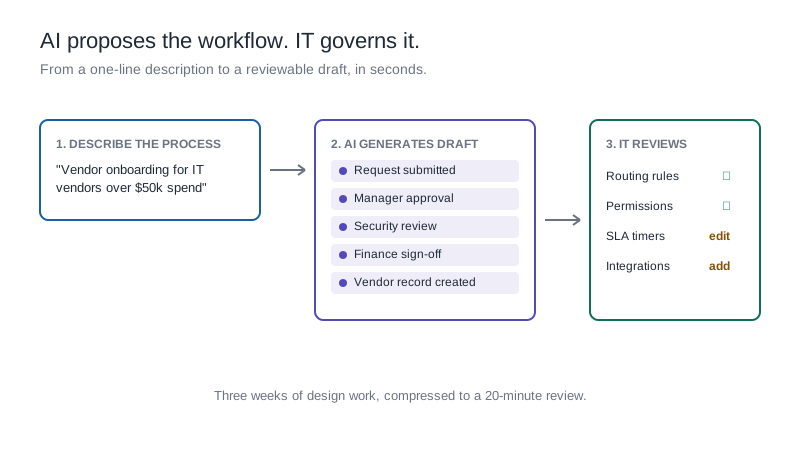
AI assistance in project management is most useful here: generating initial project workflows from a plain-language description, creating task templates based on project type, and flagging tasks approaching risk thresholds before the project manager needs to look for them. The distinction that matters for enterprise IT is what the AI produces. Tools that generate code to automate project workflows create outputs that IT cannot easily inspect, modify, or govern without developer involvement. Kissflow's AI generates blueprints: structured workflow logic that the project manager can read, the business can validate, and IT can govern at the platform level. The automation is transparent rather than hidden, which makes it safe to deploy at scale.
How Kissflow supports enterprise IT project teams
Kissflow is an enterprise application platform that includes project management capabilities alongside workflow automation and case management: on the same platform, under the same governance layer.
IT project teams on Kissflow can manage tasks through Kanban boards, visualize timelines, track dependencies, and generate reports without switching between tools. Business stakeholders get visibility into project status without needing to attend every status meeting. IT administrators get the audit trail and access controls that enterprise governance requires.
AI assistance on Kissflow helps teams build and modify their project workflows faster, generating forms, automating approval sequences, and flagging tasks that are approaching risk thresholds: with all of that logic stored as auditable blueprints rather than code that only a developer can read.
Frequently asked questions
1. What are the most important project management skills for IT leaders?
Leadership, communication, and risk mitigation are the three skills with the highest impact on project outcomes, according to PMI research. Technical planning skills like scheduling and task management are table stakes: the differentiating skills are the ones that deal with people, uncertainty, and decision-making under pressure.
2. What percentage of IT projects fail?
PMI's Pulse of the Profession 2023 report found that 47 percent of strategic initiatives fail to meet their original goals. The most common causes are poor requirements definition, stakeholder misalignment, and scope creep: all of which are project management problems, not technical problems.
3. Do project managers need technical skills?
For IT projects, a working understanding of the technical domain helps project managers make realistic plans, identify risks early, and communicate credibly with the technical team. Deep technical expertise is less important than the judgment to know when to defer to technical experts and when to push back on their estimates.
4. How does AI change project management?
AI tools assist with scheduling, risk flagging, and workflow automation: reducing the administrative overhead that consumes project managers' time. The judgment calls about scope, stakeholder management, and team dynamics still require human skill. The practical value of AI in project management is in freeing project managers to spend more time on those judgment-intensive activities.
5. What is the difference between a project manager and a task manager?
A task manager tracks what needs to be done and by when. A project manager manages the full scope of what is needed to deliver an outcome: including the risks, dependencies, stakeholder expectations, and resource constraints that determine whether the task list ever gets completed. The distinction matters most in complex, cross-functional projects where the coordination work is as demanding as the execution work.
Project management skill is built, not inherited
Every IT leader who has delivered a complex project learned through a combination of frameworks, mentorship, and experience. The frameworks are available. The mentorship can be sought. The experience comes faster when the administrative overhead is handled by a platform that does the tracking automatically.

.webp)