TL;DR
-
Kanban is one of the most proven methods for managing work in progress. It originated in Toyota's manufacturing plants and has been validated across software development, IT operations, marketing, and enterprise services for decades.
-
The tools that made Kanban accessible to small teams, Trello and its equivalents, were not designed for enterprise governance. They lack the access controls, audit trails, and administrative visibility that IT leaders require.
-
The right Kanban platform for an enterprise IT team is not the one with the cleanest interface. It is the one that makes work visible, manageable, and auditable across teams that may number in the hundreds.
-
Work-in-progress limits, which are the core of the Kanban method, are not a feature most tools implement well. Evaluate them specifically.
-
Kissflow is an enterprise application platform where Kanban boards sit within a full project management and workflow automation environment: giving teams visual work management with the governance layer enterprise IT requires.
What Kanban is and why it works
Kanban is a visual method for managing work in progress. Originally developed within Toyota's manufacturing system in the 1940s, it takes its name from a Japanese term for "signal" or "card." The core mechanism is simple: work items are represented as cards on a board, and those cards move through defined stages from start to completion.
The power of the method lies not in the visual metaphor but in the discipline behind it. Kanban does three things that most ad-hoc work management approaches do not: it makes every active work item visible to the whole team, it creates a shared understanding of what "done" means at each stage, and it uses work-in-progress limits to prevent teams from starting more work than they can complete.
That last point is the one most implementations get wrong, and the one most tools implement poorly.
Why work-in-progress limits are the most important feature most teams skip
Work-in-progress (WIP) limits are constraints on how many items can be in a given column at any one time. A team that can feasibly handle five active tasks sets a WIP limit of five for the "In Progress" column. When that column is full, the team finishes something before starting something new.
The discipline sounds simple. The organizational resistance to it is significant. Most teams, and most managers: are more comfortable with the feeling of starting things than with the discipline of finishing things. WIP limits force a different prioritization: instead of asking "what else can we pick up?", the team asks "what do we need to finish to move forward?"
Research from the Lean Enterprise Institute consistently shows that teams using WIP limits deliver work faster and more predictably than teams without them. The reduction in context-switching alone, team members focusing on fewer active items, produces measurable productivity gains.
The evaluation criterion for IT leaders: does the platform enforce WIP limits at the column level, with visual alerts when the limit is exceeded? Tools that offer WIP limits as a display feature without enforcement are not implementing Kanban correctly.
What enterprise IT teams need from Kanban software
Multiple board types and views
An engineering team managing a sprint and an IT operations team managing a service queue have different board requirements. A platform that supports only a single board structure forces teams to use tools that do not fit their work, and teams that use tools that do not fit their work use them inconsistently.
Enterprise Kanban platforms should support multiple board configurations, list views for teams that prefer tabular organization, and calendar views for deadline-driven work.
Form and card customization
Every team's work has different metadata requirements. A software development team tracking bugs needs fields for severity, environment, and reproduction steps. A procurement team tracking vendor requests needs fields for supplier, budget code, and approval status. The platform must allow teams to define custom fields without requiring a developer to configure the system.
File management and contextual communication
Knowledge work generates documents, screenshots, specifications, and reference materials that belong alongside the tasks they relate to. Kanban platforms that do not support file attachments at the card level force teams to maintain separate document repositories: creating the information fragmentation the platform was supposed to eliminate.
Contextual communication, comments, mentions, and update history, directly on the card keeps discussion attached to the work rather than scattered across email and chat.
Time tracking
Many IT teams bill internally or externally based on hours invested in specific work items. Kanban platforms that include time tracking at the card level eliminate the need for a separate time-tracking tool and give team leaders accurate data on how long different types of work actually take.
Analytics and reporting
The data generated by a team's Kanban board, how long items spend in each stage, which stages create bottlenecks, how actual cycle times compare to estimates, is some of the most valuable operational data an IT team can produce. It should be automatically available as reports without requiring data export.
Lead time (total time from request to completion) and cycle time (time in active work stages) are the two metrics with the highest management value. Evaluate whether the platform calculates and surfaces these automatically.
Access control and governance
Enterprise Kanban platforms need role-based access control: team members see and interact with the boards relevant to their work, while IT administrators have visibility across all boards and the ability to manage permissions at the platform level.
This is the criterion that eliminates most consumer-grade tools from enterprise evaluation. Trello, in its base configuration, is a fully collaborative tool: any member can see any board, and there is no organizational-level visibility for IT. That is appropriate for a small team; it is not appropriate for an enterprise IT environment.
Questions to ask before choosing a Kanban platform
Cloud or on-premise? Most modern enterprise Kanban tools are cloud-native. On-premise requirements will significantly narrow the field. For cloud tools, data residency options matter for organizations with regional compliance requirements.
How many boards and users does the platform support? Evaluate not just current team size but anticipated growth over the next three years.
What does administrative visibility look like? Can IT see all boards, all users, and all active work from a single administrative view? Can permissions be managed centrally?
How are integrations handled? Native integrations with the enterprise systems already in use are significantly more reliable than webhook-based workarounds.
Is there a free trial with full feature access? Enterprise platforms that restrict feature access in trials make it impossible to evaluate governance and admin capabilities before committing.
How AI changes Kanban board setup and workflow configuration
AI is beginning to change how teams build and configure Kanban boards, and the governance question applies here as sharply as anywhere else.
Tools that use AI to generate board configurations, workflow stages, and automation rules through code produce outputs that look useful on day one and become liabilities when requirements change. The workflow logic lives inside generated code that the team cannot read, IT cannot govern, and developers need to be involved to modify. For a team that wants to adjust its WIP limits or add a new workflow stage every few months, that dependency is a significant operational cost.
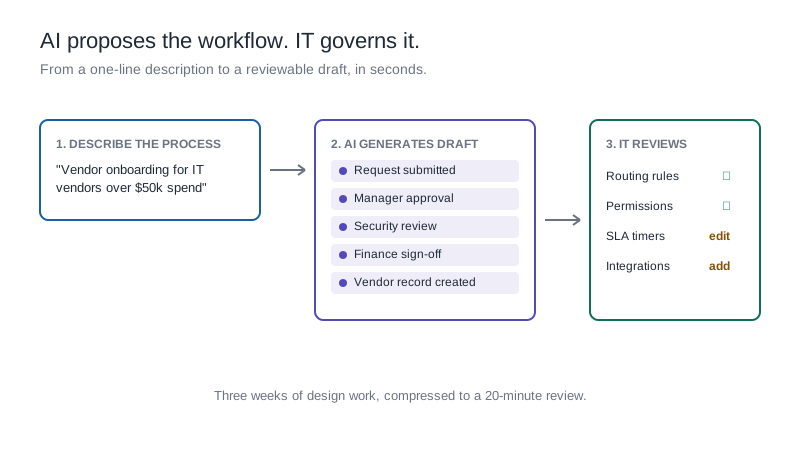
Kissflow's AI generates Kanban board configurations and workflow automations as blueprints: structured, human-readable descriptions of the process logic rather than code. A team lead can prompt Kissflow to set up a board for a software release workflow, review the generated blueprint, adjust the stages and WIP limits to match how the team actually works, and have a governed, auditable board running in the platform within the same session. When the process needs to change next quarter, the team lead makes the change in the same interface, without a developer and without creating an ungovernable layer of automation underneath the board.
For IT administrators, the blueprint approach means every Kanban board configuration is visible, versioned, and auditable at the platform level. The governance that covers access controls and audit trails covers the workflow logic too.
How Kissflow implements Kanban for enterprise teams
Kissflow's project boards are built on Kanban principles. Each card expands to show a complete form with all the information needed to complete the task: keeping the board visually clean while providing the full context team members need.
Within each column, Kissflow tracks work items through built-in states: In Progress, On Hold, and Done. This structure supports the Kanban WIP principle while giving team leaders real-time visibility into what is active, what is blocked, and what is complete.
Because Kissflow's Kanban boards are part of the broader platform rather than a standalone tool, work that moves through a Kanban board can trigger workflow automations: an item moved to "Done" can automatically notify a downstream team, update a record in an integrated system, or generate a report. This removes the manual coordination overhead that separate task and workflow tools require.
IT administrators govern the environment: setting access controls, managing user permissions, and maintaining audit trails that satisfy enterprise compliance requirements. The same governance layer that covers workflow automation and case management covers project boards: so IT manages one platform, not three.
Frequently asked questions
What is Kanban software?
Kanban software is a platform that represents work as cards on a visual board, organized into columns that reflect the stages of a process. Cards move from left to right as work progresses. Kanban software typically includes work-in-progress limits, time tracking, reporting, and collaboration features. Enterprise Kanban platforms add role-based access control, audit trails, and administrative visibility for IT governance.
What are work-in-progress limits and why do they matter?
Work-in-progress limits are constraints on how many items can be active in a given stage at one time. They prevent teams from starting more work than they can complete, which reduces context-switching and improves delivery predictability. Research from the Lean Enterprise Institute shows that teams using WIP limits consistently deliver work faster than teams without them. The limit is set based on team capacity, not arbitrary preference.
What is the difference between Trello and enterprise Kanban software?
Trello is designed for individual productivity and small team collaboration. Enterprise Kanban software adds the features required for organizational-scale deployment: role-based access control, organizational-level administrative visibility, native integrations with enterprise systems, audit trails, and compliance certifications. The UI similarity between Trello and enterprise tools masks significant architectural differences in governance capability.
What metrics should IT teams track from their Kanban boards?
Lead time (total time from when a request is created to when it is completed) and cycle time (time the item spends in active work stages) are the two most important metrics for IT teams. Bottleneck identification, which stages consistently accumulate work items: is the third. These metrics are most valuable when tracked consistently over time, since single-sprint data is rarely statistically meaningful.
How does Kanban work for IT operations versus software development?
The underlying method is the same: visualize work, limit work in progress, and manage flow. The configuration differs. IT operations teams typically manage service requests with relatively short cycle times and high volume, their boards benefit from clear triage stages and escalation workflows. Software development teams manage longer work items with more complex dependencies, their boards benefit from sprint-based WIP limits and integration with code repositories. Enterprise Kanban platforms should support both configurations.
See your team's work clearly: and govern it completely
Kanban works when teams use it consistently, and teams use it consistently when the platform fits how they actually work. The enterprise requirement adds one more criterion: IT can see everything, manage everything, and audit everything: without building a separate governance layer on top.
.webp)