The task management problem most organizations have already solved: incorrectly
Most enterprise organizations already have task management software. Many have several. The problem is not the absence of tools. It is the fragmentation: one platform for the engineering team, a different one for operations, a spreadsheet for everything else, and no single place where IT can see what is in progress across the organization.
This fragmentation is not random. It is the predictable outcome of teams adopting tools independently, without IT governance, because the officially approved tool did not meet their needs or the approval process took too long.
The result is the digital workplace problem in miniature: work is happening, but IT cannot see it. Decisions are being made, but there is no audit trail. Processes are running, but they are running outside any system the organization controls.
The task management decision is, at its core, a governance decision.
What task management actually is: and what it is not
Task management is the process of tracking individual units of work from creation through completion. It includes capturing what needs to be done, assigning ownership, setting deadlines, tracking status, and reporting on outcomes.
It is distinct from project management, which encompasses the full scope of delivering an outcome: including resources, budget, risk, and stakeholder management. Task management is a component of project management, not a synonym for it.
The distinction matters for tool evaluation. A task management tool that is excellent for individual productivity may be inadequate for managing the interdependent work of a cross-functional IT project. A project management platform that handles complex dependencies may be excessive for a marketing team tracking content production.
Understanding which use cases need to be served, and by how many tools: is the starting point for any serious platform evaluation.
The criteria most evaluation frameworks miss
Governance and access control
Enterprise task management must answer the question: who can see what, and who can change what? Role-based permissions that control which team members can create tasks, assign them, close them, or access reports are not a nice-to-have. They are the baseline for managing sensitive work at enterprise scale.
Tools that do not offer granular permission controls create two problems: they either give everyone access to everything (which creates confidentiality and compliance risks) or they are locked down so broadly that teams route around them.
Auditability
Can you see a complete history of every task: who created it, who it was assigned to, every status change, every comment, and every attachment? For regulated industries, the answer to that question determines whether a tool is usable at all.
Many consumer-grade task management tools prioritize clean interfaces over audit trails. Enterprise tools should not make that trade-off.
Integration with enterprise systems
Task management does not exist in isolation. Tasks are generated by processes running in ERP systems, CRM platforms, ITSM tools, and project management applications. A task management platform that cannot connect to those systems creates data entry overhead and reporting gaps.
Evaluate integrations before committing to a platform, and distinguish between native integrations, which are reliable and maintained, and Zapier-based workarounds, which are fragile and not suitable for regulated workflows.
Scalability to enterprise user counts
Tools that work well for teams of twenty often degrade in performance, reporting capability, or administrative manageability at enterprise user counts. Evaluate at scale before you roll out at scale.
Features every enterprise task management platform must have
The following are not differentiators. They are the minimum viable feature set for enterprise task management:
Unlimited task creation with custom fields. The ability to capture any type of work, with the data fields that work requires, not just the fields the tool's designers anticipated.
Subtask and dependency mapping. Work is rarely linear. The platform must represent the actual structure of the work, including tasks that depend on other tasks being completed first.
Multiple visualization options. Different team members need different views of the same work. Kanban boards, list views, calendar views, and timeline visualizations should all be available within the same platform.
Activity logs on individual tasks. Every action on every task should be recorded with timestamps and actor identity.
Automated notifications and escalations. Deadlines approaching, blockers surfacing, and assignments changing should trigger notifications without requiring manual follow-up.
Reporting and analytics. The platform should generate reports on team output, task completion rates, and time spent: without requiring data export and manual analysis.
How AI is changing task management
AI-assisted task management tools now offer capabilities that were not available even two years ago: automatic prioritization based on deadlines and dependencies, natural language task creation from meeting transcripts or email threads, and workload balancing recommendations based on team capacity.
The value of these features depends entirely on whether the underlying task data is reliable and whether the AI's output is something IT can govern. Both conditions matter.
The first is a data quality question. AI that operates on incomplete, inconsistently structured task data produces recommendations that teams quickly learn not to trust. Organizations that solve the governance problem first get the most value from AI features. Organizations that deploy AI features first to fill governance gaps get neither.
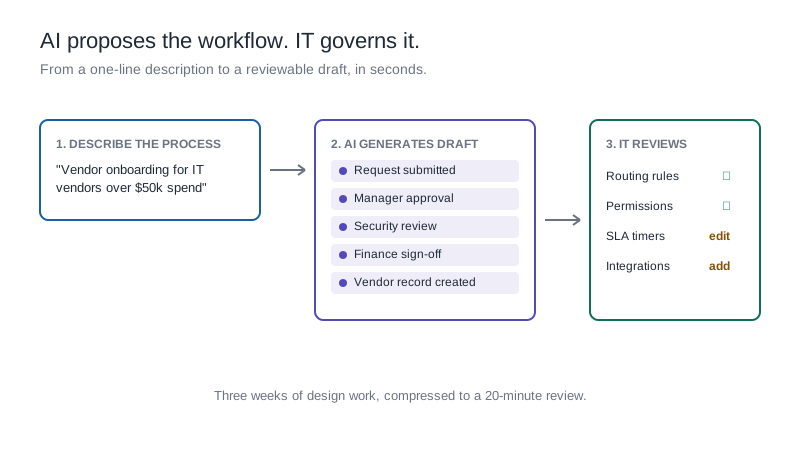
The second is an architecture question that most platform evaluations have not yet learned to ask. AI tools that generate code to automate task workflows create outputs that are fast to deploy and opaque to govern. When the automation breaks or needs to change, it requires a developer to understand what was built. When compliance asks for an explanation of the workflow logic, there is no human-readable answer.
Kissflow takes a different approach. AI on Kissflow generates workflows, forms, and task automations as auditable blueprints: structured descriptions of the business logic that the team can read, modify, and govern without developer involvement. The automation logic is transparent rather than hidden. IT can inspect it, approve it, version it, and audit it as part of the standard governance process. That makes AI-assisted task management safe to deploy at enterprise scale, not just convenient to demonstrate in a proof of concept.
What to look for in a task management platform: an evaluation checklist
Before committing to any platform, IT leaders should be able to answer yes to each of the following:
- Does the platform support granular, role-based access control?
- Is there a complete, immutable audit log for every task?
- Can the platform connect to the enterprise systems already in use: natively, not through Zapier?
- Does it handle the user count and concurrent activity levels the organization requires?
- Can business teams build and modify task workflows without IT involvement for every change?
- Does IT have a single administrative view of everything running on the platform?
- Does the vendor hold relevant compliance certifications (SOC 2, ISO 27001) for the industries the organization operates in?
How Kissflow handles task management at enterprise scale
Kissflow is an enterprise application platform where task management, workflow automation, and project governance run on the same infrastructure. Business teams manage their tasks through Kanban boards and list views. IT administrators manage the governance layer: access controls, environment settings, audit trails, and compliance configurations.
Because Kissflow's task management is built on the same platform as its workflow automation, tasks generated by business processes, an approval that requires follow-up, a case that needs resolution, a project milestone that triggers dependent work, flow automatically into the task environment without manual entry.
Kissflow holds SOC 2 Type II, ISO/IEC 27001, HIPAA, and GDPR certifications, and supports data residency in the US, EU, APAC, and Oceania regions.
Frequently asked questions
1. What is task management software?
Task management software is a platform for capturing, assigning, tracking, and reporting on individual units of work. Enterprise task management platforms extend this with role-based access control, audit trails, integration with enterprise systems, and administrative visibility across all active work. The distinction between consumer-grade and enterprise-grade task management is primarily a governance distinction.
2. How is task management different from project management?
Task management focuses on individual work items: what needs to be done, who owns it, and when it is due. Project management encompasses the full scope of delivering an outcome, including planning, risk management, resource allocation, and stakeholder communication. Most project management platforms include task management capabilities, but not all task management tools include the project governance features larger organizations need.
3. What percentage of work time is spent on coordination rather than execution?
Asana's Anatomy of Work report found that knowledge workers spend 60 percent of their time on coordination, status updates, and information retrieval rather than on the skilled work they were hired to do. Task management platforms that reduce coordination overhead, through automated notifications, clear ownership, and real-time status visibility, return meaningful time to productive work.
4. What are the most important features for enterprise task management?
The features with the highest enterprise impact are: granular access control, complete and immutable audit trails, native integration with existing enterprise systems, multiple task visualization options, and automated notification and escalation workflows. Governance features are more important for enterprise evaluation than interface aesthetics or individual productivity features.
5. How do AI features in task management tools actually help teams?
AI assistance in task management delivers value in three areas: natural language task creation, automatic prioritization based on deadlines and dependencies, and workload balancing recommendations. These features work best when the underlying task data is complete and consistently structured. Organizations that address governance before adding AI capabilities get significantly more value than those that use AI as a substitute for governance.
Stop managing tasks across five tools and start seeing all your work in one place
The organizations with the highest task management adoption are not the ones with the most features. They are the ones with the clearest governance: every team member knows where work lives, IT can see everything that is running, and the platform makes coordination faster rather than adding to it.

.webp)