
What is low-code? A 2026 guide for IT and business leaders
Low-code development is a visual approach to building software applications using drag-and-drop interfaces, pre-built components, and minimal hand-coding. It enables professional developers and business users to create, deploy, and modify enterprise applications five to ten times faster than traditional coding. Forrester Research coined the term in 2014.
Low-code is a visual approach to software development that replaces hand-written code with drag-and-drop interfaces and pre-built components. Instead of writing thousands of lines of code, developers and business users design applications by configuring visual models, which collapses build times from months to weeks. Forrester analysts Clay Richardson and John Rymer coined the term in a 2014 report on customer-facing development platforms, and by 2026, the category had grown into a $44.5 billion market that powers three out of every four new enterprise applications.
TL;DR: What is low-code?
-
Low-code is a visual development approach that builds enterprise applications with drag-and-drop interfaces, pre-built components, and minimal hand-coding
-
It lets professional developers and business users (citizen developers) ship applications five to ten times faster than traditional development, with consistent governance and audit trails
-
Gartner projects the global low-code market will reach $44.5 billion in 2026 and $58.2 billion by 2029, with 75 percent of new applications built on the technology
-
Low-code is not the same as no-code. Low-code allows custom code extensions for complex logic; no-code does not. Both serve different teams and use cases
-
The major enterprise platforms include OutSystems, Mendix, Microsoft Power Apps, Appian, ServiceNow App Engine, Salesforce Platform, Oracle APEX, and Kissflow
What is a low-code platform?
A low-code platform is a software environment that enables low-code development. It bundles a visual development studio, a logic engine, an integration layer, deployment infrastructure, and the security and governance controls that enterprises need to run applications in production. The term "low-code" describes the approach. The term "low-code platform" refers to the tool.
This distinction matters when you evaluate vendors. Two platforms can claim the same visual builder and still differ wildly in how they handle versioning, role-based access, integration governance, and what happens when a citizen developer hands an app off to IT for scale. The platform decisions made today determine whether a working prototype becomes a maintainable production system or another piece of shadow IT.
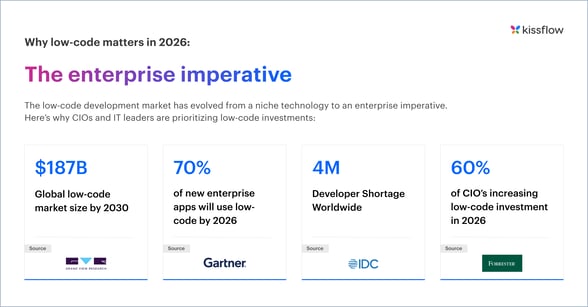
Sources: [Grand view research] [Gartner] [IDC Forrester] [Forrester]
How low-code development works
Low-code platforms operate on a layered architecture that abstracts technical complexity while maintaining enterprise-grade capabilities. Understanding this architecture helps IT leaders evaluate platforms effectively. Below are the five pillars of low-code architecture
-
Visual development studio
-
Business logic engine
-
Integration layer
-
Runtime and Deployment
-
Security and governance
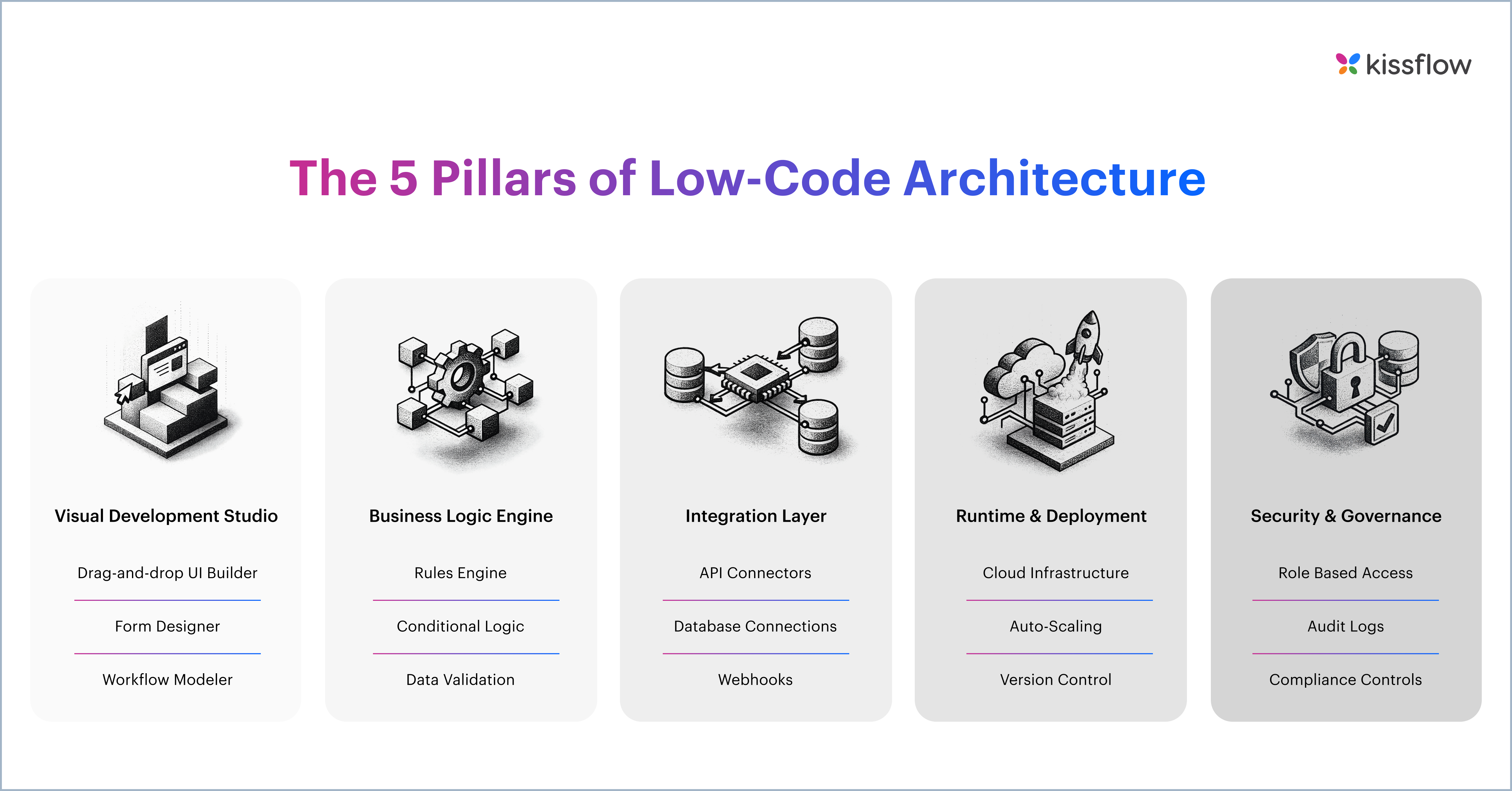
Every enterprise-grade low-code platform sits on five architectural layers. Understanding them helps IT leaders separate marketing copy from genuine capability.
1. Visual development studio
This is the layer most buyers see in a demo. It is the drag-and-drop canvas for designing forms, screens, dashboards, and process flows. Strong studios let developers build at the same speed as business users and switch to code when needed. Weak studios force one or the other to wait.
2. Business logic engine
Behind the visual canvas, the logic engine handles conditional branching, calculations, validation rules, and decision tables. The quality of this engine determines whether the platform can support a leave request and a multi-stage credit underwriting workflow, or only the former.
3. Integration layer
Enterprise apps rarely live alone. The integration layer connects the platform to systems of record such as SAP, Salesforce, Oracle, and Microsoft 365 via pre-built connectors, REST APIs, and webhook triggers. Without it, every low-code app risks becoming an isolated island.
4. Runtime and deployment
This layer handles the infrastructure work most teams want to avoid: hosting, auto-scaling, environment management, and the path from development to staging to production. The strongest platforms do this with one click and a clear audit trail of what changed and who approved it.
5. Security and governance
Role-based access, audit logs, data residency, single sign-on, and compliance certifications belong here. For regulated industries, this layer is often the deciding factor. A platform that lets business users build apps without the right governance controls eventually creates a problem larger than the one it solved.
Low-code vs no-code vs traditional development
These three approaches sit on a continuum from full hand-coding to full visual configuration. The right choice depends on who is building, what they are building, and how complex the application needs to become.
|
Factor |
Low-code |
No-code |
Traditional development |
|---|---|---|---|
|
Coding required |
10 to 20 percent custom code |
None |
100 percent hand-coded |
|
Target users |
Developers and business users |
Business users only |
Professional developers only |
|
Complexity ceiling |
Enterprise applications, including complex workflows and integrations |
Simple apps, forms, and approvals |
Effectively unlimited |
|
Development speed |
Five to ten times faster than traditional |
Ten to twenty times faster for simple apps |
Baseline |
|
Best for |
Enterprise workflow apps, internal tools, customer portals, ERP extensions |
Departmental forms, simple workflows, citizen-built apps |
Highly differentiated products, performance-critical systems |
Most enterprises do not pick one and abandon the others. They run all three in parallel. Traditional development still owns the systems of competitive differentiation. Low-code covers the long tail of operational and workflow applications that drive the business but do not differentiate it. No-code lets business teams self-serve on the simplest of those.
Learn more about low-code vs. no-code differences
Who uses low-code platforms?
Low-code adoption looks different across IT and business. The pattern that holds across both is that platforms succeed when they are owned by IT, governed centrally, and opened up selectively to the rest of the organization.
1. CIOs and IT leaders
IT leaders sit on application backlogs that traditional development cannot clear. Gartner reports that 41 percent of employees are now business technologists who customize or build technology for business use, and IDC projects that by 2026 more than 90 percent of organizations will feel the pain of the IT skills shortage. Low-code gives IT a way to clear the operational queue while keeping engineering capacity focused on platform, integration, and security work that genuinely needs custom code.
2. Professional developers
Most enterprise developers spend a meaningful share of their week on routine application work: internal forms, approval flows, admin dashboards, and the connectors between them. Low-code handles those builds visually and frees senior engineers to work on the systems where custom code creates a competitive advantage. Forrester Research suggests that 87 percent of enterprise developers already use low-code in some form.
3. Citizen developers
Gartner forecasts that by 2026, developers outside formal IT departments will make up at least 80 percent of the user base for low-code tools, up from 60 percent in 2021. These are business professionals who know their processes better than any IT team can, and who can now configure applications under IT-set guardrails. The model only works when those guardrails exist, which is why platform choice matters as much as platform speed.
4. Process and operations owners
Heads of finance, HR, procurement, and operations rarely care about the technology category. They care about cycle time, exception rates, and SLA compliance on the processes they own. Low-code lets them digitize a process they understand, instrument it, and iterate based on what the data shows, without waiting in an IT queue for every change
5. Digital transformation leaders
CDOs and modernization sponsors use low-code as the practical execution layer for legacy migrations. Rather than rebuilding a Lotus Notes or PowerBuilder application from scratch, they re-platform it on a governed low-code environment, preserve the business logic in visual form, and free the team from a stack no one wants to touch.
Enterprises hit hardest by the developer shortage
The U.S. Bureau of Labor Statistics projects a shortfall of roughly 1.2 million software engineers by 2026, and senior engineering capacity is the scarcest resource in most enterprises. Low-code does not replace the senior engineers a business needs for its product. It lets the business build the internal applications around the product without hiring more of them.
A short video on when to adopt low-code
The business case for low-code
The benefits below are the ones that show up consistently across Forrester Total Economic Impact studies, customer case studies, and analyst surveys, rather than the longer wish-list found in vendor brochures.
1. Faster delivery, measured in weeks not months
Across Forrester studies of enterprise low-code adopters, organizations consistently report development cycles that run five to ten times faster than equivalent hand-coded projects. Visual development removes boilerplate work, pre-built components remove design work, and automated deployment removes most of the DevOps work that slows traditional projects.
2. Lower total cost of development
Cost savings come from three places: fewer developer hours per application, lower infrastructure cost through managed cloud deployment, and reduced maintenance overhead. Forrester Total Economic Impact studies of enterprise low-code platforms regularly report three-year ROI between 300 and 500 percent with payback windows under a year.
3. A way through the IT backlog
Most enterprise IT teams carry application backlogs that stretch from months to years, and survey research consistently shows that around 72 percent of IT leaders say their backlog prevents them from working on strategic projects. Low-code addresses both sides of the problem. IT delivers the requested apps faster, and business users self-serve on the simpler ones with appropriate governance.
4. Governance that beats the alternative
The fear that low-code platforms create shadow IT misreads what they replace. The realistic alternative is not custom code. It is a sprawl of spreadsheets, Google Forms, shared mailboxes, and one-off scripts that no one can audit. An enterprise low-code platform consolidates that sprawl onto a single governed environment with audit trails, role-based access, and consistent security controls. That is a net governance improvement, not a regression.
5. Agility on the work that actually changes
Markets, regulations, and customer expectations move faster than traditional development cycles can keep up with. The applications that need to change most frequently are usually the operational ones: how purchase orders are approved, how new vendors are onboarded, and how an exception in a manufacturing process gets escalated. Low-code applications change in hours rather than release cycles, which makes the operational layer of the business genuinely responsive.
Real-world examples where Kissflow played a major role
McDermott, a global engineering and construction firm, reduced its IT application backlog by roughly 80% within 12 months of standardizing on a low-code platform. That outcome is not unusual. It is what you would expect from any large enterprise that moves operational work away from custom code and into a governed visual environment.

Featured customer story: Puma Energy
Puma Energy, a global energy company operating in 35+ countries, used Kissflow to digitize their procurement and operations processes. Results included:
- 85% reduction in process cycle time
- 60+ processes automated in the first year
- Standardized operations across global offices
Check out this video on Puma
The major low-code platforms in 2026
The market has a clear set of enterprise-grade players. Each has carved out a different center of gravity, and the right shortlist depends on the workload you intend to run.
- Kissflow: Focused on enterprise workflow automation, internal applications, and citizen development on a single governed platform. Strong when the buyer is balancing IT delivery and business self-service across multiple departments.
-
OutSystems: Strong for customer-facing applications and complex UI work. The platform is purchased most often by IT- led product teams
-
Mendix: Part of Siemens. Strong in industrial and engineering use cases, with deep modeling capabilities and a defined collaboration model between business and IT.
-
Microsoft Power Apps: The default option for organizations already standardized on Microsoft 365 and Dynamics. Strong on user reach, with capability depth that varies by workload.
-
Appian: Process-centric, with a strong reputation for case management, regulated workflows, and financial services use cases.
-
ServiceNow App Engine: The right answer when the apps being built are deeply intertwined with IT service management and the rest of the ServiceNow platform.
-
Salesforce Platform: For organizations whose system of record is Salesforce. Most useful when applications need to live close to the CRM data layer.
-
Oracle APEX: A strong fit when applications need to sit alongside an Oracle Database. Often chosen by Oracle-heavy IT shops.
Learn more: 10 Best low-code platforms in 2026 for enterprises
How AI is changing low-code in 2026
Every low-code vendor now has an AI story. The interesting question is not whether AI is in the platform, but what AI is producing inside it. Two architectural choices have emerged, and they are not equivalent.
The first approach uses AI to generate code. A natural language prompt produces application code that gets compiled and run. This is the model behind most consumer-grade vibe coding tools and an increasing number of developer assistants. The output is impressive in a demo. The problem shows up later, when a compliance team asks to see the business logic, when a configuration change silently breaks a downstream feature, or when the application needs to be extended by someone other than the engineer who wrote the prompt. Generated code is non-deterministic, opaque, and hard to govern at enterprise scale.
The second approach uses AI to generate structured blueprints. A prompt produces a configured form, a workflow, an integration, or a complete application as metadata that the platform can execute. The output is deterministic, readable, version-controlled, and auditable by people who do not write code. The same blueprint can be inspected by compliance, edited by a business analyst, and extended by a developer, all inside the same visual environment.
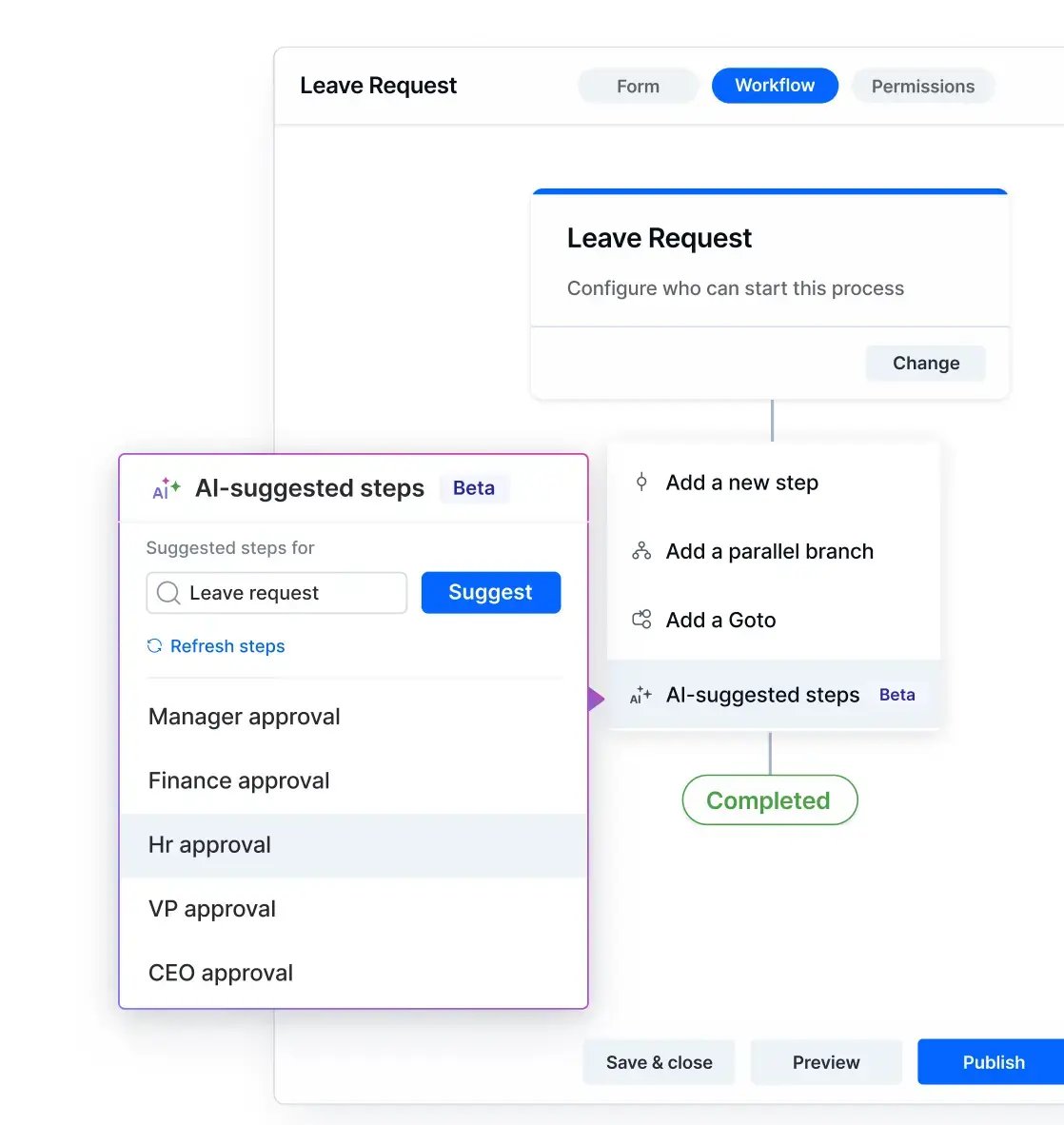
For enterprise application development, the blueprint approach is the one that holds up over time. Code generation is optimized for speed at day one. Blueprint generation is optimized for the full lifecycle of the application, which is where governance, maintenance, and total cost of ownership are decided. This distinction is now the central architectural debate inside the low-code category.
In practical terms, AI on a strong low-code platform should be able to scaffold an application from a natural-language description, suggest the next field on a form, propose an integration based on the data being captured, and explain the change in plain language to a reviewer. The human stays in the loop. The output stays governable. The lifecycle stays manageable.
.png?width=260&height=260&name=ebook%20cover%20(1).png)
.png?width=16&height=16&name=icon-3-kissflow-adv%20(1).png) Free ebook
Free ebookThe Next Normal in Application Development: Where Low-Code and AI Intersect
How Will Low Code and AI Co-exist?

Thank you for downloading!
What to look for in an enterprise low-code platform
Most evaluations get stuck on the visual builder, which is the part that every vendor demos well. The differences that matter at scale show up below the surface.
-
Governance built in from the start, including role-based access, audit trails, environment management, and a clear separation between citizen-built and IT-built apps
-
Integration depth across the systems of record the business already runs, plus REST and webhook support for the ones the vendor has not pre-built
-
A workflow engine that handles parallel routing, conditional logic, SLA timers, and exception handling, not only linear approvals
-
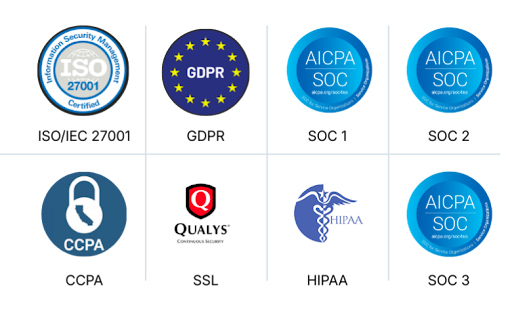
Enterprise security and compliance certifications, including SOC 2 Type II, ISO 27001, GDPR, and HIPAA where applicable
-
AI capabilities that produce governable blueprints rather than opaque generated code, with the human reviewer kept in the loop
-
A transparent pricing model that scales with users and apps rather than punishing success with surprise renewal increases
Learn more about low code platform features in detail
Low-code use cases by industry
The industries that get the most out of low-code share a profile: distributed operations, regulated workflows, and a backlog of internal applications that traditional development cannot clear at the pace the business needs. The examples below cover what enterprises in each industry typically build, drawing from the kinds of high-value applications now being launched in weeks rather than quarters.
1. Oil and gas
Work in the sector spans upstream, midstream, and downstream operations, with safety, regulatory, and ESG obligations that traditional development cycles cannot keep up with. Low-code applications in oil and gas typically cover permit-to-work, incident reporting, safety management, well and reservoir management, field operations, asset management, drilling optimization, and ESG compliance reporting. McDermott, a global engineering and construction firm in the sector, runs governed, business-built applications across its IT estate on a low-code foundation.
→ Kissflow oil and gas platform
2. Manufacturing
Most manufacturers run a global ERP that handles transactions cleanly and leaves the operational work around it to spreadsheets, shared mailboxes, and one-off tools. Low-code closes that gap with applications for production tracking, quality control, maintenance requests, new product development workflows, supplier onboarding, and the exception handling that wraps the ERP. Olympus consolidated supply chain coordination that previously ran on email into a single, governed low-code environment.
→ Kissflow manufacturing platform
3. Retail
Retail operations span stores, regions, distribution centers, and supply partners, and the applications that connect them need to change as quickly as the business does. Common low-code applications include retail store management, new-store opening, partner and supplier portals, store visit reports, and inventory exception handling. CaratLane, an omnichannel jewelry retailer, designed, tested, and deployed its first production application in a week.
4. Banking, financial services, and insurance
The sector sits at the intersection of customer demand for speed and regulatory demand for control, which is the tension low-code is built for. Typical applications include loan origination, claims processing, KYC onboarding, exception management, dispute resolution, and customer service workflows. Audit trails, role-based access, and segregation of duties are governed from day one rather than bolted on after a process is live.
5. Healthcare
Healthcare organizations build low-code applications for patient intake, vendor and clinician credentialing, equipment and supply requests, clinical workflow approvals, and incident reporting. HIPAA, data residen
cy, and consent management are non-negotiable because the platform-level governance layer matters as much as the application layer in this industry.
→ Kissflow healthcare platform
6. Consumer goods and FMCG
FMCG businesses run on distributor and retailer networks, and the operational work that holds those networks together rarely fits a pack
aged software category. Common low-code applications include distributor onboarding, trade promotion management, claims and rebates processing, supplier portals, and field sales tracking. Global beverage and snack businesses, including PepsiCo, run internal application categories on Kissflow.
How Kissflow approaches the low-code problem
Most enterprises hit the same wall when low-code adoption scales. Applications ship fast, but governance lags behind. Business users build what they need, but IT loses visibility into what was built. The newest AI code-generation tools accelerate the first problem and make the second one worse, because what AI writes in these tools is the kind of opaque, non-deterministic code that enterprise IT cannot reasonably maintain over time.
Kissflow's low-code platform is built for that specific gap. It is one platform on which IT, professional developers, and business users work together, with a visual builder, an enterprise workflow engine, integrations to the major systems of record, and governance controls that are on by default rather than added after the fact. The AI layer is designed to produce structured, deterministic blueprints rather than generated code, so the application launched in week one is the same artifact that can be audited, extended, and governed in year three. McDermott, PepsiCo, Olympus, and CaratLane run categories of internal applications on this foundation, across oil and gas, consumer goods, manufacturing, and retail.
Frequently asked questions about low-code development
1. What is the difference between low-code and no-code?
Low-code allows custom code extensions for complex logic and integrations, while no-code does not. Low-code platforms are designed for a mix of professional developers and business users. No-code platforms are designed for business users only and are best suited to simpler departmental applications. Most enterprise-grade platforms now offer both modes on a single tool.
2. How big is the low-code market in 2026?
Gartner projects the global low-code development technologies market will reach $44.5 billion in 2026, growing to $58.2 billion by 2029. By the same year, low-code is expected to be used in roughly 75 percent of new enterprise applications.
3. Who coined the term low-code?
Forrester Research analysts Clay Richardson and John Rymer coined the term in a 2014 Forrester report on customer-facing development platforms. The category that the term describes existed earlier in the form of rapid application development tools, but 2014 is when it was named and defined as a distinct analyst category.
4. How much faster is low-code than traditional development?
Across Forrester research and customer case studies, enterprise low-code applications ship five to ten times faster than equivalent hand-coded projects. Simpler applications can be built and deployed in days rather than the months a traditional project would take. The speed advantage compounds when applications need to be changed after they go live, since visual edits are dramatically faster than re-coding and re-deploying.
5. Is low-code secure enough for enterprise use?
Enterprise low-code platforms now hold the same security and compliance certifications expected of any production SaaS, including SOC 2 Type II, ISO 27001, GDPR, and HIPAA, where applicable. The real security improvement is governance. Consolidating applications onto one platform with role-based access, audit trails, and central oversight is consistently safer than the spreadsheet and email-based status quo that low-code typically replaces.
6. Will AI replace low-code?
AI is more likely to change what low-code looks like than to replace it. The question is what AI inside the platform actually produces. Tools that use AI to generate raw code create governance problems that are familiar to anyone who has tried to maintain a hand-coded enterprise application over time. Tools that use AI to generate structured, auditable blueprints preserve the governance and lifecycle advantages that drove enterprises to low-code in the first place. The category will keep growing. Its underlying architecture is what is being debated.
7. What is the best low-code platform?
There is no single best platform. The right shortlist depends on what the business is trying to build, what systems of record the applications need to connect to, and which buyer in the organization is leading the evaluation. For customer-facing apps with complex UIs, OutSystems and Mendix often surface. For Microsoft-standardized organizations, Power Apps is the default. For process-heavy or regulated workflows, Appian and Kissflow are common shortlist entries. The evaluation that produces the best outcome looks at the workload first and the vendor second.
8. What is DevOps in Low-Code?
DevOps in low-code integrates development and operations processes to enable faster application delivery. A low-code platform streamlines DevOps by offering automated testing, CI/CD pipelines, and real-time monitoring. This allows teams to deploy updates quickly and efficiently with minimal risk.
9. What are Progressive Web Apps in Low-Code?
Progressive Web Apps (PWAs) in low-code development let businesses create fast, responsive, and offline-capable web applications. A low-code platform supports PWA development with pre-configured templates, caching mechanisms, and cross-platform compatibility, enabling a seamless user experience across devices.
10. What is UI/UX Design in Low-Code?
UI/UX design in low-code development focuses on creating intuitive, visually appealing user interfaces with minimal coding. A low-code platform provides drag-and-drop UI builders, customizable templates, and responsive design features, enabling seamless user experiences across devices.
11. What are KPI Dashboards in Low-Code?
KPI dashboards in low-code development let businesses track key performance indicators through interactive, real-time reporting. A low-code platform allows users to build customized dashboards using drag-and-drop widgets and data integrations, so teams can visualize metrics without writing code. This gives organizations clear, up-to-date visibility into performance and helps them monitor progress toward their goals.
12. What is Role-Based Access Control in Low-Code?
Role-based access control (RBAC) in low-code ensures users only access specific features and data based on their roles. Low-code platforms provide built-in security settings that let businesses define user permissions and protect sensitive information.
13. What is Automated Testing in Low-Code?
Automated testing in low-code allows developers to validate applications without manual intervention. Low-code platforms provide built-in testing tools that automate unit, functional, and performance testing, ensuring high-quality applications with reduced development effort.
14. What is Application Analytics in Low-Code?
Application analytics in low-code development helps businesses monitor user behavior, app performance, and error tracking. Low-code platforms provide built-in analytics tools, enabling data-driven decision-making and continuous application improvement.
15. What is Edge Computing in Low-Code?
Edge computing in low-code development processes data closer to the source, reducing latency and improving performance. A low-code platform enables edge computing by integrating IoT devices, real-time data processing, and localized automation.
16. What is Data Binding in Low-Code?
Data binding in low-code connects user interface components with backend data sources, enabling real-time synchronization. A low-code platform simplifies data binding through visual development tools, reducing the need for manual coding while ensuring data consistency.
17. What is User Role Management in Low-Code?
User role management in low-code development lets businesses define access controls and permissions for different users. A low-code platform provides built-in role-based access management, ensuring secure application usage while maintaining governance and compliance.
18. What is Data Management in Low-Code?
Data management in low-code development ensures secure, structured, and efficient handling of business data. A low-code platform provides built-in data connectors, integration tools, and real-time synchronization, allowing seamless access to and management of data across applications.
19. What is Performance Optimization in Low-Code?
Performance optimization in low-code development ensures that applications run efficiently without latency issues. A low-code platform provides tools for caching, load balancing, and scalable architecture to enhance application speed and reliability.What is Performance Optimization in Low-Code? Performance optimization in low-code development ensures that applications run efficiently without latency issues. A low-code platform provides tools for caching, load balancing, and scalable architecture to enhance application speed and reliability.
20. What is Containerization in Low-Code?
Containerization in low-code packages an application together with its dependencies so it runs in an isolated, self-contained environment. This keeps behavior consistent across different infrastructure setups and makes applications easier to move between environments. It improves portability and scalability, letting low-code apps be deployed reliably and scaled up without being tied to a specific server or platform.
21. What are the key features in a citizen development platform?
A strong citizen development platform combines visual, drag-and-drop workflow and app design with automation, form builders, analytics, integration options, and mobile access. Pre-built templates simplify building, testing, and deploying applications without code, keeping the tools accessible to non-technical users. Just as important are governance features that let IT oversee the apps created, ensuring they stay secure, compliant, and integrated with existing systems.
If you're exploring this topic further, consider diving deeper into the below related topics
Future Of Low Code Application Development
Low Code Vs High Code
Types Of Low Code Platforms
What Is Technical Debt
How To Build A Custom Logistics Management Software
Related Articles


16 MINUTES READ
The future of low-code development in 2026 and beyond | Kissflow