Scaffold Tagging & Inspection App for Every Site
Kissflow runs scaffold inspection as a tag-and-findings workflow: a reusable checklist by scaffold type, a green, yellow, or red tag status tied to the last inspection, and a findings-to-CAPA loop, so a tag on the ladder reflects this week's inspection, not last month's.
Trusted by energy operators worldwide






A green tag means someone checked this scaffold. It doesn't say when.
A scaffold gets erected, inspected, and re-inspected on a schedule, and every stage needs a record: who built it, who checked it, what load it's rated for, and whether anything changed since. A paper tag clipped to the frame can say inspected. It can't hold the inspection history, route a failed component to a fix-and-reinspect loop, or show a supervisor which scaffolds across the site are overdue.
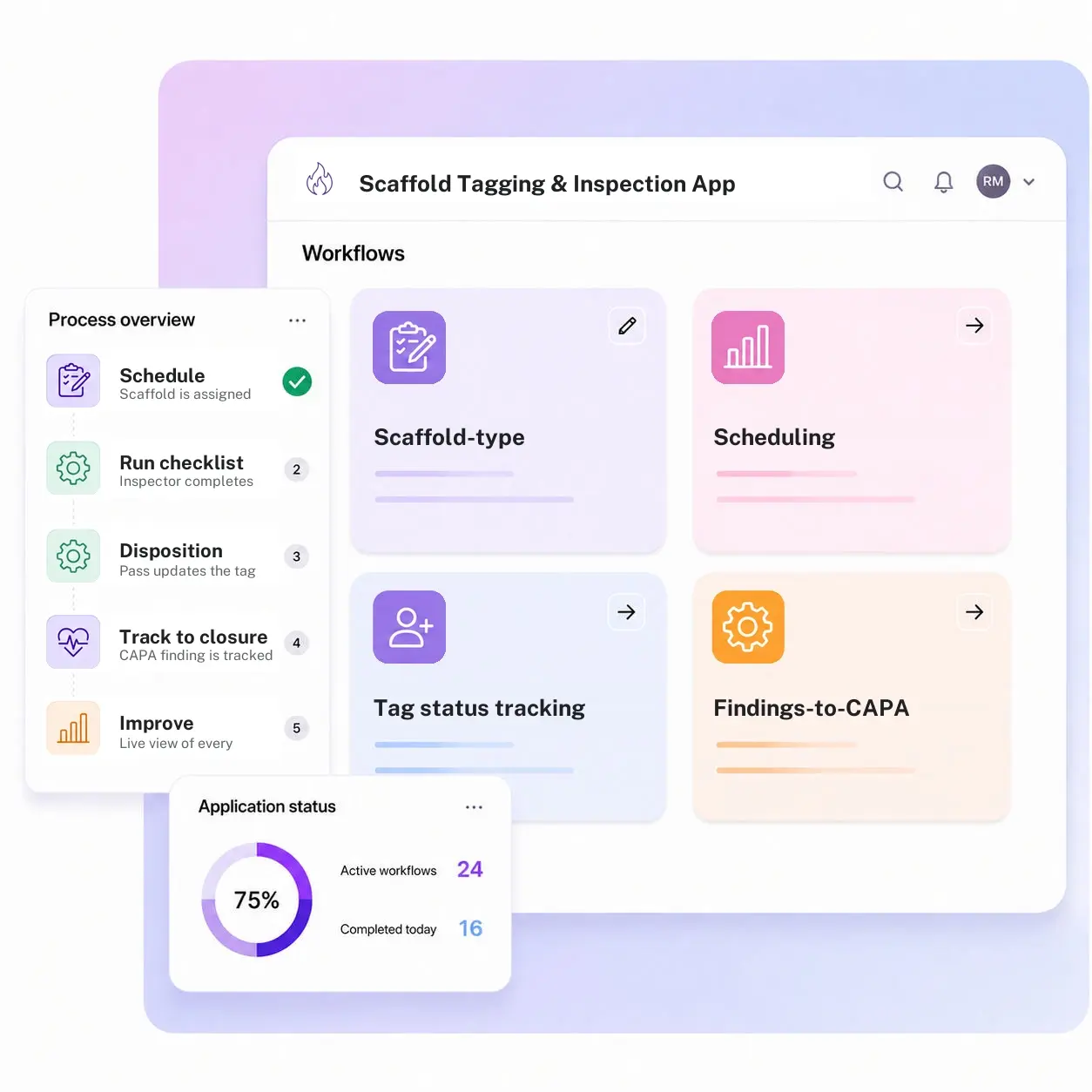
Kissflow runs scaffold tagging as an inspection app: reusable checklists by scaffold type and load class, a scheduling and assignment layer that flags overdue re-inspections, a tag status tied to the record instead of a marker on paper, a findings-to-CAPA workflow when a component fails, photo evidence attached to every finding, and a compliance dashboard across every scaffold on site.
Scaffolding supervisors configure checklist templates, load classes, and re-inspection intervals in the visual builder. A tag color on the frame now points back to a full inspection record, not a date someone wrote in marker.
Where scaffold tagging breaks down between the frame and the record
Tags don't carry history
A colored tag on the frame shows a status, but nothing behind it shows the inspection that produced it.
Re-inspection dates get missed
Without a scheduler, an overdue scaffold looks identical to one inspected this morning.
Findings don't route anywhere
A failed component gets noted on paper, but there's no workflow that tracks it to a fix and a re-check.
No site-wide view
A supervisor walking one work front has no way to see which scaffolds elsewhere are overdue or flagged.
Six modules. Every tag backed by a real inspection.
Configure each module to your scaffold types, load classes, and inspection intervals.
Scaffold-type inspection templates
Checklists built for the load class and configuration of each scaffold, not a generic form.
Scheduling and assignment
Erection, periodic, and post-weather re-inspections are scheduled and assigned automatically.
Tag status tracking
Green, yellow, and red status is tied to the inspection record, not a marker on the frame.
Findings-to-CAPA workflow
A failed component routes to a corrective action with an owner and a re-inspection date.
Photo evidence capture
Every finding carries a photo, timestamped and attached to the scaffold's record.
Compliance dashboard
A live view of every scaffold's status, overdue re-inspections, and open findings across the site.
From request to system of record in four steps
Initiate

A scaffold is assigned an inspection on its erection, periodic, or post-weather schedule.
Conduct

The inspector completes the load-class checklist on a phone or tablet at the scaffold.
Flag

A pass updates the tag to green; a fail routes to CAPA and holds the tag at red.
Record

A CAPA finding is tracked to a fix and a re-inspection before the tag clears, with photo evidence stored, so the tag reflects this week's inspection.
What changes when scaffold tagging runs on Kissflow
| Process | Before Kissflow | On Kissflow |
|---|---|---|
| Inspection record | A paper checklist filed in a binder | A digital checklist tied to the scaffold's record |
| Tag status | A marker written on a paper tag | A status tied to the actual inspection behind it |
| Re-inspection scheduling | Tracked on a wall calendar, if at all | Assigned and flagged automatically when due |
| Failed components | Noted on paper, no tracked follow-up | Routed to a CAPA workflow with an owner |
| Evidence | A note, if anything | A timestamped photo attached to the finding |
| Site-wide visibility | One binder per work front | One dashboard across every scaffold on site |
Works alongside your permit-to-work and asset systems; Kissflow doesn't replace either
A scaffold inspection can be linked to the permit it supports. Kissflow runs the inspection, tagging, and CAPA layer; your PTW and asset systems stay the system of record for the permit and the asset register.
.svg)



.svg)
.svg)
.svg)
.svg)

.svg)
.svg)
.svg)
.svg)
.svg)

.svg)

.svg)

.svg)
.svg)
.svg)
.svg)
.svg)
.svg)
.svg)
.svg)
.svg)

.svg)
Built for how scaffold inspections actually get run and tracked
Tags that reflect this week's inspection
A tag color updates the moment the checklist is completed, not on the next site walk.
Findings that don't die on paper
A failed component is tracked to a fix and a re-inspection, not just noted and forgotten.
Every scaffold, one dashboard
See overdue and flagged scaffolds across the whole site instead of walking every work front.
Live in weeks
Configure checklist templates and load classes in the visual builder, or describe the use case to the AI Builder.
Governed from day one
Role-based access and a full audit log are built into every inspection and tag change.
One view for HSE and the field
Supervisors, inspectors, and HSE see the same live status instead of separate binders.
Related apps
Mobile Equipment Inspection & Dispatch Management System
Pre-use inspection and dispatch gate for forklifts, cranes, and mobile site equipment.
Safety Critical Equipment Compliance Tracker
Track certification and compliance status for safety-critical equipment across every site.
Site Workfront Readiness Management System
Verify permits, crew, tools, and isolations before a work front is released.
We help site teams keep every scaffold tag backed by a real inspection
.gif)

“If a company cannot enable everybody to use AI, they will never get the true benefit of AI. Platforms like Kissflow allow us to put that capability in the hands of our users in a safe way.”
Vagesh Dave
GVP & CIO at McDermott International, Ltd
See The Full Story

“Advanced automation of all processes is easy to set up. I cannot imagine how to manage workflows without this software.”
Tanay Tiwary
Global Head - Digitalization & Business Improvement
See the Full Story

“Kissflow supports rapid application development by building a working application prototype in the shortest amount of time.”
Maria Theresa Cabigon
CIO, SN Aboitiz Power Group
See The Full Story
See what Kissflow can do for you
Talk to usGot questions? We're here to help.
Get SupportNo. Kissflow runs the inspection and tagging workflow; your PTW system stays the record for the permit itself, and a scaffold's tag status can be referenced from the permit.
That app inspects and dispatches mobile assets like forklifts and cranes before they leave the yard. This app inspects fixed scaffolding structures and manages the tag status and re-inspection schedule.
No, most sites keep the physical tag for a visual check at the frame. This app is the record behind it: the checklist, the history, and the CAPA trail the tag color represents.
Yes, checklist templates are configured per scaffold type and load class, so a tube-and-clip scaffold and a system scaffold don't share a form that fits neither.
Whoever you configure, typically the scaffolding supervisor first, escalating if it isn't actioned.
Yes, the checklist and photo capture work from a mobile device in the field.
Configuration and AI-assisted app generation move delivery from a multi-month program to a matter of weeks.
Kissflow is certified to SOC 1, SOC 2, SOC 3, and ISO/IEC 27001, with role-based access and a full audit log on every inspection.











