
What is a Workflow? Definition, Types, and Differences
A workflow is a structured sequence of tasks that moves work from initiation to completion through defined steps, decision points, and responsible parties. For enterprises, workflows are the operational backbone that connects people, processes, and systems yet most organizations still run critical workflows through email, spreadsheets, and informal conversations that leave no trail, no visibility, and no control.
In this article 
What you'll learn on this page:
- The precise definition of a workflow and why it matters
- The main types of workflows and when to use each
- How sequential, parallel, and rules-driven workflows differ in practice
- The difference between a workflow, a process, and a checklist
- Real workflow use cases across finance, IT, HR, and operations
- How workflow automation cuts cycle times, improves compliance, and drives visibility
- How Kissflow acts as the digital backbone that connects workflows across systems
What is a workflow?
A workflow is a repeatable sequence of tasks with a defined start, structured steps, assigned owners, and a clear end state. Every workflow converts an input - a request, a document, a decision into an output through a series of coordinated actions carried out by people, systems, or both.
In practice, workflows exist in every function of a business. A purchase order approval, a new employee onboarding checklist, an IT service desk ticket all of these are workflows. The difference between organizations that scale efficiently and those that stagnate usually comes down to whether their workflows are structured and visible or fragmented and informal.
Core elements of a workflow:
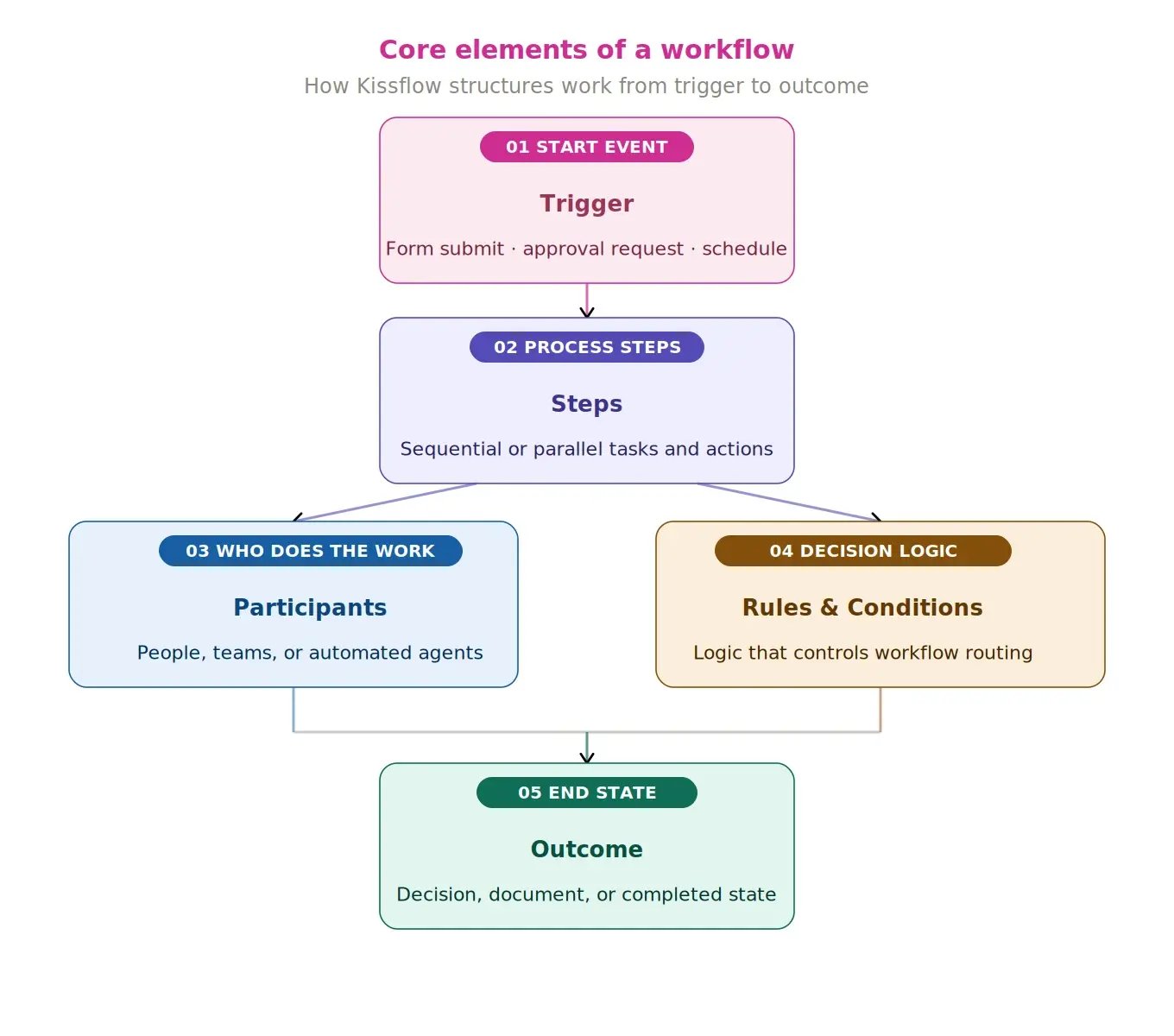
- Trigger — the event or request that starts the workflow (a form submission, an approval request, a scheduled task)
- Steps — the individual tasks or actions that must be completed in sequence or in parallel
- Participants — the people, teams, or automated systems responsible for each step
- Rules and conditions — the logic that determines which path a workflow takes based on data or decisions
- Outcome — the completed state, output document, or decision that closes the workflow
-> Learn more about AI workflow orchestration
Why workflows break down in enterprise environments?
Most enterprises have two kinds of work: the work that happens inside systems of record (ERP, HRMS, CRM), and the work that happens between those systems through email threads, chat messages, spreadsheet trackers, and verbal approvals. That gap between systems is where workflows collapse.
When a vendor invoice requires sign-off from finance, procurement, and legal before it can be paid, and each handoff happens over email, the process has no visibility, no accountability, and no audit trail. If someone misses a step, delays compound silently.
This is not an edge case. It is the operational reality for most mid-to-large enterprises. The consequences show up as:
- Extended cycle times on approvals and requests
- Regulatory exposure from undocumented decisions
- Operational inefficiencies that are difficult to measure or fix
- Shadow processes that bypass official systems because the official process is too slow
Kissflow addresses this gap by creating a unified digital layer where workflows can be built, tracked, and managed regardless of which systems of record they touch. Work that used to disappear into inboxes becomes structured, traceable, and measurable.
Learn more: Enterprise workflow automation
The main types of workflows
Not all workflows behave the same way. Understanding the type of workflow you are dealing with determines how to structure it, which tool to use, and what governance model applies.
The four main types of workflows are as follows,
- Process workflow
- Case workflow
- Project workflow
- Approval workflow
- Document workflow
| Workflow Type | How it works | Best For | Use case |
| Process Workflow | Fixed, predictable path from start to finish | Repeatable, standardized operations | Invoice processing, purchase order approval |
| Case Workflow | Path unfolds based on new information gathered at each step | Exception handling, investigations | Insurance claims, IT incident management |
| Project Workflow | Structured path for a one-time outcome | Complex deliverables with defined milestones | Website launch, product release |
| Approval Workflow | Multi-stage review before an item progresses | Risk management and governance | Budget requests, contract sign-off |
| Document Workflow | Workflow built around a specific document | Compliance and legal | Contract lifecycle, policy approval |
Read More: What are the Major Differences Between Workflow and Process?
Key characteristics of workflows include:
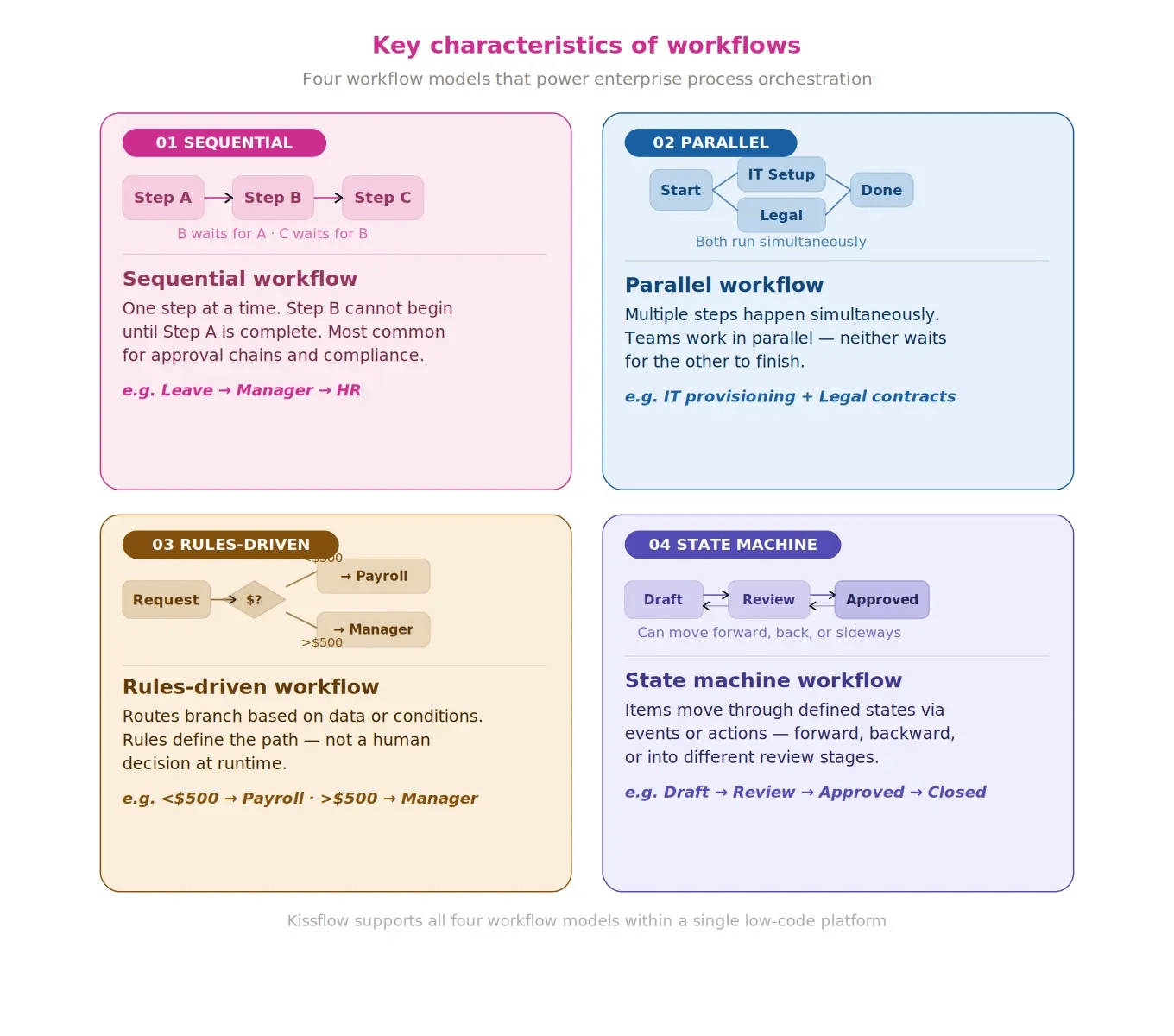
Sequential workflows move items one step at a time. Step B cannot begin until Step A is complete. This is the most common workflow model for approval chains and compliance processes. A leave approval that must pass through a manager before reaching HR is a sequential workflow.
Parallel workflows allow multiple steps to happen simultaneously. When onboarding a new employee, the IT team can provision accounts at the same time that legal prepares contracts. Neither team waits for the other.
Rules-driven workflows branch based on data or conditions. A reimbursement request under $500 may route directly to payroll, while one over $500 requires manager approval first. The rules define the path, not a human decision at runtime.
State machine workflows move an item through a series of defined states based on events or actions. These are common in project management, software development, and any process where items can move forward, backward, or into different review stages.
Be careful before choosing a business workflow tool that looks more like an automated checklist, as you will quickly find limitations in its ability to handle your items.
Learn more: Custom workflow software
Workflow vs Process vs Checklist - What is the difference?
These three terms are often used interchangeably, but they describe different levels of operational structure. Understanding the distinction matters when deciding which tool or approach fits your situation.
| Dimension | Checklist | Process | Workflow |
|---|---|---|---|
| Complexity | Simple list of tasks | Broader framework including data, forms, roles, and notifications | Structured task sequence with routing logic and ownership |
| Flexibility | Low — static, usually manual | Moderate — can include conditions and roles | High — handles branching, exceptions, and automation |
| Trackability | Difficult to track across multiple people | Can be tracked with the right tooling | Built for visibility and audit trails |
| Scale | Good for individual use | Good for team-level operations | Designed for enterprise-scale, cross-functional operations |
| Automation | Not automated by default | Partially automatable | Built to be automated |
A checklist is the starting point. A process adds context — the forms, the data, the notifications, the roles. A workflow is what makes a process run reliably at scale, with automated handoffs, conditional logic, and real-time visibility into where every item stands.
When a company says they want to "automate their processes," they are almost always describing the need to build structured workflows with automated workflow routing, notifications, and approvals.
Common workflow use cases across enterprise functions
Workflows show up across every department. The challenge is that most of them are invisible — managed through email or handled ad-hoc — until something breaks or an audit is triggered. Followingn are some of the workflow examples and use cases,
Finance:
- Invoice approval and three-way matching
- Purchase order creation and vendor payment
- Expense reimbursement and claim validation
- Budget allocation and variance reporting
Human resources:
- New hire onboarding with cross-functional coordination (IT, legal, facilities)
- Performance review cycles and documentation
- Offboarding and asset recovery
- Leave management and policy enforcement
Information technology:
- IT service desk ticketing and escalation
- Change management and release approval
- Access provisioning and deprovisioning
- Incident classification and resolution
Operations and Procurement:
- Vendor onboarding and qualification
- Contract creation, review, and renewal
- Audit and compliance reporting
- SLA tracking and breach escalation
Each of these can run through email today. All of them work better, faster, and with lower risk when they run through a structured workflow platform with built-in traceability and automated routing.
Learn more about governance in enterprise workflows
 Free Ebook
Workflow Automation Checklist: The Complete Guide for Business Owners

Thank you for downloading!
Human centric vs System centric workflows
Workflows fall into two broad categories based on how much human involvement they require.
Human-centric workflows assign most steps to people. The system handles routing and notifications, but humans make the decisions — they approve, reject, delegate, or escalate. This model is essential for high-stakes approvals, exception handling, and any situation where judgment matters. Compliance reviews, legal sign-offs, and executive approvals all fall here.
System-centric workflows execute automatically without requiring human action at each step. The system collects data, processes it according to defined rules, and triggers the next action. A monthly reporting workflow that pulls data from multiple sources, formats a report, and distributes it to stakeholders is a system-centric workflow.
Most real-world enterprise workflows blend both. A procurement workflow may have automated validation and routing but require human approval at key decision points. Kissflow supports both models through its workflow orchestration capability, allowing organizations to define where automation should run independently and where a human decision gate is required.
Learn how McDermott accelerated field and back-office workflows with Kissflow’s visual builder.
Read More
Manual workflows vs Automated workflows
Before the table, a quick primer, here's how workflow automation works in practice the system routes, the rules enforce, and the audit trail writes itself.
| Attribute | Manual Workflow | Automated Workflow |
|---|---|---|
| Handoffs | Human must pass work to the next step | System routes automatically based on defined rules |
| Notifications | Manual follow-up (email, phone) | Automated at each step with configurable reminders |
| Tracking | Requires spreadsheets or manual updates | Real-time status visible to all participants |
| Consistency | Varies by person and moment | Same path every time rules are met |
| Errors | Higher — depends on human accuracy and memory | Lower — system validates and enforces conditions |
| Audit Trail | Minimal or none | Complete log of who did what and when |
| Cycle Time | Longer due to wait times and missed handoffs | Shorter — items move immediately when conditions are met |
The shift from manual to automated workflow platform is not just a productivity gain. It is a governance and compliance enabler. When every step of a process is logged automatically, organizations can prove compliance, identify bottlenecks, and continuously improve without relying on anecdotal reports from team members.
-> Learn more about workflow management tools
How to identify workflows worth automating in your organization
Not every workflow needs to be automated immediately. The highest-value workflows to tackle first share a set of common characteristics and the benefits of workflow automation compound most when you start with these.
Signs a workflow is a prime candidate for automation:
- It happens more than 50 times per month
- More than two teams or departments are involved
- It currently moves through email or shared spreadsheets
- Approval delays are a common complaint
- Errors or missed steps have caused compliance issues
- It takes longer than it should because someone forgot to follow up
Starting with these workflows delivers the fastest ROI. Common first targets include invoice approvals, employee onboarding, IT service requests, and contract reviews — all of which meet most of the criteria above.
Kissflow allows organizations to map these workflows visually, set up routing rules, assign owners, and activate automation without writing code. The workflow builder supports both simple linear flows and complex multi-branch processes.
The role of workflow in digital transformation
Digital transformation is often described as a technology initiative. In practice, it is an operational one. The technology is the means; the goal is making work faster, more visible, and more consistent across the organization.
Workflows sit at the center of this. Every digital transformation initiative — from ERP upgrades to cloud migrations to AI adoption — eventually needs to connect to how people actually do their work day to day. Workflows are the connective tissue.
When workflows are fragmented and informal, transformation programs stall. Decisions get made outside the system. Data stays siloed. Progress becomes impossible to measure.
Organizations that treat workflow standardization as a core pillar of their transformation agenda tend to see faster adoption, better data quality, and measurable improvements in operational KPIs — cycle time, error rates, compliance adherence, and cost per transaction.
For IT leaders, this means investing in a workflow platform that can manage workflows across functions without requiring custom development for each new use case. That is the gap Kissflow is built to fill.
IT workflows and why they deserve a dedicated strategy
IT teams run some of the most process-heavy operations in any organization. Incident management, change control, access requests, asset provisioning — each of these requires structured coordination across multiple teams with clear accountability.
Without proper workflow tooling, IT service delivery becomes reactive and inconsistent. Engineers spend time chasing approvals rather than solving problems. End users experience delays and confusion. Audit trails are incomplete.
Common IT workflows that benefit from structure:
- Service desk ticket triage and escalation
- New employee access provisioning
- Change request review and approval
- Software deployment and release management
- Vendor access governance
- Security incident classification and response
A structured IT workflow platform allows teams to standardize these processes, enforce SLAs, and generate the audit logs that compliance frameworks require — without building custom tooling for each workflow.
Kissflow - Built for enterprise operations
Kissflow is a low-code platform that functions as the digital backbone for enterprise process operations. It connects the work that happens between systems — the approvals, handoffs, decisions, and coordination that live outside your ERP or HRMS — and makes it visible, structured, and measurable.
How Kissflow handles workflow management:
- Visual workflow builder — Teams can design workflows using a drag-and-drop interface without writing code. Sequential, parallel, and conditional paths are all configurable without IT dependency.
- Workflow orchestration — Kissflow coordinates workflows across departments and external stakeholders. A vendor onboarding workflow can span procurement, legal, finance, and IT from a single platform.
- Process builder — For more complex, multi-step processes, Kissflow's process builder supports full BPM-style process design with forms, data fields, SLA settings, and automated notifications.
- Built-in governance — Every action in a Kissflow workflow is logged. Audit trails are generated automatically. Approvals are documented. Escalations are tracked.
- Low-code app creation — Beyond workflow automation, teams can build lightweight internal applications on top of their workflows — portals, dashboards, and request forms — without engineering resources.
- Integrations — Kissflow connects to existing systems including SAP, Salesforce, Google Workspace, Microsoft 365, and hundreds of other enterprise applications through native connectors and APIs.
Dive Deeper into Workflows!
Check Out Now!
Frequently Asked Questions
1. What does a workflow do?
A workflow organizes tasks into a defined sequence with assigned owners, automated routing, and trackable outcomes. It replaces ad-hoc coordination — email chains, verbal approvals, shared spreadsheets — with a structured process that runs consistently and generates an audit trail at every step.
2. Workflow vs process - which is broader?
A process is the broader term. It includes all the data, forms, reports, notifications, and governance elements needed to complete a business outcome. A workflow is the specific task sequence within that process — the ordered set of steps that moves an item from initiation to completion.
3. What makes a workflow "automated"?
An automated workflow uses workflow automation software to route tasks, send notifications, enforce conditions, and log actions without manual handoffs at each step.. When a user submits a form, the system determines the next step based on defined rules and assigns it automatically — no email, no follow-up required.
4. Which workflows should enterprises automate first?
Start with workflows that are high-volume, cross-functional, and currently managed through email or spreadsheets. Invoice approvals, employee onboarding, IT service requests, and contract reviews meet all three criteria and deliver measurable ROI within the first 90 days of automation.
5. How do workflows support compliance?
Every step in a structured workflow generates a log — who acted, when, and what decision was made. This audit trail is created automatically, not assembled after the fact. For organizations subject to SOX, GDPR, ISO, or industry-specific regulations, workflow automation turns compliance from a periodic exercise into a continuous operational output.
6. What is a digital workflow?
A digital workflow is a sequence of tasks or processes carried out electronically, typically using software tools to automate and manage the flow of information. Digital workflows replace traditional manual processes with automated ones, improving efficiency, reducing errors, and providing greater visibility into task status. They can be applied to many business processes, from document approvals to customer onboarding, helping teams automate repetitive tasks and track progress in real time.
Related Articles

9 MINUTES READ
What Is an Agile Workflow? Steps to Build One
9 MINUTES READ
3 Workflow Tips to Launch a Restaurant Fast









