
No-Code BPM Software: Automate Business Processes Without Coding
No-code BPM software is a business process management tool that lets users design, automate, and optimize processes using visual interfaces instead of code. It combines process modeling, workflow automation, task management, and analytics so teams can map and improve operations without technical expertise.
The software landscape has drastically changed since the only tools out there were custom-made for large corporations with huge budgets. Now, software has become a necessity for every business. Even companies with small budgets expect to use great software they don’t have to wait on.
One area where more companies than ever are turning to technology is business process management. For decades, only the largest companies could afford software capable of managing complex processes. Regardless of its size, though, every business wants to keep its processes running smoothly to get to the next level of growth.
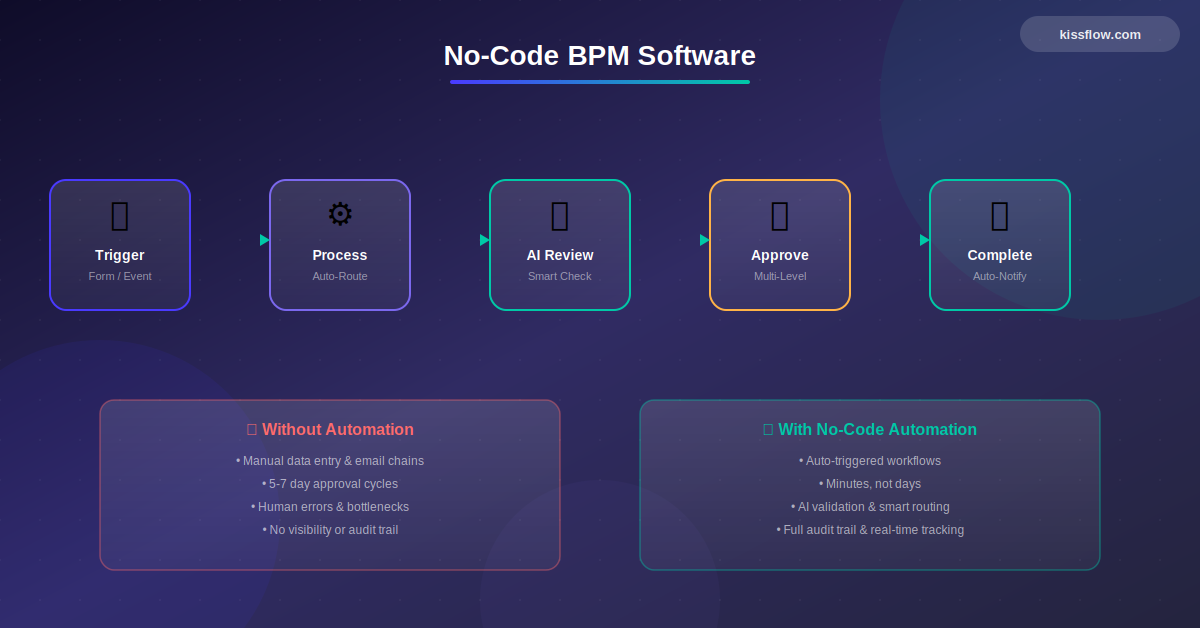
Early BPM software was hard to use unless you understood programming. Heads of departments who wanted their processes streamlined had no other option but to shell out a lot of cash to 3rd party coders, or wait for internal IT teams to create what they needed.
That is, until no-code BPM jumped onto the scene.
Why No-code BPM Software?
A no-code platform allows business users–or people who aren’t familiar with coding–to program their own applications without having to write a single line of code. The most effective no code workflow automation platform combines intuitive visual design with robust backend processing, enabling users to create sophisticated workflows that rival custom-coded solutions.
It takes care of all the backend connections and handles exceptions on its own, making things incredibly easy on the user and highlighting some of the key no-code automation benefits.
No-code platforms are attractive both for the IT department and the end user. The IT team is typically slammed with requests, with varying degrees of complexity. A no-code solution can give all those easier solutions back to the people who requested them. Business users are happy because they are empowered to make the application exactly as they want it, without a lot of back and forth.
No-Code development software can save your company time and increase efficiency at the same time.

 Free eBook
The Ultimate Buyer's Guide to No-Code

Thank you for downloading!
How No-Code BPM Software Works
Before you buy no-code BPM software, it’s important to understand how it works, and how it benefits your organization.
Consider this scenario.
Your finance team usually sends out invoices to vendors only after getting a manually approval from the purchasing head. But since you’ve expanded support to a hundred new vendors, it’s eating into a lot more of their time than anticipated. Your IT team is already clogged with auditing and troubleshooting faulty devices, so they aren’t available to create a custom solution. If only you had an automatic invoicing solution that could ease up the finance team’s burden!
Jorge has been with the finance team for five years and knows the system like the back of his hand. He’s technologically proficient, but wouldn’t know how to start creating an application on his own. However, with no-code BPM software like Kissflow, he can sit down and create an automated form and workflow that connects everyone perfectly.
No-code BPM software represents a key capability of any enterprise no-code platform, providing visual process design, execution, and monitoring.BPM works hand-in-hand with no-code automation — while BPM defines the process structure, automation executes the individual steps and triggers.
The real power of no-code BPM is that it takes people like Jorge and turns them into superheroes. Just as easily as he can start a new spreadsheet, he can start up a new automated process.
What No-Code BPM Adds to an Organization
No-code app development platforms definitely save you a lot of time, but also offer a lot of other benefits.
Save Money
Without no-code BPM, you need to spend a lot more money on staff and tools every time you need to increase or improve your processes. With no-code, your existing team can scale processes suitably.
As a large company, you might spend anywhere from $2,000 to $20,000 per year for a no-code platform. That’s still a lot of savings compared to hiring developers and consultants to build the process for you.
Promote Career Advancement
Coding skills are always in demand, but you can find them hard to pick up if you’re on the business side. Learning to create applications through no-code helps people understand their processes better. The work business users do with no-code web application development platforms ensures they get recognized on the floor, which is good for career advancements. People who understand the process better and work to improve it are the ones who are given more responsibility.
Improve Productivity
Traditionally, if an implementation request was sent to IT, it would take ages to get to it, ultimately forcing business users to cope with what they had until the app was finally developed.
With no-code platforms, there’s no delay. Applications are built and deployed when and where they are required. This improves the efficiency and productivity of business users. Meanwhile, IT is free to focus their attention on tasks that actually need their expertise.
See the full story → Ramco Group: BPM Across 40 Companies — 85 Processes, 30+ Hours Saved Weekly
What You Want in Your No-Code Platform
If you’re picking a no-code platform, there are a few things you should look for in any platform you decide to buy.
1. Does it have a free trial?
A free trial lets you test the product and see if it’s a fit for your organization, without having to make a purchase beforehand. If a product doesn’t have a free trial, ask the vendor about it.
2. Does it require significant training for your staff?
The best no-code app builders will be easy to use. If you find something that’s a lot more difficult than you bargained for, it’s best to look elsewhere.
3. Can your staff collaborate on a single project?
Staff can have different ideas for a single implementation, and collaboration is the best way to ensure everyone works on the project, without having to send and receive data.
4. Is it on the cloud?
Having it on the cloud means you don’t have to waste resources installing it on your devices. You won’t need to worry about data loss and backups.
5. Is it scalable?
The no-code platform should be able to scale up with the growth of your organization. If you find that the platform cannot incorporate more people as you grow, or requires you to purchase expensive bundles of users to do so, then it’s best to leave it and find something else.
Conclusion
When adopting no-code for BPM, it's essential to choose from top no-code BPM software providers offering advanced solutions.
No-code is the way forward for BPM. If you haven’t adopted it already, it’s high time you did. If you’re looking for a competent and easy-to-use no-code platform, check out Kissflow No-Code. It’s got a ton of features for business process improvement, and offers a free trial to help you understand how it works.
FAQs:
1. How is a no-code BPM platform different from traditional BPM tools?
No-code BPM platforms prioritize visual, intuitive interfaces over complex configuration and scripting. Business users can design and modify processes without IT intervention or extensive training. Traditional BPM tools often require technical consultants for implementation and customization. No-code platforms integrate form building, data management, and reporting in addition to process orchestration. Deployment is faster, with processes going live in days or weeks rather than months. The total cost of ownership is lower due to reduced implementation, training, and maintenance costs. Modern no-code BPM includes AI-assisted development features not found in legacy BPM suites.
2. Can enterprises use no-code BPM for complex multi-step workflows?
Yes, enterprise no-code platforms handle sophisticated workflows with multiple approval stages, conditional routing, and parallel processes. Kissflow's patented rules engine supports complex business logic without requiring coding. Multi-department processes can be orchestrated with role-based routing and escalation rules. Exception handling, SLA management, and automated notifications are built into the platform. Large organizations successfully run business-critical processes involving dozens of steps and multiple stakeholders. The visual interface makes it easier to design, test, and optimize complex workflows compared to traditional BPM tools.
3. How does governance work when business teams build BPM workflows?
IT administrators establish governance frameworks that automatically apply to all processes built by business users. Role-based permissions control who can create, modify, and deploy workflows within each department. Process templates and approved components ensure consistency and compliance across the organization. Approval workflows for publishing new processes give IT review authority before deployment. Centralized monitoring provides visibility into all active processes and their performance metrics. Version control and audit trails track changes and maintain process history. The platform prevents shadow IT by giving business users approved tools instead of forcing them to use unauthorized solutions.
4. What limitations does Google or others not highlight about BPM tools?
Many BPM platforms have steep learning curves despite marketing claims of ease-of-use. Customization often requires proprietary scripting languages or technical consultants. Integration with other systems may be limited to specific platforms or require expensive middleware. Performance degradation can occur with high transaction volumes or complex processes. Vendor lock-in makes it difficult to migrate processes if you want to change platforms. Hidden costs include implementation services, training, maintenance, and upgrade expenses. Some platforms struggle with mobile accessibility and modern user experience expectations. The gap between marketing demos and real-world implementation complexity can be significant.
5. How can no-code BPM improve cross-department process visibility?
Centralized dashboards provide real-time views of process status across all departments. Stakeholders can track bottlenecks, completion rates, and SLA compliance without manual reporting. Visual process maps show exactly where work is in the workflow and who is responsible. Automated notifications keep relevant parties informed of process progress and required actions. Historical data and analytics reveal patterns, inefficiencies, and opportunities for optimization. Standardized processes ensure consistency in how work flows between departments. Executive dashboards aggregate metrics from multiple processes for enterprise-wide visibility.

Related Articles

6 MINUTES READ
No-Code Workflow Automation | A Detailed Overview

6 MINUTES READ
No-Code Automation: Build Workflows Without Code (2026)









