What Is Workflow Automation? Definition, Types, and Enterprise Use Cases
This guide covers the three workflow automation types enterprises actually use. It maps the outcomes by industry, the difference between workflow automation and adjacent categories like RPA, BPM, and orchestration, and what to look for in a platform when your buyers are CIOs and IT leaders.
Key Takeaways
-
Workflow automation is software that runs a business process from trigger to completion without manual handoffs between people, systems, or chat threads.
-
Three patterns matter most for enterprises: rule-based automation, document-centric automation, and cross-system orchestration. Most enterprise wins come from combining all three.
-
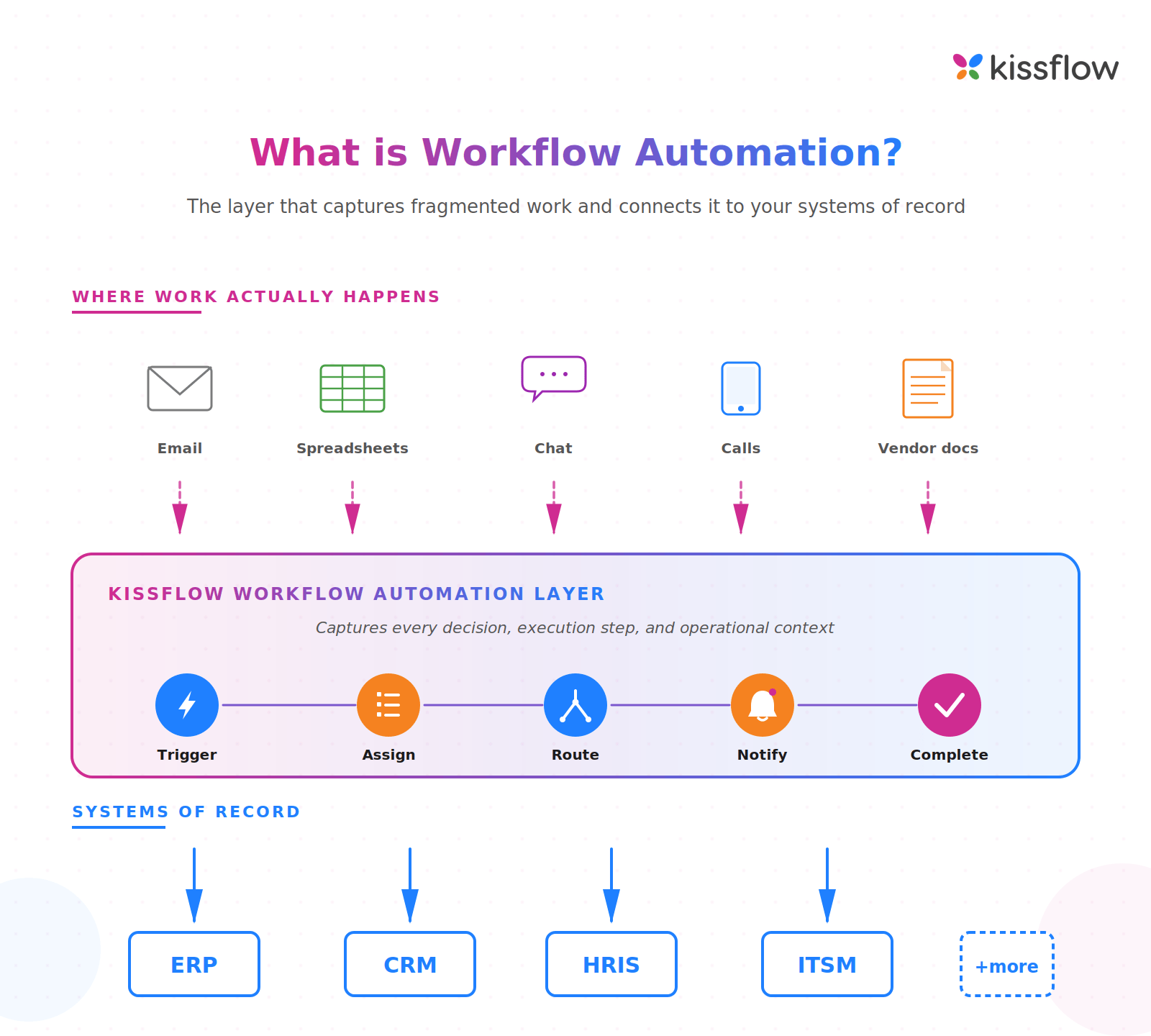
Workflow automation isn't a replacement for ERP or CRM. It's the layer that connects fragmented work (email, spreadsheets, chat) to those systems of record.
-
McKinsey's November 2025 research finds AI and robots can automate 57 percent of work hours in the US economy today (McKinsey Global Institute, 2025).
-
Start with high-volume, rule-clear processes: invoice approvals, employee onboarding, vendor management. Move to multi-system orchestration once governance is in place.
Workflow automation captures the decisions, data movement, and approvals that happen between systems of record like ERP and CRM, where most enterprise work actually lives.
What is Workflow Automation? - DEFINITIONWorkflow automation is the use of software to execute business processes end-to-end, replacing manual coordination across email, spreadsheets, and chat with rules-driven, traceable execution. |
Most enterprises don't lack systems of record. They lack a layer that connects work to those systems. Invoices sit in inboxes. Workflow approvals happen in chat threads. Vendor changes get tracked in spreadsheets. The result is poor visibility, weak traceability, and operational drag that CIOs and IT leaders feel every quarter.
What workflow automation actually does?
Workflow automation moves a process from start to finish by triggering steps, routing tasks, applying business rules, and writing the result back to the systems that need it. The work that used to require five emails and a spreadsheet now runs in one defined path with an audit trail.
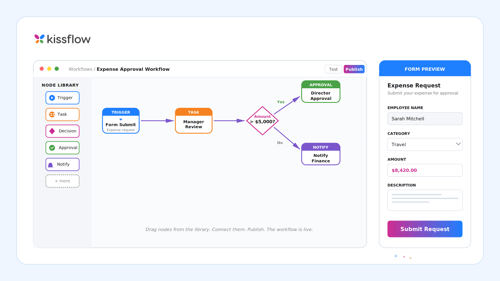
A working enterprise workflow has five elements:
- A trigger. A submitted form, a record update in Salesforce, a scheduled date, an event from another system.
- Routing rules built from any data the process captures. Amount, region, requester, vendor category, anything that should change where the work goes next.
- Approvals or task hand-offs that send the work to whoever owns the next step.
- Write-back to ERP, CRM, HRIS, or whichever system owns the data. The approval has to land somewhere.
- An audit trail finance, compliance, and IT can all read.
Without these five elements working together, a workflow software is juvbluest a digital form. With them, it's the operational layer enterprises actually need.
Most teams start with one high-volume process. Useful reference: workflow automation tools for comparing options.
The three types of workflow automation enterprises use
Enterprise workflow automation comes in three patterns. Most large organizations need all three, but they usually start with one.
1. Rule-based automation
Rule-based automation handles processes with clear logic and predictable steps. Approval routing by amount, leave requests by role, and vendor onboarding by region all have codifiable rules. The workflow runs without human judgment in the middle. This is where most enterprises start, because the ROI is fast and the failure modes are easy to spot.
2. Document-centric automation
Document-centric workflow automation handles forms, contracts, and records that need approvals, signatures, or compliance checks. Invoice approvals, expense reports, policy attestations, NDAs. The document is the work unit, and the workflow makes sure it gets reviewed, signed, stored, and indexed for retrieval. This pattern is dominant in finance, HR, legal, and procurement.
3. Cross-system orchestration
Cross-system orchestration handles processes that span multiple systems and teams. A new employee joins, which triggers actions in HRIS, Active Directory, the laptop provisioning system, finance for payroll, and IT for badge access. No single system owns the process, so workflow orchestration runs it from one place and writes back to each. This is where Kissflow's enterprise value compounds, because the work between systems is the work that breaks most often.
Workflow automation use cases by industry
The patterns that work in workflow automation cluster by industry, not by department. The same approval logic looks very different in a hospital versus a bank versus an oil and gas operator.
|
Industry |
High-impact workflow |
Outcome it changes |
|
Banking and Financial Services |
Credit memo approval, KYC exceptions, loan disbursement routing |
Reduces approval cycle time and creates the audit trail regulators require |
|
Manufacturing |
Engineering change requests, supplier onboarding, quality non-conformance reports |
Closes the gap between shop-floor reality and ERP records |
|
Healthcare |
Patient referral routing, credentialing, supply requisitions |
Cuts administrative load on clinicians and shortens patient throughput |
|
Retail |
New store openings, vendor onboarding, markdown approvals |
Standardizes execution across stores and gives merchandising real-time visibility |
|
Oil and Gas |
Permit-to-work, MOC (management of change), vendor compliance attestations |
Enforces safety and compliance with traceable sign-offs across sites |
|
Insurance |
Underwriting exceptions, claims triage, broker onboarding |
Compresses cycle times in the workflows that determine combined ratio |
In every one of these workflow examples, the value isn't in replacing the system of record. The value is in capturing what happens between systems, where the decisions, exceptions, and approvals actually live.
Benefits of workflow automation enterprises actually measure
Generic ROI claims don't help CIOs build a business case. The benefits enterprises measure fall into four buckets:
Cycle time compression
Manual approval cycles measured in days collapse to hours when rules replace email threads. Gartner's September 2024 analysis finds hyperautomation remains a staple discipline for 90 percent of large enterprises, even as fewer than 20 percent have mastered measurement of those initiatives (Gartner, 2024). The cycle time numbers vary by process, but the direction is consistent.
Traceability and audit-readiness
Every step has a timestamp, an actor, and a reason. For regulated industries (BFSI, healthcare, pharma), this is the difference between a clean SOX or HIPAA audit and weeks of evidence-gathering.
Operational visibility
Dashboards show workflow analytics where work is stuck, who's the bottleneck, and which exceptions repeat. IT leaders see real demand patterns instead of inferring from ticket volume.
AI readiness through structured data
Automated workflows generate structured event data: which step happened, when, by whom, with what input. That structured data is the precondition for predictive routing, anomaly detection, and the agentic workflows AI vendors are now selling. Manual processes generate nothing of the kind.
Common workflow automation challenges (and how to avoid them)
Most workflow automation programs stall for predictable reasons. Knowing them up front prevents the rework that consumes 12 months of the wrong roadmap:
- Automating broken processes. If the manual process is wrong, automating it just produces the wrong outcome faster. Map the process, fix the logic, then automate.
- Treating workflow as a feature, not a layer. Workflow management capabilities inside an ERP or CRM only handle that vendor's data. Cross-system work needs a platform built for the layer between systems.
- Skipping workflow governance. Citizen developers building unsanctioned workflows is a security and audit problem. Set governance from day one, not after the first incident.
- Choosing on features instead of jobs-to-be-done. A long feature list doesn't tell you whether a platform fits the work your enterprise actually does. Pilot the three most complex processes you have.
- Underestimating change management. The hardest part of automating an approval workflow isn't the software. It's getting the seven managers who used to sign off in email to trust the new path.
How to choose a workflow automation platform
Enterprise workflow automation platforms aren't interchangeable. The selection criteria that matter for an SMB buying their first tool are different from what a CIO needs at a 5,000-employee company. Use this short list:
- Can it run all three workflow patterns (rule-based, document-centric, cross-system orchestration) on one platform without bolt-ons?
- Does it integrate with the systems of record you already run (SAP, Oracle, Workday, Salesforce, ServiceNow) using APIs, not screen scraping?
- Does it support citizen development with governance, so business users can build but IT keeps control?
- Does it produce the structured event data your AI roadmap will need, in a format you can query?
- Does the pricing model scale with the value you create, not with seat counts that punish you for rolling out further?
- Can the vendor reference enterprise customers in your industry, at your scale, running the workflow patterns you need?
If a platform can't answer all six confidently with named customers and live demos, it's a workflow tool, not an enterprise workflow automation platform.
How Kissflow approaches workflow automation
Kissflow sits between fragmented work and the systems of record. Email, spreadsheets, chat, and calls are where most enterprise work actually happens. ERP and CRM are where the truth is supposed to live. The gap between those two layers is where decisions get lost, approvals stall, and audit trails break.
Kissflow's role is to be that connecting layer. It runs the workflows that span systems. It captures the decisions and exceptions that don't fit inside any single system. Then it writes results back to the systems of record that need them. The platform handles all three workflow patterns (rule-based, document-centric, orchestration) and exposes structured event data your AI and analytics roadmap can use.
For enterprises consolidating fragmented automation tools, Kissflow is the platform that replaces three or four point solutions with one governed layer. For enterprises just starting, it's the platform that grows with the work.
Where to start
Workflow automation works when it's positioned as the layer between fragmented work and systems of record, not as a standalone productivity tool. The enterprises getting outsized returns aren't automating individual tasks. They're treating workflow automation as operational infrastructure that captures the decisions, approvals, and exceptions ERP and CRM miss.
If you're starting from scratch, pick three high-volume processes with clear rules (invoice approvals, employee onboarding, vendor management) and run them on one platform. Don't automate broken processes. Don't skip governance. Don't pick a tool that only handles one of the three workflow patterns.
If you already have point solutions in place, the next step is consolidation. Three workflow tools running in three departments is three audit surfaces, three integration debts, and three license bills. One platform across the enterprise is what scale actually looks like.
Frequently asked questions on workflow automation
1. What is workflow automation in simple terms?
Workflow automation is software that runs a business process from start to finish without people having to email each other, update spreadsheets, or chase approvals. It moves work between people and systems using defined rules.
2. What are the main types of workflow automation?
The three main types are rule-based automation (clear logic, predictable steps), document-centric automation (forms, approvals, signatures), and cross-system orchestration (processes that span multiple systems and teams). Most enterprises need all three.
3. What's the difference between workflow automation and RPA?
Workflow automation routes work between people and systems using rules and APIs. RPA mimics human keystrokes on a screen, usually to bridge systems without APIs. RPA is tactical and brittle. Workflow automation is structural and scalable.
4. Does workflow automation replace ERP or CRM?
No. Workflow automation is the layer between fragmented work (email, spreadsheets, chat) and systems of record like ERP and CRM. It captures the decisions and execution those systems don't track, then writes results back to them.
5. How long does workflow automation take to implement?
Simple rule-based workflows (leave approvals, expense routing) can go live in two to four weeks. Cross-system orchestration involving SAP, Salesforce, or ServiceNow typically takes eight to sixteen weeks, depending on integration complexity and governance setup.
6. What's the ROI of workflow automation?
Enterprises typically measure ROI in cycle-time reduction, audit-readiness, and reduced exception-handling cost. McKinsey research finds 60% of occupations have 30%+ of activities that can be automated. The specific ROI depends on the process volume and current manual cost.
7. Can workflow automation be done without IT involvement?
Business users can build simple workflows on a low-code platform. But governance, security, integration with systems of record, and data quality all need IT in the design. The right model is citizen development with IT-defined guardrails, not citizen development in isolation.
8. Is workflow automation the same as hyperautomation?
No. Hyperautomation is Gartner's term for combining workflow automation, RPA, AI, process mining, and analytics into one program. Workflow automation is one of the building blocks. You can have workflow automation without hyperautomation, but not the reverse.
9. What is workflow automation in CRM?
Workflow automation in CRM involves automating routine tasks and processes related to managing customer interactions, such as lead tracking, follow-up reminders, and customer communication. This helps organizations manage relationships more effectively so no opportunities are missed. It also improves efficiency by reducing time spent on manual tasks and ensuring processes are followed consistently. Integration with CRM systems can further enhance this automation.
10. Best alternatives to manual workflow processes?
The best alternatives to manual workflow processes involve digitization and automation. Options include workflow automation software to design and manage processes digitally; robotic process automation (RPA) for repetitive, rule-based tasks across systems; no-code/low-code platforms for building custom apps without coding; integration platforms (iPaaS) for orchestrating data across applications; and dedicated business software to replace generic tools. The goal is to reduce human intervention, minimize errors, and accelerate execution.
11. How can I automate business workflows easily?
The easiest way to automate business workflows is with a user-friendly, cloud-based low-code/no-code platform offering drag-and-drop interfaces, pre-built templates, and visual builders that require no coding. Start by identifying a repetitive, time-consuming task and mapping out its steps. Then use the platform's tools to digitize and automate each stage, including forms, approvals, and integrations, so the process runs consistently without manual effort.
12. How can I automate repetitive business tasks?
Start by identifying frequent, manual, error-prone tasks such as data entry, report generation, or approval routing, then document each step. Choose the right tool: workflow automation software for multi-step processes and approvals, RPA for human-computer interactions, or integration platforms for connecting apps. Design the automation using the tool's visual interface with triggers, actions, and conditional logic. Finally, test, refine, and continuously monitor for further optimization.
13. What are simple ways to set up workflow automation?
Start small and use user-friendly tools. Pick a repetitive, simple process such as leave or expense approvals as a quick win, then map every step and decision point manually first. Choose a no-code platform with visual builders and ready-to-use templates, customize a pre-built template, and drag and drop forms, approval steps, and integrations. Pilot the workflow with a small team, gather feedback, then iterate and improve continuously.
Related Articles

8 MINUTES READ
What Is Workflow Orchestration? Guide for 2026