Everything You Need to Know About Document Approval Workflow
In this article, we explore what document approval workflows are, how they work, and how they fit into the big picture of your organization’s efficiency.
What are document approval workflows?
A document approval workflow is the series of steps of human input required to ensure a document meets internal standards before it’s approved for usage.
Document approval workflow software serve as a QA element for ensuring documents created in an organization meet the need for which they’re created with the help of an approval workflow software.
Why do you need approval workflow software for documents?
Currently, your team might do a huge part of your document management in Slack via chat, email, or right there in Google docs, running through a series of edits before you finally hit done.
So, why should you even bother looking into workflow documentation software to manage documents?
Here are some key ways by which workflows can simplify the document management and approval process for your team.
- Minimizing and eliminating human error from documents. With several rounds of reviews for your internal documents, it’s harder for mistakes to fall through the cracks unseen
-
Simplify document management since now, it’s easier to run through a specific number of steps vs creating workflow from scratch every single time
-
Enabling you to automatically pass documents through several levels of input vs having to collaborate manually via email, Slack, or Google docs
-
Reducing the amount of input and resources required for document QA and approvals, since document management now follows a defined pattern
-
Making it easy to improve your workflows over time by analyzing the workflows you run with.
Well-designed workflows form the basis of simpler, smarter document management and help you do more with less.
Automate your document management workflows with the right workflow software for businesses.
How to create a document approval workflow easily?
Workflows are a significant step forward in the document management process and enable you to simplify knowledge sharing no matter how large your team is, or how much input is required.
Here’s the step by step guide to creating a document management approval workflows:
1. Choose a workflow documentation software
To a significant degree, the workflow management software you choose to manage documents determines how much functionality you can get out of your workflows, and how fast you can process documents.
When hunting for the best workflow management tool to manage documents, insist on one with:
-
an intuitive interface that’s easy to understand and start building with
-
vast integration capabilities, ideally one that syncs with your work/document management suite, i.e. Google Drive, Box, Dropbox, etc
-
drag and drop functionality that’s easy to create, design, edit, with little or no technical expertise, and
-
smart team management so you can easily assign tasks and assignments to team members.
2. Map out all the stages of input you need
Ideally, a document management workflow is made up of the layers of human input required to either edit, review, or control access to the document. As a result, before jumping into actually creating the workflow, it’s important that you accurately map out the stages the workflow will include.
This offers an opportunity to perform a surface review, discuss with stakeholders that’ll be responsible for the workflow, and analyze to ensure it includes all the steps it should, as well as whether work can flow through it with little or no hitches. This stage is where any issues identified can be marked out and resolved before building out the workflow.
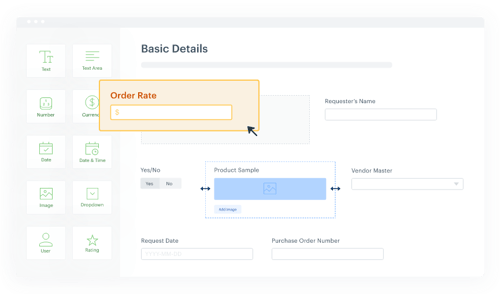
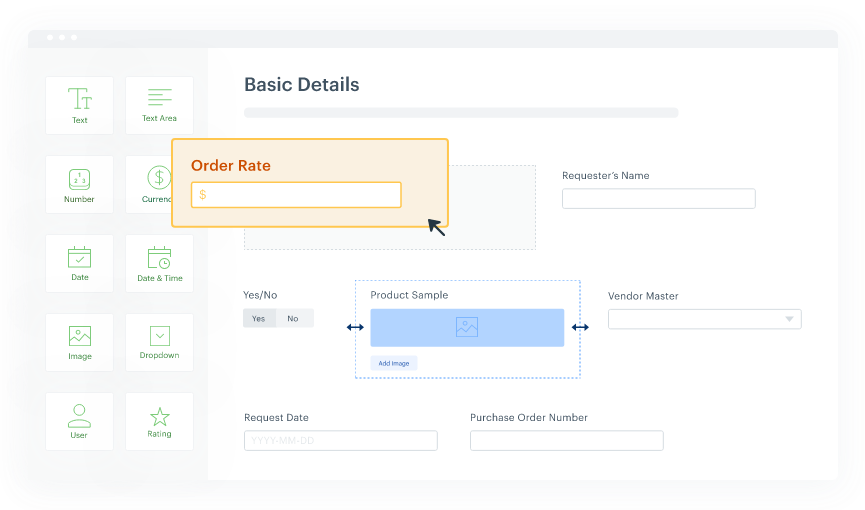
3. Create a digital form with the necessary fields
Two primary fields you might want to include are due dates and attachments. Make sure the form is easy to scan and consume. Don’t overload the form with unnecessary data that might confuse people.
4. Design the workflow
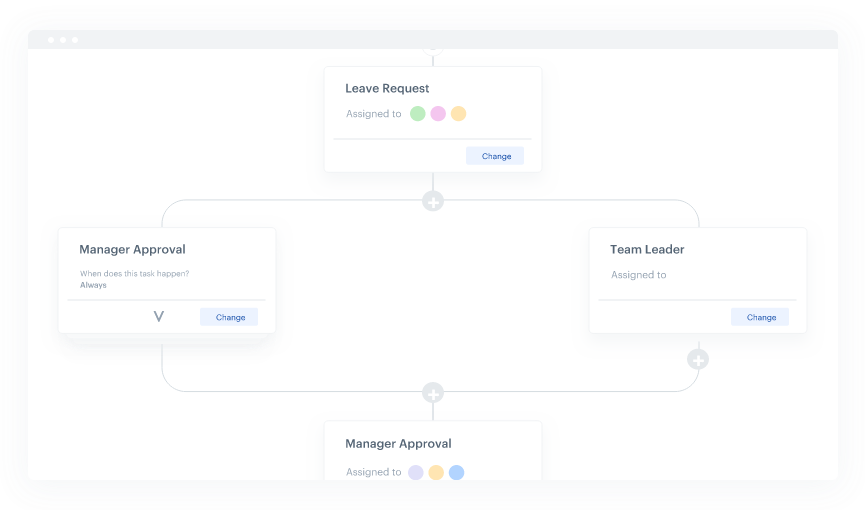
The workflow shows all the steps of the approval process. Split the different stages of the approval process into separate steps. Name each step clearly and assign specific stakeholders that are accountable for particular steps. You can also assign two approvers, split into parallel steps (like in the image) that happen simultaneously.
5. Set permissions and rules
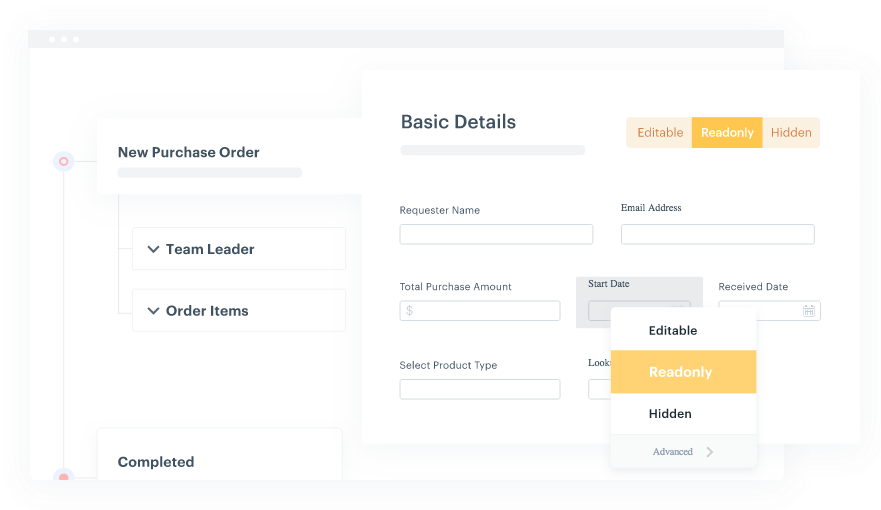
One advantage of workflow management is the ability to control data accessibility. You can configure each field to be either editable, read-only, or hidden for specific users or user groups.
If there are approval conditions based on the values of certain fields, you can assign specific actions for each condition.
6. Do a test run and deploy
Orchestrate workflow and test it by creating requests and submitting them a few times. Check if all the conditions you set work without any errors.
Before you deploy it full time, make sure all the stakeholders are familiar with the workflow application. The primary stakeholders of the approval process should know how to make simple changes in the process without any help. Your approvals shouldn’t get stuck if the system needs to be tweaked.
Build the ultimate document management workflow
Beyond just managing several layers of approvals and input for managing documents, a simple factor holds the key to next level functionality for your document management workflows.
Smart integrations with your work suite.
With a workflow management software like Kissflow, you can connect directly to Google Drive, Dropbox, Box, or wherever you store your documents so you can organize your work and collaborate faster and with greater visibility.
Kissflow Workflow makes it easy to focus on doing your best work vs. fishing through folders every single time so you can get the files you need. Instead, you can focus more simplifying your document management workflow so your team can spend more time reviewing and brushing up documents vs. having to manually move data from Google docs to your document management workflow.
With Kissflow, you can:
-
sync with several workflows in the cloud to manage all your documents
-
create two-way triggers so an action in Kissflow can trigger an automation in Google Drive; likewise, a trigger in Google Drive or Dropbox can update a document workflow
-
create, assign tasks to team members, and manage their input with ease
FAQs on document approval workflow
1. What is document approval workflow software and why do I need it?
Document approval workflow software automates the review and approval process for business documents like contracts, invoices, and reports. Instead of chasing approvals through email or Slack, the software routes documents through predefined steps, tracks progress in real-time, and notifies stakeholders automatically. This eliminates bottlenecks, reduces human error, and ensures documents meet company standards before finalization.
2. How does workflow documentation software differ from regular document management tools?
Workflow documentation software goes beyond simple file storage by adding structured approval processes and automation. While tools like Google Drive store documents, workflow documentation software defines who reviews what, in which order, and under what conditions. It creates audit trails, enforces compliance rules, and automates handoffs between team members, making it ideal for organizations with formal approval requirements.
3. Can document approval workflow software integrate with existing document storage systems?
Yes, modern document approval workflow software integrates seamlessly with platforms like Google Drive, Dropbox, Box, and SharePoint. These integrations allow you to keep documents in your preferred storage location while adding approval layers on top. Two-way syncing ensures that updates in either system reflect automatically, eliminating duplicate data entry and maintaining a single source of truth.
4. What features should I look for when choosing workflow documentation software?
Prioritize workflow documentation software with drag-and-drop workflow builders, role-based permissions, and conditional routing capabilities. Look for intuitive interfaces that non-technical users can navigate, robust integration options with your existing tools, mobile accessibility for approvals on the go, and detailed analytics to identify bottlenecks. Cloud-based solutions typically offer better scalability and collaboration features.
5. How quickly can we implement document approval workflow software in our organization?
Most document approval workflow software platforms can be deployed within days, not months. No-code tools let you design workflows by mapping approval steps visually, setting permissions, and creating digital forms without IT support. After a brief test run to validate the process, you can roll it out company-wide. The key is starting with one high-impact workflow before expanding.
Related Articles


5 MINUTES READ
How to Create an Approval Workflow in 15 Mins? | Kissflow
5 MINUTES READ
Intelligent Approval Workflows: AI Streamlines Approvals










