
No-Code Integration Layer for ERP, CRM, and Legacy Systems
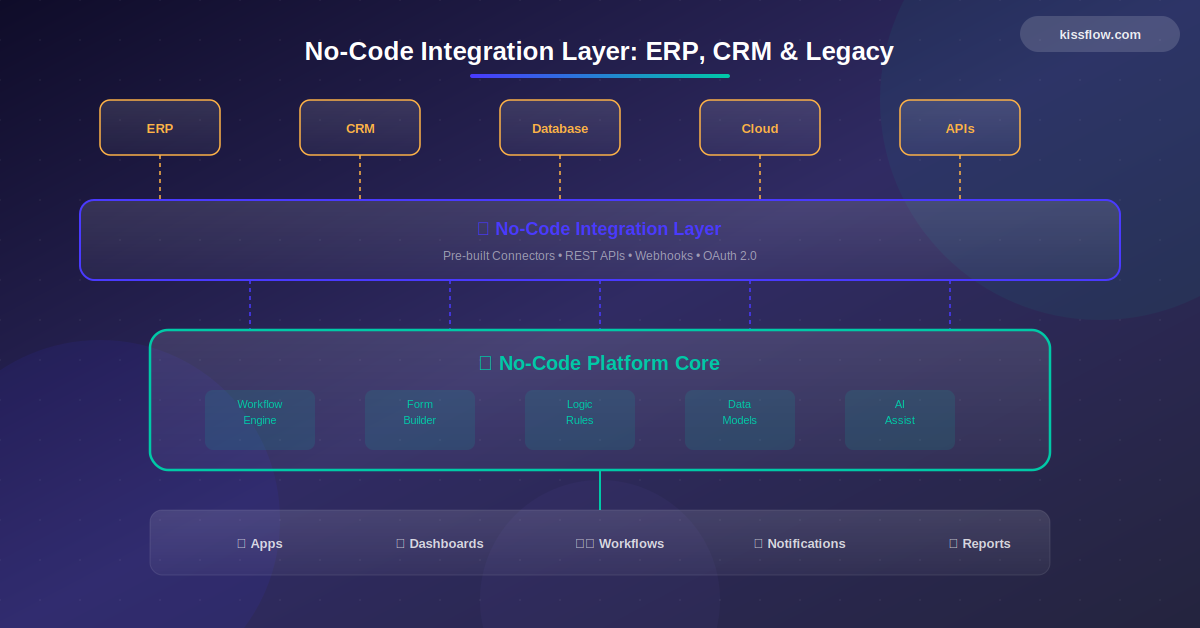
A no-code integration layer connects enterprise systems like SAP, Oracle, Salesforce, and legacy applications through visual configuration instead of custom middleware. IT teams map data fields, set sync schedules, and configure transformation rules through drag-and-drop interfaces, eliminating the need for specialized integration developers.
Your enterprise runs on data flowing between systems. Customer records move from CRM to ERP. Order information syncs with inventory management. Financial data feeds into reporting tools. When these connections break or slow down, entire business processes grind to a halt.
The challenge is not recognizing the importance of integration. It's executing integration at the speed and scale your business demands. Traditional API development requires specialized skills, extensive implementation time, and ongoing maintenance as systems evolve. The ERP market alone reached $66 billion in 2024, growing at an annual rate of 11.3 percent. Each new system adds integration complexity exponentially.
The integration complexity crisis
Your organization probably runs dozens of enterprise applications. ERP handles financials and operations. CRM manages customer relationships. HRIS tracks employee data. Supply chain systems monitor inventory. Marketing automation platforms drive campaigns. Each system is powerful in isolation but delivers exponential value when connected.
The mathematics of integration is punishing. Three systems require three integrations. Five systems need ten integrations. Ten systems demand 45 unique connections. As your application portfolio grows, integration complexity explodes.
Traditional integration compounds these challenges. Each connection requires custom code understanding both systems' APIs, data structures, authentication protocols, and error handling. When APIs change through updates, integrations break. When authentication methods evolve, connections fail. When data schemas shift, transformations become invalid.
By 2027, 60 percent of customers replacing ERP applications will select software specifically for platform and business process orchestration capabilities, according to Gartner. Integration is no longer an afterthought. It's a primary selection criterion.
Why traditional integration fails modern enterprises
Custom API integration demands specialized developer skills. You need engineers who understand RESTful APIs, OAuth protocols, JSON data structures, error handling patterns, and the specific quirks of each system you're connecting. Finding developers with this skill set is challenging. Keeping them productive on integration projects is expensive.
Implementation timelines stretch longer than business needs allow. A seemingly straightforward integration between your CRM and marketing automation platform might require eight weeks of development. Scope this work, write authentication code, build data transformation logic, handle edge cases, test thoroughly, deploy carefully. Meanwhile, your marketing team needs the integration operational next month for an upcoming campaign. A no-code integration layer bridges your no-code platform applications with ERP, CRM, and legacy systems through pre-built connectors and visual API mapping.
Maintenance burden escalates over time. Enterprise software vendors release updates frequently. A CRM API update can break five integrations simultaneously. When one system adds a new authentication requirement, every connected integration needs modification. This ongoing maintenance consumes development capacity that should be building new capabilities.
Documentation gaps create additional friction. APIs rarely document every edge case, error code, or rate limit. Developers discover these limitations during implementation, extending timelines and increasing frustration. What looked like a two-week integration project becomes a two-month investigation of undocumented system behaviors.
Organizations have recognized this challenge. 65 percent of organizations now consider integration capabilities as strategic investments, compared to just 40 percent in 2019, per Gartner. The shift from tactical integration to strategic platform capabilities reflects the growing recognition that integration determines digital transformation success.
Modern integration layers empower organizations to explore diverse enterprise no-code use cases by connecting legacy systems with agile enterprise no-code tools . To ensure these connections remain secure, businesses must implement a formal enterprise no-code governance strategy alongside specific no-code governance for IT teams . This oversight is critical to manage no-code risk and compliance while providing the visibility needed to reduce shadow IT . By prioritizing enterprise no-code security , organizations can safely navigate the no-code application lifecycle management of their integrated apps. At the core, this ecosystem relies on robust no-code databases and automated no-code data pipelines to ensure seamless data flow between modern interfaces and core enterprise records.
See the full story → United Motors Group Integrated Kissflow with Core ERP/CRM Systems
How no-code platforms simplify system connections
No-code integration platforms remove the technical barriers that slow traditional development. Instead of writing code to connect systems, you configure pre-built connectors through visual interfaces. These connectors handle authentication, data transformation, error handling, and rate limiting automatically.
The connector library model provides immediate value. Major enterprise systems like Salesforce, SAP, Oracle, Workday, ServiceNow, and Microsoft Dynamics have pre-built connectors maintained by the platform vendor. When these systems update their APIs, the platform vendor updates the connector. Your integrations continue working without intervention.
Visual workflow builders let you design integration logic without coding. Need to sync contacts from your CRM to your marketing platform? Configure the trigger, map the fields, set the sync frequency. Want to create ERP purchase orders when sales opportunities close? Define the conditions, map the data, handle the approvals. The visual interface makes complex integration patterns accessible to technical analysts, not just specialized developers.
Built-in data transformation removes another integration barrier. Different systems use different field names, date formats, currency codes, and data structures. No-code platforms provide visual mapping tools where you match source fields to destination fields, apply transformations, and handle data type conversions. What would require hundreds of lines of custom transformation code becomes a configuration task.
The acceleration is dramatic. Integrations that required weeks of development can be configured in hours or days. The time savings multiply across every integration project.
Real-world integration patterns made simple
Customer data synchronization is one of the most common integration needs. Your sales team updates contact information in the CRM. Your support team needs that same information in the ticketing system. Your marketing team requires updated records in the automation platform. Your finance team wants customer details in the ERP.
With traditional integration, you'd build four separate connections, each with custom code handling authentication, field mapping, error cases, and change detection. With no-code platforms, you configure one integration workflow that syncs data to multiple systems. Set the trigger for CRM updates, map the fields once, define the target systems. The platform handles the rest.
Order-to-cash workflows demonstrate integration's business value. When a sales opportunity closes in your CRM, several actions need to happen automatically. Create the customer account in the ERP. Generate the sales order. Trigger the provisioning workflow. Send welcome communications. Update reporting dashboards.
Each step crosses system boundaries. Traditional integration would require coordinating multiple development teams, weeks of implementation work, and extensive testing. No-code platforms let you build this entire workflow visually, testing each step immediately and deploying when ready.
Financial close processes need data from dozens of sources. General ledger entries come from the ERP. Project costs flow from time tracking systems. Expense data arrives from procurement platforms. Revenue recognition requires CRM data. Consolidating this information manually is error-prone and time-consuming.
No-code integration platforms can orchestrate these complex data flows. Configure scheduled extracts from each system, transform the data into consistent formats, load it into your reporting platform or data warehouse. The financial close process that once took days of manual work becomes an automated overnight batch job.
Handling legacy systems without custom code
Legacy systems present unique integration challenges. They often lack modern APIs. Their data structures are complex and poorly documented. Their authentication mechanisms are outdated. Yet these systems contain critical business data that needs to flow to modern applications.
Traditional approaches to legacy integration require deep technical expertise. Developers must understand database direct connections, file transfers, message queues, or proprietary protocols. This work is specialized, time-consuming, and difficult to maintain.
Modern no-code provide multiple pathways to legacy data. Database connectors can extract data directly from legacy databases without modifying the source system. File transfer protocols handle batch data exchanges. Message queue integrations support event-driven architectures. The platform abstracts away the technical complexity.
This approach lets you modernize incrementally. Instead of requiring a wholesale replacement of legacy systems, you can extract their data, integrate it with modern applications, and deliver new capabilities to users. The legacy system continues running while you build its eventual replacement.
Organizations operating in multi-cloud environments face additional integration complexity. 89 percent of enterprises now run multi-cloud architectures, requiring sophisticated integration capabilities to maintain data consistency across environments. No-code platforms provide cloud-native connectors that handle these distributed architectures automatically.
M&A IT integration: the highest-pressure case for a no-code integration layer
Every category of system integration is hard. M&A IT integration is harder than any of them. The deadlines are not internal preferences. They are tied to legal close dates, regulatory filings, and earn-out clauses. The two technology stacks were never built to talk to each other. The people who know how each system works are often the same people negotiating their own retention packages. And the volume of work compounds quickly: payroll, identity, ERP, CRM, expense, ticketing, file storage, intranet, and a long tail of departmental apps all need a path between the two organizations within months, not quarters.
The traditional approach is to staff up a systems integration team and build custom middleware between the two estates. That works on paper. In practice, the build queue runs longer than the integration window allows, and the SI partner cost runs into the millions before the first business-facing workflow ships. Bain research on M&A finds that roughly 70 percent of acquisitions fail to deliver their full value, with technology integration friction among the most-cited reasons.
A no-code integration layer changes the economics of M&A IT work in three ways. First, the connector library handles the heaviest lift. Pre-built connectors for the systems most likely to appear in both estates (Salesforce, SAP, Oracle, Workday, NetSuite, ServiceNow) remove weeks of API plumbing from each integration. Second, business analysts and operations leads can wire up departmental data flows without waiting for engineering. The finance team can stand up an expense bridge between the two ERPs while the SI team focuses on identity and security. Third, the integration logic stays visible and editable after Day 1. M&A integrations almost always change shape after close as redundant systems get rationalized, and a no-code layer is rewireable in days rather than months.
For acquirers running a portfolio strategy, the value compounds. Each deal reuses the connector library, the governance model, and the team that knows how to operate the platform. The fifth integration costs a fraction of the first. That kind of operating leverage is hard to build with custom middleware, and it sets up the governance conversation that follows.
Governance and security in no-code integration
Integration involves sensitive business data flowing between systems. Customer information, financial records, employee data, and competitive intelligence move through integration pipelines. Security and governance are not optional considerations.
Enterprise-grade no-code platforms provide comprehensive security controls. Role-based access restricts who can create, modify, or view integrations. Audit logs track every integration execution, data transfer, and configuration change. Encryption protects data in transit and at rest. Compliance certifications ensure the platform meets industry standards.
Data governance becomes manageable at scale. Define which systems can connect, what data can be synchronized, who has approval authority, and how long data is retained. These policies apply consistently across all integrations, reducing compliance risk and simplifying audits.
Error handling and monitoring ensure integration reliability. The platform automatically logs errors, retries failed transactions, and alerts administrators when issues require intervention. You see which integrations are running, which have failed, and where bottlenecks exist through centralized dashboards.
Building an integration-first architecture
The shift to no-code integration enables architectural patterns that were previously impractical. Instead of selecting enterprise applications based primarily on features, you can evaluate systems based on best-of-breed capabilities and assume they'll integrate seamlessly.
This composable architecture approach means choosing the best CRM, the best ERP, the best HR system, and the best marketing platform, confident that they'll work together through your integration layer. You're not locked into monolithic suites that bundle mediocre capabilities across multiple domains.
The integration platform becomes infrastructure. Like your network or your database, it's a fundamental capability that enables everything else. Invest in a robust integration platform early, and every subsequent system addition becomes easier.
Start with high-value, low-complexity integrations to build momentum. Connect your CRM and marketing automation platform. Sync customer data between sales and support systems. Automate invoice creation when orders close. Each successful integration demonstrates value and builds organizational confidence in the approach.
Establish integration standards and best practices. Define naming conventions, documentation requirements, testing protocols, and deployment procedures. These standards ensure consistency as integration usage scales across the organization.
Build a center of excellence for integration. This team provides training, reviews integration designs, maintains the connector library, and troubleshoots issues. They ensure that business units can build integrations independently while maintaining security and architectural standards.
How Kissflow simplifies enterprise integration
Best no-code integration providers enable seamless connectivity between legacy systems, ERPs, and CRMs without complex coding.
Kissflow provides pre-built connectors for major enterprise systems including Salesforce, SAP, Oracle, Microsoft Dynamics, and dozens of other platforms. The visual integration builder lets business analysts and IT teams design complex data flows without coding. Built-in data transformation handles field mapping, format conversions, and conditional logic through configuration rather than code. Enterprise-grade security, audit logging, and governance controls ensure integrations meet compliance requirements while enabling self-service integration across business units.
Related Topics:
No-Code API Orchestration for Complex Enterprise Workflows
Enterprise API Management Using No-Code Platforms
No-Code Data Pipelines: Connecting Databases Without SQL
.webp)

Related Articles



8 MINUTES READ
No-Code Backend Integration: Connect APIs, Data & Logic









