Student Lifecycle Orchestration Across Every Office That Touches a Student
Kissflow maps every stage between acceptance and the first day of class, assigns tasks across admissions, financial aid, housing, and the registrar automatically, and gives the student one place to see what's still outstanding, so melt gets caught at the stage it starts, not after decision day.
Trusted by leading universities worldwide






One shared map from acceptance to the first day of class
Six offices touch a single student between the acceptance email and the first day of class, and none of them can see what the other five already did. Admissions clears an applicant, financial aid packages an award, housing assigns a room, and the registrar finalizes a schedule, each working from its own list.
A housing deposit task can depend on a financial aid clearance nobody flagged as done. A student calls three offices to find out what's still outstanding, because no office can see the whole picture, only its own piece of it. An admitted student who stops responding at the housing stage doesn't get flagged as at risk of melting until they've already decided not to enroll.
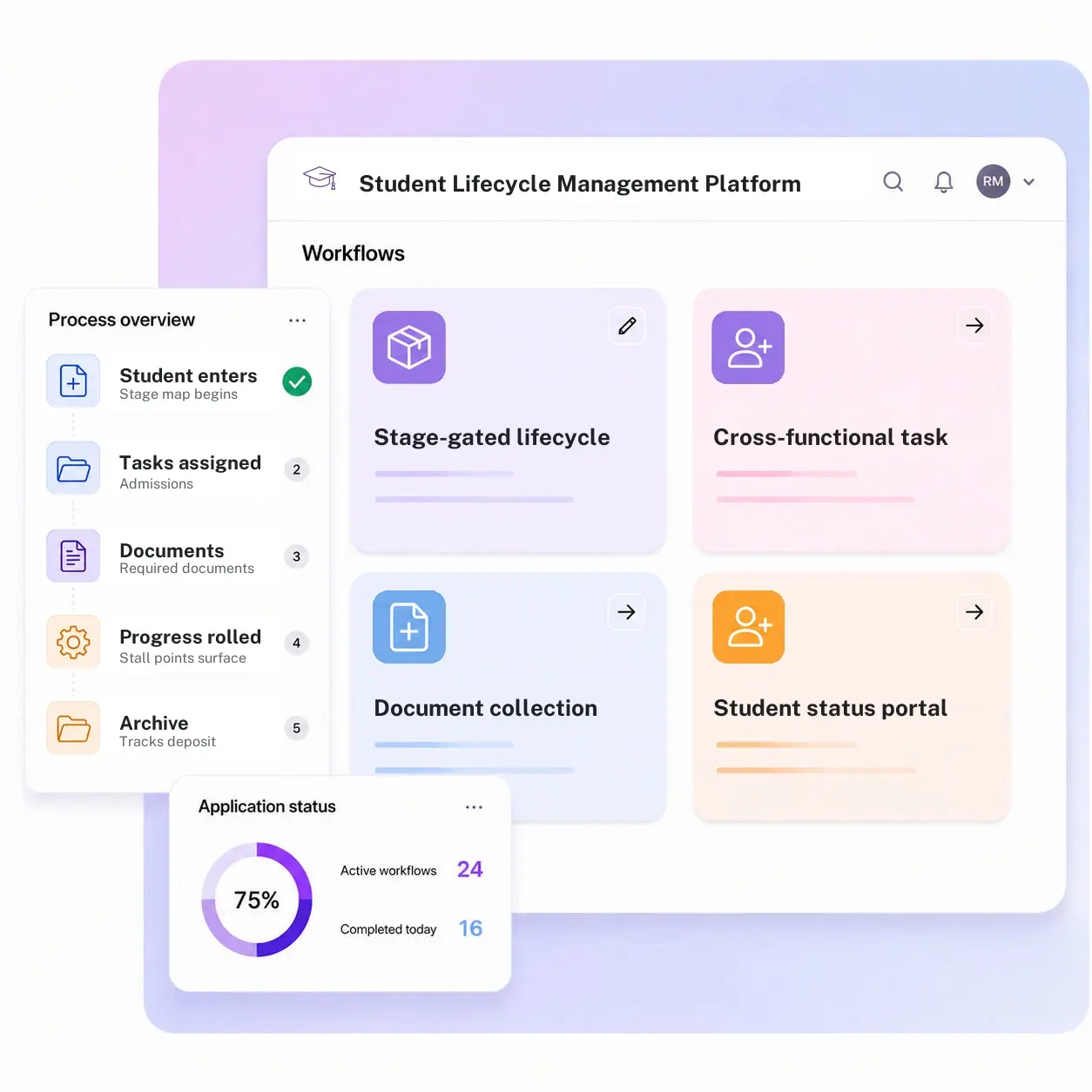
Kissflow maps the full lifecycle as a set of stages with an owner per stage, assigns cross-functional tasks automatically as a student moves through it, collects documents against a shared checklist, and gives the student and every office the same status view. Banner, Workday, or Ellucian remains the record of the enrollment decision itself; Kissflow is the coordination layer running across the offices that have to act on it.
What happens when six offices coordinate through email
No office can see what another has already done
Admissions doesn't know financial aid already resolved a document issue, so the student gets asked for it twice.
Tasks fall through between office handoffs
A housing deposit task depends on a financial aid clearance that nobody flagged as done.
Students can't tell where they stand
Without a shared status view, a student calls three offices to find out what's still outstanding.
Stall points aren't visible until melt happens
An admitted student who stops responding at the housing stage doesn't get flagged until they've already decided not to enroll.
Six modules. Built for how a student actually moves from acceptance to day one.
Every module ships with default forms, task logic, integrations, and dashboards. Configure each one to your enrollment calendar in the visual builder.
Stage-gated lifecycle map
Defines every stage from acceptance to first day, with an owning office assigned to each one.
Cross-functional task orchestration
Assigns admissions, financial aid, housing, and registrar tasks automatically as a student moves through each stage.
Document collection
Collects transcripts, immunization records, and financial aid documents against a checklist tied to the individual student.
Student status portal
Gives the student and their advisor a single place to see which stage they're in and what's still outstanding.
Stage dashboards
Shows where students are stalling by stage and by office, not just a single overall enrollment number.
Milestone and deadline tracking
Tracks deposit deadlines, orientation registration, and first-bill dates against each student's actual stage.
From request to system of record in four steps
Plan

The stage map begins the moment an offer is accepted, scoping the relevant office tasks between acceptance and the first day of class.
Assign

Admissions, financial aid, housing, and registrar tasks are assigned automatically, with owners, as the student reaches each stage.
Execute

Required documents are collected against the checklist, the student sees real-time status in the portal, and stall points surface by stage and office.
Close-out

Progress rolls into stage dashboards so melt is caught at the stage it starts, well before a deposit deadline passes and every office's tasks are complete on one record.
What changes when the student lifecycle runs on Kissflow
| Process | Before Kissflow | On Kissflow |
|---|---|---|
| Stage visibility | Each office sees only its own task list | A shared stage map visible to every office involved |
| Task assignment | Handed off manually between offices, with drops at the seams | Assigned automatically as a student reaches each stage |
| Document collection | Requested separately by each office, sometimes twice | Collected once against a shared checklist |
| Status communication | The student calls multiple offices to find out what's outstanding | Visible to the student in a single status portal |
| Stall detection | Invisible until the student doesn't show up | Flagged by stage and office as it happens |
| Reporting | A single overall enrollment number, late in the cycle | Stage-level dashboards throughout the enrollment calendar |
Connects to Banner, Workday, Ellucian, and your housing and financial aid systems
Kissflow does not replace Banner, Workday, or Ellucian as the record of the enrollment decision. It coordinates the cross-office tasks that decision sets in motion.
.svg)



.svg)
.svg)
.svg)
.svg)

.svg)
.svg)
.svg)
.svg)
.svg)

.svg)

.svg)

.svg)
.svg)
.svg)
.svg)
.svg)
.svg)
.svg)
.svg)
.svg)

.svg)
Built for how a new student actually moves through your institution
One stage map, six offices
Admissions, financial aid, housing, and the registrar work off the same shared stage map instead of six separate lists.
Melt caught at the stage it starts
A stall shows up by stage and office while there's still time to intervene, not after a deposit deadline passes.
Live before your next enrollment cycle
Enrollment and student services staff configure stages, tasks, and dashboards in the visual builder.
An ERP-adjacent coordination layer
Banner, Workday, or Ellucian stays the system of record for the enrollment decision. Kissflow coordinates the offices acting on it.
One status view for the student, too
A student sees exactly what's outstanding and from which office, instead of calling around to find out.
Documents collected once, not per office
A shared document checklist means a student isn't asked for the same transcript by two different offices.
Related apps
Matriculation Case Management System
Handle the exceptions, missing documents, transfer credit questions, that come up during the lifecycle journey.
Student Course Progress Management System
Course-level progress tracking with at-risk flagging and advisor routing.
Faculty Lifecycle Events Management System
Stage-gated task orchestration and document collection across a faculty member's full career.
We help enrollment and student services teams keep a promise made at acceptance
.gif)

“If a company cannot enable everybody to use AI, they will never get the true benefit of AI. Platforms like Kissflow allow us to put that capability in the hands of our users in a safe way.”
Vagesh Dave
GVP & CIO at McDermott International, Ltd
See The Full Story

“Advanced automation of all processes is easy to set up. I cannot imagine how to manage workflows without this software.”
Tanay Tiwary
Global Head - Digitalization & Business Improvement
See the Full Story

“Kissflow supports rapid application development by building a working application prototype in the shortest amount of time.”
Maria Theresa Cabigon
CIO, SN Aboitiz Power Group
See The Full Story
See what Kissflow can do for you
Talk to usGot questions? We're here to help.
Get SupportThis app follows a student from acceptance through the first day of class across admissions, financial aid, housing, and the registrar. Faculty Lifecycle Events follows an employee through hire, tenure review, sabbatical, and retirement across HR and the provost's office. The population and the stage set are entirely different.
Student Course Progress tracks academic performance within enrolled terms. This app orchestrates the onboarding journey before and around enrollment, across offices, not academic performance inside a course.
No. Those systems remain the record of the enrollment decision and student data. Kissflow coordinates the cross-office tasks and document collection that decision triggers.
Both. Each office works its own task list, but the stage map and student status are visible across every office involved, so nothing gets duplicated or dropped at a handoff.
Yes. Stages, task assignments, and document checklists are configured in the visual builder, and the AI Builder can generate a starting workflow from a plain-language description of your enrollment calendar.
Through APIs and integration connectors, under single sign-on and role-based access, with every stage transition and task written to an audit log.
Configuration and AI-assisted setup move rollout to weeks, so the stage map can be running before your next acceptance cycle begins.
Kissflow is certified to SOC 1, SOC 2, SOC 3, and ISO/IEC 27001, supports HECVAT review for procurement, and is built to support FERPA and GLBA Safeguards obligations, with data residency options in the US, EU, APAC, and Oceania.











