Drilling Optimization App
Kissflow tracks daily drilling reports, flags parameter deviations against the drilling program, logs non-productive time against its cause, and runs the post-well review that turns one well's lessons into the next well's plan, with rig instrumentation staying the system of record for real-time data.
Trusted by energy operators worldwide






Twelve hours of non-productive time on a stuck pipe gets logged as a line item, not as the pattern the next well plan should account for
The daily drilling report captures what happened today. It rarely captures whether this well's stuck pipe event looks like the last three wells drilled through the same formation. A PDF report emailed at end of tour can record the day. It can't flag that a rate-of-penetration parameter has drifted outside the program's range, or connect this well's NPT to an offset well's lessons-learned entry from six months ago.
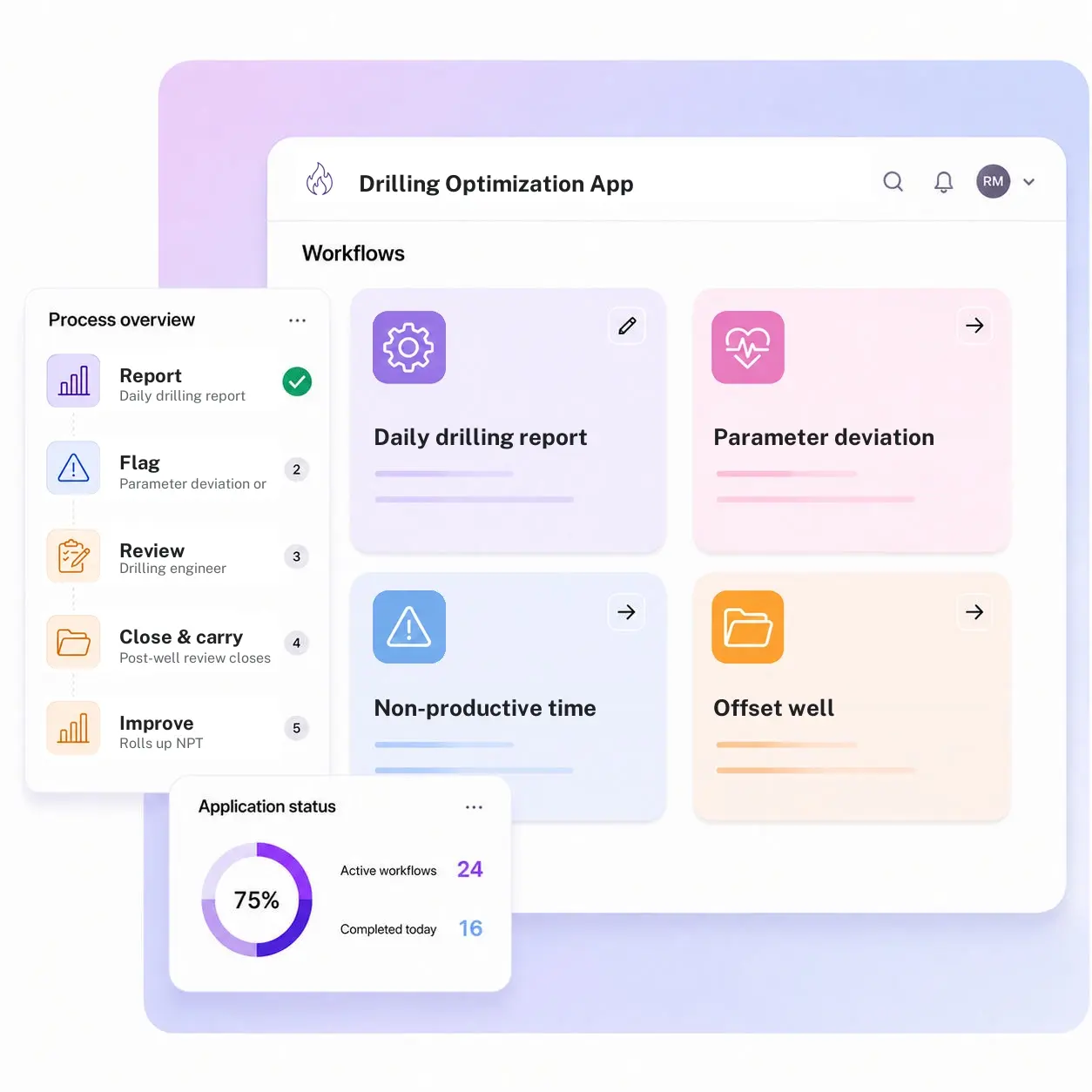
Kissflow tracks the operational layer of a drilling program as one app: a daily drilling report captured against the well plan, parameter deviation flags when rate of penetration, torque, or mud weight drift outside the program's range, non-productive time logged by cause category, an offset well lessons-learned library that surfaces the pattern across wells in the same field, and a post-well review that closes the loop into the next well plan. Rig instrumentation and your WITSML feed stay the system of record for the raw real-time data.
Drilling engineers configure parameter thresholds, NPT categories, and review templates in the visual builder. Every deviation and NPT event carries a cause and a timestamp, so a pattern across wells shows up on a dashboard instead of getting re-discovered from scratch on well number four.
What a daily report captures and a well program still misses
Parameter deviations aren't flagged in real time
A drift outside the planned range gets noticed at the next report review, not while it's happening.
NPT gets logged, not categorized
A stuck-pipe event is recorded as a line item, without a cause code that would let it be tracked as a pattern.
Offset well lessons don't travel
What the last three wells in the same field learned about this formation stays with whoever drilled them.
Post-well reviews don't reach the next plan
A review happens, then sits in a folder instead of informing the next well's drilling program.
Six modules. Built so well four learns from well one.
Every module ships with default forms, routing, and dashboards. Configure each one to your drilling program in the visual builder.
Daily drilling report
Captures each day's drilling activity against the well plan, with parameters, depth, and events logged in one form.
Parameter deviation flagging
Flags a rate-of-penetration, torque, or mud weight reading that drifts outside the program's planned range.
Non-productive time logging
Logs an NPT event against its cause category, stuck pipe, equipment failure, weather, tied to the current well section.
Offset well lessons-learned library
Surfaces relevant NPT and deviation history from offset wells in the same field or formation.
Post-well review
Structures the review of a completed well's performance against its plan, ready to inform the next one.
Drilling performance reporting
Rolls up NPT, deviations, and review outcomes across wells for the drilling engineering team.
From request to system of record in four steps
Report

A daily drilling report is submitted against the current well plan and section, and a parameter deviation or NPT event is logged and categorized as it occurs.
Assess

The drilling engineer reviews flagged items against the drilling program and the offset-well lessons-learned library.
Resolve

Each deviation or NPT cause is worked and dispositioned, with rig instrumentation remaining the system of record for real-time data.
Record

A post-well review closes the well and feeds its lessons into the next well's plan.
What changes when drilling optimization runs on Kissflow
| Process | Before Kissflow | On Kissflow |
|---|---|---|
| Daily reporting | A PDF emailed at end of tour | A structured report tied to the well plan |
| Parameter deviations | Noticed at the next report review | Flagged as they happen against the program |
| NPT tracking | Logged as a line item | Categorized by cause and tracked as a pattern |
| Offset well lessons | Stay with whoever drilled the last well | Surface automatically for the current well section |
| Post-well review | Filed away after completion | Feeds directly into the next well's plan |
| Program-wide visibility | Reconstructed manually across wells | Rolled up on one performance dashboard |
Connects alongside rig instrumentation and your WITSML feed
Rig data acquisition and WITSML stay the system of record for real-time parameters. Kissflow tracks the daily report, deviations, and review workflow around it.
.svg)



.svg)
.svg)
.svg)
.svg)

.svg)
.svg)
.svg)
.svg)
.svg)

.svg)

.svg)

.svg)
.svg)
.svg)
.svg)
.svg)
.svg)
.svg)
.svg)
.svg)

.svg)
Built so well four learns from well one
Deviations flagged against the program
A parameter drift is flagged in the moment, not discovered at the next report review.
Offset well lessons that travel
Relevant NPT and deviation history from nearby wells surfaces automatically for the current one.
NPT tracked as a pattern, not a line item
Every event carries a cause code, so a repeat issue across wells is visible, not buried.
Live in weeks
Parameter thresholds and NPT categories configure in the visual builder, without a systems project.
Post-well reviews that close the loop
A completed well's review feeds directly into the next well's plan, not a folder.
Access restricted to the drilling team
Role-based access keeps drilling performance data scoped to engineering and wellsite roles.
Related apps
Reservoir Management App
Supplies the reservoir data and recommendations this app's well plan draws on.
AI-Enabled Seismic Analytics App
The subsurface interpretation layer upstream of an active well's drilling program.
Maintenance Management App for Oil & Gas Industry
Breakdown logging, work order creation and scheduling, execution and closure, and preventive maintenance planning across oil and gas facilities.
We help drilling teams turn one well's lessons into the next well's plan
.gif)

“If a company cannot enable everybody to use AI, they will never get the true benefit of AI. Platforms like Kissflow allow us to put that capability in the hands of our users in a safe way.”
Vagesh Dave
GVP & CIO at McDermott International, Ltd
See The Full Story

“Advanced automation of all processes is easy to set up. I cannot imagine how to manage workflows without this software.”
Tanay Tiwary
Global Head - Digitalization & Business Improvement
See the Full Story

“Kissflow supports rapid application development by building a working application prototype in the shortest amount of time.”
Maria Theresa Cabigon
CIO, SN Aboitiz Power Group
See The Full Story
See what Kissflow can do for you
Talk to usGot questions? We're here to help.
Get SupportNo. Rig instrumentation and your WITSML feed stay the system of record for real-time drilling parameters. Kissflow tracks the daily drilling report, non-productive time events, and the review and reporting workflow built on top of that data.
That app manages subsurface interpretation data during exploration and appraisal, before or alongside drilling. This app tracks the active drilling operation itself, daily reports, parameter deviations, and non-productive time, on a rig that's currently turning to the right.
Any tracked value, rate of penetration, torque, mud weight, that drifts outside its planned range for the current well section, flagged for review against the drilling program.
An NPT event is logged against its cause category, stuck pipe, equipment failure, weather, and feeds both the current well's report and the offset well lessons-learned library.
No. The well plan and engineering design come from your drilling engineering software. This app tracks actual performance against that plan and the reporting behind it.
Configurable by role, typically the drilling engineer or wellsite supervisor reviews a flagged parameter deviation against the program before it's actioned.
Parameter thresholds, NPT categories, and reporting templates configure in the visual builder, without an engineering project.
Kissflow is certified to SOC 1, SOC 2, SOC 3, and ISO/IEC 27001, with role-based access restricted to the drilling and engineering team.











