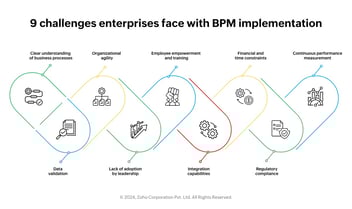
This guide breaks down the most common workflow automation challenges in large enterprises and provides practical strategies to overcome them, so your teams can move faster, cut costs, and scale operations with confidence.
Key takeaways
- Legacy system integration remains the biggest barrier to enterprise workflow automation, with 58% of organizations citing it as their top challenge.
- Employee resistance, unclear ownership, and poor change management cause more automation failures than technology limitations.
- Low-code platforms close the gap between IT and business teams, accelerating adoption by up to 60%.
- Organizations using workflow automation report 25-30% average productivity gains and error reduction rates of 40-75%.
- Starting with high-impact, low-risk processes builds momentum and executive buy-in for broader rollout.
Why enterprise workflow automation fails before it starts?
Most enterprise automation projects do not fail because of bad technology. They fail because of misaligned priorities, unclear goals, and the assumption that simply buying a tool will fix broken processes. Understanding these root causes is the first step toward building workflows that actually stick.
Enterprise environments are complex by nature. Multiple departments, layers of approvals, decades-old processes, and competing priorities all create friction. When organizations rush into automation without addressing these foundational issues, they end up with expensive tools that nobody uses.
Top workflow automation challenges in large enterprises
From legacy infrastructure to people problems, enterprises face a distinct set of hurdles when implementing workflow automation at scale.
Here is a breakdown of the most common challenges and what makes each one difficult to overcome.
| Challenge |
Impact on Enterprise |
Affected Teams |
| Legacy system integration |
Delays deployment by 6-12 months; increases costs |
IT, Operations, Finance |
| Employee resistance to change |
Low adoption rates; underutilized tools |
All departments |
| Siloed processes across departments |
Fragmented workflows; data inconsistency |
HR, Procurement, Finance |
| Lack of IT-business alignment |
Mismatched priorities; slow decision-making |
IT, Business Units |
| Security and compliance concerns |
Stalled projects; governance bottlenecks |
IT, Legal, Compliance |
| Scaling automation across the org |
Pilot projects that never expand enterprise-wide |
Executive Leadership, IT |
How legacy systems block workflow automation adoption
Legacy infrastructure is the most frequently cited barrier to automation in large organizations. Studies show that 58% of enterprises identify legacy system integration as their biggest challenge when adopting cloud-based or modern workflow automation platform.
Older ERP systems, on-premise databases, and custom-built applications were never designed to communicate with modern workflow tools. This creates data silos, manual workarounds, and expensive custom integrations that slow everything down.
- APIs and middleware connectors can bridge the gap between legacy and modern systems without full replacement.
- Low-code platforms with pre-built integrations reduce the dependency on IT for every connection.
- A phased migration approach lets enterprises modernize gradually instead of attempting risky full-scale overhauls.
Overcoming employee resistance to workflow automation
Technology adoption fails when people are left out of the conversation. Employee resistance is one of the most overlooked automation challenges, and it often causes more damage than technical issues. Teams worry about job displacement, unfamiliar tools, and disruption to routines they have followed for years.
Successful enterprises treat automation rollouts as change management projects, not just IT projects. This means involving end users from the start, communicating the benefits clearly, and providing hands-on training that builds confidence.
- Create internal automation champions who demonstrate early wins to their peers.
- Use no-code or low-code tools that business users can operate without deep technical skills.
- Nearly 70% of employees believe automation helps them qualify for higher-value roles when framed correctly.
Bridging the gap between IT and business teams
In many enterprises, IT teams build automation solutions that business users struggle to adopt. The disconnect between what IT delivers and what operations teams actually need is a major reason workflow projects stall or underperform.
The fix is not about one team winning over the other. It is about creating a shared platform where both sides can collaborate. IT maintains governance and security. Business teams design and modify the workflows they use daily. This model, often called citizen development, is gaining traction across industries.
- Low-code platforms allow business users to build workflows while IT sets guardrails and compliance rules.
- Cross-functional automation committees ensure priorities align across departments.
- Shared dashboards give both IT and business leaders visibility into workflow performance and bottlenecks.
Addressing security and compliance in enterprise automation
Regulated industries like financial services, healthcare, and government face heightened scrutiny when automating workflows. Data privacy regulations, audit requirements, and role-based access controls must all be built into the automation framework from day one.
Security concerns should not be an excuse to delay automation. Instead, enterprises should choose platforms that offer enterprise-grade security by default, including encryption, audit trails, and compliance certifications that satisfy regulators.
- Platforms with SOC 2 Type II certification, GDPR compliance, and role-based access meet most enterprise requirements.
- Automated audit logs reduce the manual effort involved in compliance reporting.
- Governance frameworks that balance speed with control help enterprises scale securely.
How to scale workflow automation across the enterprise?
Most organizations can automate a single approval workflow process. The real challenge is scaling that success across departments, geographies, and business units. Pilot projects that deliver results but never expand enterprise-wide are a common pattern.
Scaling requires a unified workflow platform, executive sponsorship, and a repeatable playbook. Organizations that treat automation as a strategic initiative rather than a series of disconnected projects achieve significantly better outcomes.
| Pilot-Stage Approach |
Enterprise-Scale Approach |
| Single department focus |
Cross-departmental rollout with shared platform |
| IT-driven implementation |
Citizen developers + IT governance |
| Custom-coded integrations |
Pre-built connectors and low-code tools |
| Ad-hoc success metrics |
Defined KPIs: cycle time, error rates, ROI |
| Limited executive visibility |
Real-time dashboards for leadership |
Why enterprises choose Kissflow for workflow automation?
Large enterprises need a platform that solves the challenges listed above without adding more complexity. Kissflow is built specifically for this purpose, offering a unified low-code/no-code platform that brings IT and business teams together on a single workspace.
- Unified platform: Combine process automation, case management, and app development in one place, eliminating tool sprawl.
- Built for citizen developers: Business users create and modify workflows without writing code, while IT maintains governance.
- Enterprise-grade security: SOC 2 Type II certified with role-based access, audit trails, and data encryption.
- Proven results: Customers like McDermott, Puma Energy, and TotalEnergies have achieved up to 451% ROI with Kissflow.
- Fast time to value: Organizations deploy their first automated workflows in days, not months.
- Scales with you: From a single department to enterprise-wide rollout, Kissflow grows alongside your automation maturity.
If your enterprise is ready to move past pilot-stage automation and build workflows that scale, Kissflow gives you the platform, the simplicity, and the governance to make it happen.
Frequently Asked Questions
1. What are workflow automation challenges?
Workflow automation challenges include legacy system integration, employee resistance, siloed processes, poor IT-business alignment, compliance risks, and difficulty scaling beyond pilot projects. These issues are especially common in large enterprises with complex operations and multiple departments.
2. How do enterprises adopt workflow automation?
Enterprises adopt workflow automation by starting with high-impact, low-risk processes, choosing platforms that support both IT governance and business user participation, and building a change management strategy that drives adoption across teams.
3. Why does automation fail in large companies?
Automation fails when organizations skip process redesign, lack executive sponsorship, ignore change management, or choose tools that are too complex for business users. Technology alone does not guarantee success.
4. What is the ROI of workflow automation?
Organizations using workflow automation report 25-30% productivity gains, 40-75% reduction in errors, and 60% achieve positive ROI within 12 months. Kissflow customers have reported up to 451% return on investment.
5. Is low-code good for enterprise automation?
Yes. Low-code platforms accelerate automation by letting business users build workflows while IT maintains control. This model reduces backlogs, speeds up deployment, and improves adoption rates significantly compared to traditional coding approaches.