No-Code Automation: Build Workflows Without Writing Code
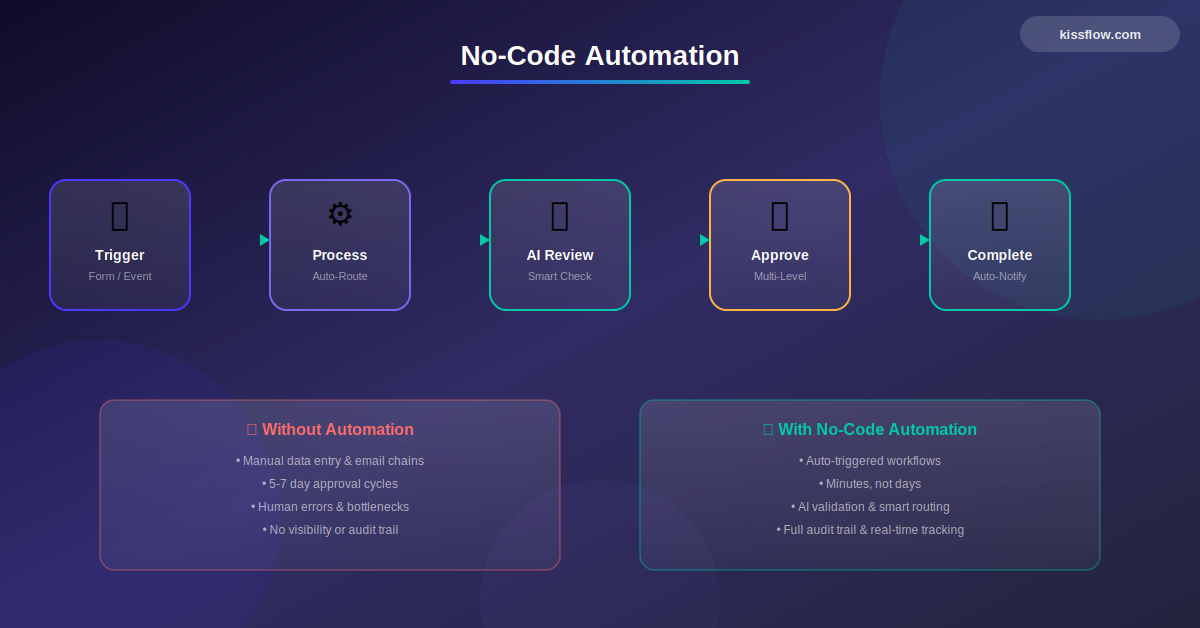
No-code automation is the process of building automated workflows and business processes using visual tools instead of programming. Users create automation rules, triggers, and actions through drag-and-drop interfaces, enabling teams to eliminate manual tasks, reduce errors, and speed up operations without developer involvement.
Every enterprise runs on workflows. Purchase approvals, employee onboarding, vendor assessments, compliance checks, field service requests. The problem is that most of these workflows still live in email threads, shared spreadsheets, or somebody's memory. And when a company finally decides to automate them, the IT backlog is already 6 to 12 months long.
No-code automation changes that equation entirely. It gives business teams the ability to design, test, and deploy automated workflows using visual drag-and-drop builders, conditional logic, and pre-built integrations. No programming language. No developer dependency. No waiting.
That is not a small shift. According to Gartner, 75% of new enterprise applications will be built with low-code or no-code technologies by 2026, up from less than 25% in 2020, and by 2029, 80% of mission-critical applications will run on these platforms.[1]
The market for these platforms is growing at roughly 30% year over year, with total spending expected to surpass $65 billion by 2030. The driver behind this growth is simple: organizations cannot afford 12-month build cycles when market conditions change every quarter.
Kissflow is built for exactly this reality. Our AI-powered, no-code lets IT leaders, process owners, and operations teams automate workflows across departments, from procurement and finance to HR and field operations, in days rather than months. And because everything runs on a governed, enterprise-grade platform, IT stays in control without becoming a bottleneck.
No-code automation is a core capability of any enterprise no-code platform, enabling business teams to streamline processes without IT dependency.
What Is No-Code Automation?
No-code automation is the practice of building and running automated business processes through visual tools instead of traditional programming. Rather than writing scripts or relying on developer teams, anyone in the organization can map out a process, configure triggers and rules, and let the system handle execution from end to end.
Think of it this way. In a traditional setup, if the finance team wants to automate invoice approvals, they submit a request to IT, wait for a developer to scope it, build it, test it, and deploy it. That cycle can take weeks or months. With a no-code platform, the finance operations lead can open a visual builder, define the approval stages, set dollar-amount thresholds for routing, connect to the ERP, and launch the workflow by the end of the week.
The core building blocks of no-code automation typically include:
- Visual workflow designers where you drag and drop steps, conditions, and parallel branches
- Form builders for capturing structured input from requesters or approvers
- Rule engines that route tasks based on criteria like department, dollar amount, region, or priority
- Pre-built connectors to enterprise systems such as SAP, Oracle, Salesforce, Microsoft 365, and Slack
- Dashboards and reporting for tracking SLAs, bottlenecks, and cycle times in real time
What separates no-code automation from simple task automation (like a Zapier trigger) is scope. No-code automation platforms handle multi-step, multi-stakeholder business processes with conditional logic, exception handling, escalations, and audit trails. They are designed for the kind of workflows that run across departments and touch dozens of people every day.
How No-Code Automation Differs from Low-Code and Traditional Development
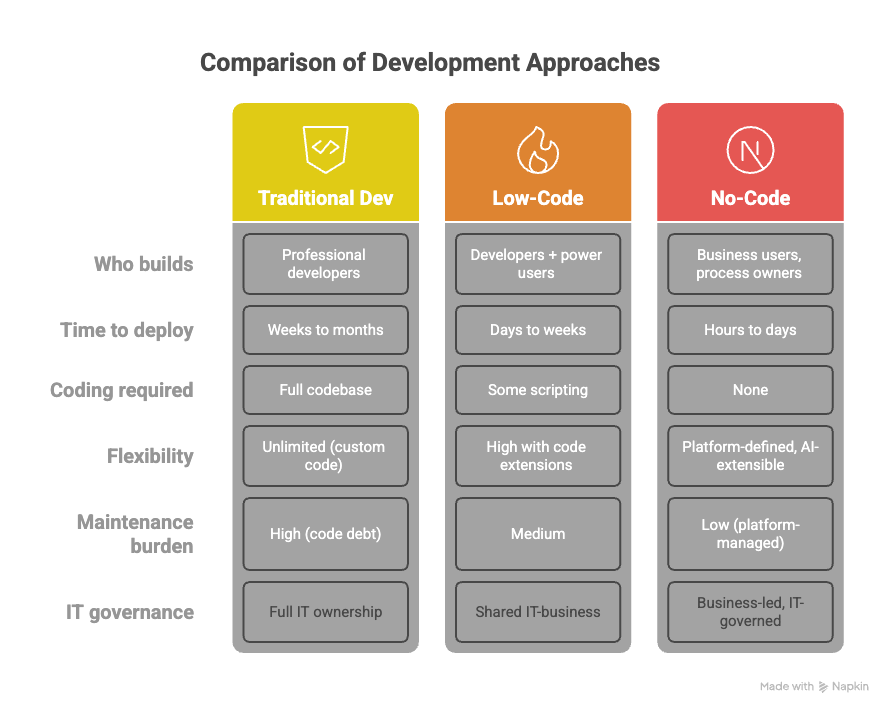
These three approaches sit on a spectrum. Traditional development means writing application code from scratch. Low-code platforms reduce the coding effort but still expect users to write scripts or expressions for complex logic. No-code platforms eliminate coding entirely and rely on visual configuration.
|
Factor |
Traditional Dev |
Low-Code |
No-Code |
|
Who builds |
Professional developers |
Developers + power users |
Business users, process owners |
|
Time to deploy |
Weeks to months |
Days to weeks |
Hours to days |
|
Coding required |
Full codebase |
Some scripting |
None |
|
Flexibility |
Unlimited (custom code) |
High with code extensions |
Platform-defined, AI-extensible |
|
Maintenance burden |
High (code debt) |
Medium |
Low (platform-managed) |
|
IT governance |
Full IT ownership |
Shared IT-business |
Business-led, IT-governed |
For most enterprise workflows, no-code is the right starting point. If a process needs deep customization beyond what visual tools offer, a platform like Kissflow also supports low-code extensions so teams are never boxed in.
Streamline contract management and approval routing with no-code document automation that eliminates manual handoffs and version control issues.
Benefits of No-Code Automation for Enterprises
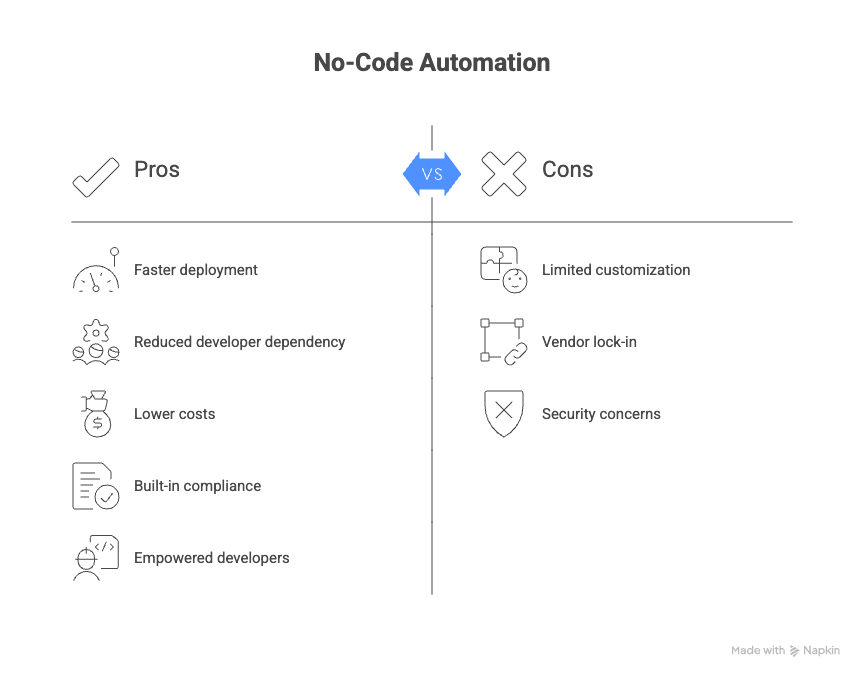
No-code automation does not just speed up development. It reshapes how enterprises deliver internal tools, respond to operational problems, and scale process improvements. Here are the outcomes that matter most to IT leaders, CIOs, and operations executives.
1. Drastically shorter time to value
Organizations using no-code platforms report up to 90% faster deployment compared to traditional development. A workflow that used to take three months from request to production can go live in under a week. For a CIO managing a 200-item IT backlog, that difference is strategic.
2. Reduced dependency on scarce developer resources
Developer talent is expensive and hard to retain. When business teams can build their own workflows on a governed platform, IT teams can refocus engineering resources on core product development and infrastructure instead of building internal forms and approval chains.
3. Lower total cost of ownership
Research from Forrester and multiple industry benchmarks shows that organizations save an average of $100,000 to $200,000 annually after adopting no-code platforms. These savings come from shorter development cycles, reduced QA overhead, and significantly lower maintenance costs since the platform vendor handles updates and patches.
4. Built-in compliance and audit trails
Every action in a no-code workflow is logged. Approvals are timestamped. Escalation paths are recorded. For industries like healthcare, financial services, oil and gas, and manufacturing, this kind of traceable process execution is not optional. It is a regulatory requirement. No-code automation delivers compliance by design, not as an afterthought.
5. Empowered citizen developers, with IT guardrails
Gartner reports that 41% of organizations now have active citizen development programs. No-code platforms make this possible by giving business users the tools to build while IT retains governance over data access, integrations, security policies, and deployment controls. This is not shadow IT. It is structured, sanctioned, and scalable.
6. Faster response to change
Markets shift. Regulations update. Internal policies evolve. With no-code automation, adjusting a workflow takes minutes, not a new development sprint. That agility compounds over time into a genuine operational advantage.
Real-World Use Cases for No-Code Automation
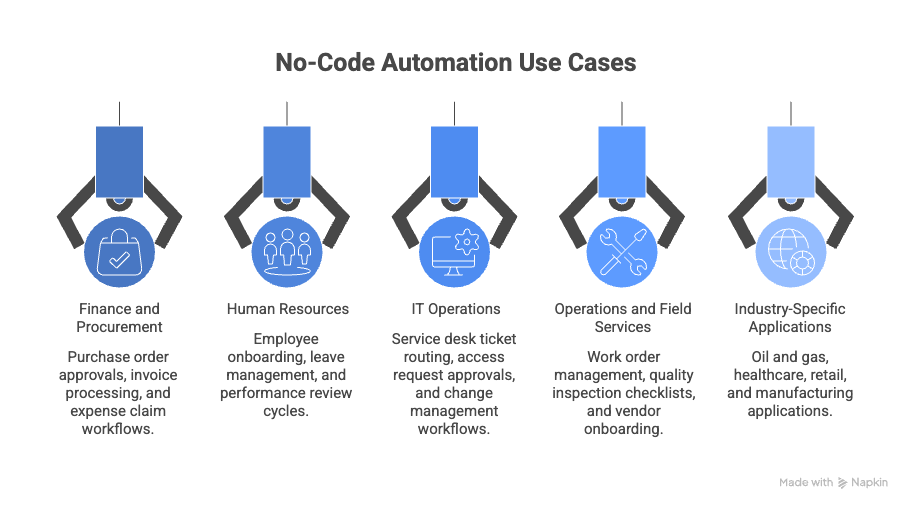
No-code automation is not limited to one department or industry. Here are specific use cases where enterprises are seeing measurable impact:
Finance and Procurement
- Purchase order approvals with dynamic routing based on amount, vendor tier, and budget owner
- Invoice processing with three-way match verification and exception handling
- Travel and expense claim workflows with policy enforcement and automatic reimbursement triggers
Human Resources
- Employee onboarding across IT provisioning, facilities, training assignments, and benefits enrollment
- Leave management with balance tracking, manager approvals, and payroll integration
- Performance review cycles with goal setting, self-assessments, manager ratings, and calibration rounds
IT Operations
- Service desk ticket routing and escalation based on category, priority, and SLA thresholds
- Access request approvals for applications, databases, and infrastructure resources
- Change management workflows with risk assessment, approval gates, and post-implementation reviews
Operations and Field Services
- Work order management from initiation through scheduling, field execution, and closeout
- Quality inspection checklists with photo capture, non-conformance flagging, and corrective action workflows
- Vendor onboarding with document collection, compliance verification, and contract approvals
Industry-Specific Applications
- Oil and gas: Permit to work, safety incident reporting, and management of change processes
- Healthcare: Patient intake forms, referral management, and credentialing workflows
- Retail and FMCG: Store audit workflows, planogram compliance checks, and distributor claim processing
- Manufacturing: Production change requests, supplier quality management, and equipment maintenance scheduling
No-Code AI Workflow Automation: The Next Evolution
The no-code category is evolving fast. The most significant development in 2025 and 2026 is the integration of artificial intelligence directly into no-code workflow platforms. This is not about bolting a chatbot onto an existing tool. It is about making AI a native part of how workflows get built, run, and improved.
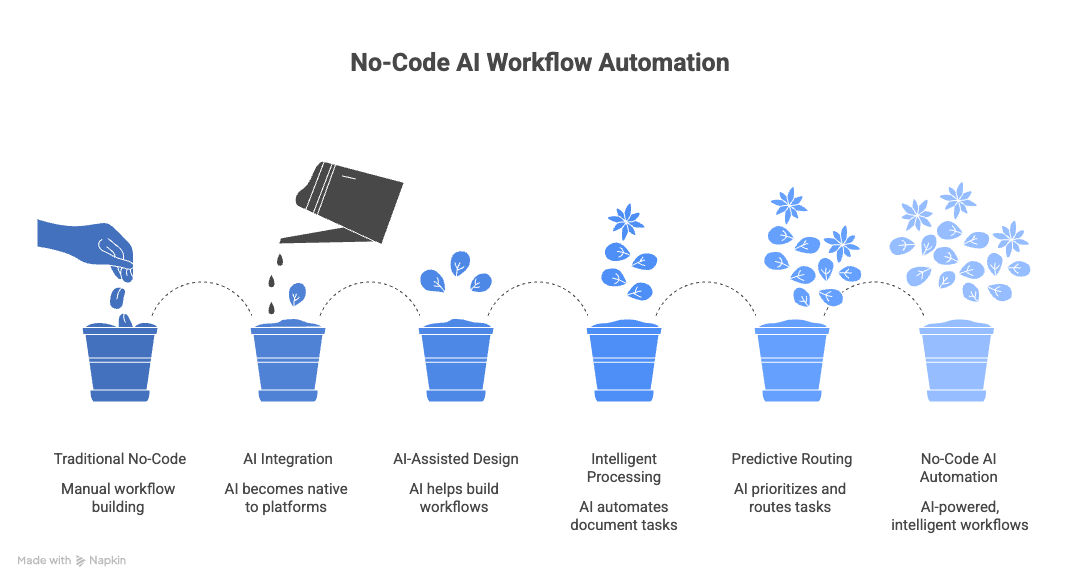
Here is what no-code AI workflow automation looks like in practice:
AI-assisted workflow design
Instead of starting from a blank canvas, you describe the process you want to automate in plain language. The AI generates a draft workflow with suggested steps, conditions, and integrations. You refine it visually. What used to take a day of mapping now takes 15 minutes.
Intelligent document processing
AI reads incoming documents (invoices, contracts, compliance certificates), extracts relevant data, and populates workflow fields automatically. This eliminates the manual data entry that slows down every document-heavy process.
Predictive routing and prioritization
AI analyzes historical patterns to route tasks to the right person, flag high-risk items for additional review, or predict where bottlenecks are likely to occur. This turns reactive workflows into proactive ones.
Natural language queries on process data
Instead of building custom reports, users ask questions in everyday language: "How many vendor onboarding requests are stuck in compliance review?" or "What was the average cycle time for purchase approvals over $50,000 last quarter?" The AI generates the answer from live workflow data.
Kissflow brings all of these capabilities into a single platform, purpose-built for enterprise teams. It is designed so that business users get the benefit of AI without needing to understand prompts, models, or APIs.
Take automation further by using AI to automate enterprise workflows with intelligent decision-making, adaptive routing, and predictive process optimization.
Finance teams are among the biggest beneficiaries — see how no-code automation for finance teams streamlines invoice processing, budgeting, and compliance reporting.
See the full story → Ramco Group Achieved 35-45% Process Cycle Time Reduction
 Free eBook
The Ultimate Buyer's Guide to No-Code

Thank you for downloading!
Types of No-Code Automation Platforms
Not every no-code platform solves the same problem. Understanding the categories helps IT leaders and process owners pick the right tool for the job.
|
Platform Type |
Best For |
Examples |
|
Workflow automation platforms |
Multi-step business processes with approvals, rules, SLAs, and integrations |
Kissflow, Appian, ServiceNow |
|
Integration automation (iPaaS) |
Connecting SaaS apps with trigger-based data flows |
Zapier, Make, Workato |
|
Robotic process automation (RPA) |
Mimicking human actions in legacy systems with no API |
UiPath, Automation Anywhere |
|
App builders |
Building internal tools and front-end applications |
Retool, Bubble, OutSystems |
|
AI workflow orchestrators |
Building AI model pipelines and agentic workflows |
Vellum, Dify, LangFlow |
Many enterprises use more than one type. The key is to have a primary platform that handles core business process automation while integrating with specialized tools where needed. Kissflow serves as that central platform, with native integrations and open APIs that connect to the rest of the stack.
Combine automation with no-code BPM software to manage end-to-end business processes, from initial request through multi-level approvals to final execution.
Combine RPA with no-code for end-to-end enterprise automation that handles both structured workflows and unstructured tasks across legacy systems.
How to Evaluate and Choose a No-Code Automation Platform
Choosing the right no-code platform is a strategic decision. Here are the criteria that matter most for enterprise buyers, drawn from actual procurement evaluations and analyst frameworks:
- Ease of use for non-technical users. Can a process owner with no coding background build and modify workflows independently? Test this with a real use case during the evaluation, not just a vendor demo.
- Enterprise governance and security. Look for role-based access controls, data encryption at rest and in transit, SSO integration, SOC 2 compliance, and audit logging. This is non-negotiable for regulated industries.
- Integration depth. Pre-built connectors are a starting point. What matters more is the ability to connect to custom APIs, legacy systems, and on-premise databases without involving a developer.
- Scalability. Can the platform handle thousands of concurrent workflow instances across multiple departments and geographies without performance degradation?
- AI capabilities. Native AI features like i
- ntelligent document processing, predictive analytics, and AI-assisted workflow design are becoming table stakes. Evaluate whether the AI is genuinely integrated or just a marketing label.
- Low-code extensibility. The best no-code platforms also offer low-code capabilities for edge cases, so you are never stuck when a process needs custom logic.
- Vendor viability and support. Check the vendor's track record with enterprise customers, analyst coverage (Gartner, Forrester), customer success resources, and community ecosystem.
Why Enterprises Choose Kissflow for No-Code Automation
Kissflow is trusted by organizations in over 160 countries, including companies like McDermott, Puma Energy, Olympus, and SN Aboitiz Power. Here is what sets it apart:
- Purpose-built for enterprise business processes. Kissflow is not a generic app bui or a lightweight connector tool. It is designed from the ground up for the kind of multi-step, cross-departmental workflows that enterprises actually run.
- Unified low-code and no-code on a single platform. Business users start with no-code. When a process needs custom logic or integration, developers can extend it with low-code. One platform, one governance model, no silos.
- Kissflow AI. AI-powered workflow design, intelligent document processing, predictive analytics, and natural language reporting, all built into the platform. Not a third-party add-on.
- Enterprise-grade governance. Granular access controls, audit trails, data encryption, SOC 2 compliance, and centralized administration give IT the oversight they need without slowing business teams down.
Fast, measurable ROI. Customers consistently report deployment in days, not months, and measurable productivity gains within the first quarter.
Configure event-driven automation triggers to execute workflows in real time — when a form is submitted, a status changes, or a threshold is crossed.
No-Code Automation Related FAQ's
1. What is no-code automation?
No-code automation is the practice of designing, building, and running automated business workflows using visual, drag-and-drop tools instead of writing code. It allows business users, process owners, and operations teams to automate repetitive tasks, approval chains, and cross-departmental processes without developer involvement. Platforms like Kissflow provide visual builders, rule engines, form designers, and pre-built integrations that make it possible to go from a manual process to a fully automated workflow in days.
2. What is the difference between no-code and low-code automation?
No-code automation requires zero programming knowledge and relies entirely on visual interfaces for building workflows. Low-code automation provides visual tools as well but also allows or requires some scripting or coding for complex logic and customizations. In practice, the best enterprise platforms like Kissflow offer both: business users work in no-code mode for standard workflows, and developers can extend those same workflows with low-code when needed.
3. What are the main benefits of no-code automation?
The primary benefits include dramatically faster deployment (up to 90% reduction in development time), lower total cost of ownership (organizations save $100K to $200K annually on average), reduced dependency on IT developers, built-in compliance and audit trails, empowered citizen developers operating within IT-governed guardrails, and the ability to adapt workflows quickly when business requirements change.
4. What are common use cases for no-code automation?
Common enterprise use cases include purchase order and invoice approvals, employee onboarding, leave and expense management, IT service desk ticket routing, vendor onboarding and compliance, field service work orders, quality inspections, and change management workflows. Industry-specific applications range from permit-to-work processes in oil and gas to patient referral management in healthcare.
5. What is no-code AI workflow automation?
No-code AI workflow automation combines visual workflow builders with embedded artificial intelligence. AI capabilities include natural language workflow design (you describe the process and the AI builds a draft), intelligent document extraction, predictive task routing, anomaly detection, and conversational analytics on live process data. These features are built directly into the no-code platform, so users benefit from AI without needing technical expertise.
6. Is no-code automation secure enough for enterprises?
Yes, when you choose an enterprise-grade platform. Look for SOC 2 Type II compliance, data encryption at rest and in transit, role-based access controls, SSO integration, and comprehensive audit logging. Kissflow meets all of these requirements and is trusted by enterprises across regulated industries including financial services, healthcare, energy, and manufacturing.
7. How long does it take to automate a process with no-code?
Simple workflows like leave approvals or expense claims can be automated in a few hours. More complex, multi-department processes like vendor onboarding or employee lifecycle management typically take a few days to a week. This compares to weeks or months with traditional development approaches.
8. Can no-code automation integrate with existing enterprise systems?
Yes. Enterprise no-code platforms support pre-built connectors to systems like SAP, Oracle, Salesforce, Microsoft 365, Slack, and ServiceNow, as well as custom API integrations for proprietary or legacy systems. Kissflow offers native integrations along with open APIs and webhook support for connecting to virtually any system in your technology stack.
Related Topics:
- Backends & APIs for No-Code: Bridging Logic, Data & UI
- Monetizing No-Code Skills: Freelancing, Agencies, and Side Projects
- No-Code Ecosystem: Platforms, Integrations, and Community Trends
- No-Code Workflow Templates Library
- No-Code RPA enterprise automation strategy
.webp)

Related Articles

10 MINUTES READ
No-Code Workflow Automation | A Detailed Overview
10 MINUTES READ
No-Code Marketing Automation to Simplify Your Marketing Process
10 MINUTES READ
No-Code BPM Software for Process Management | Kissflow









