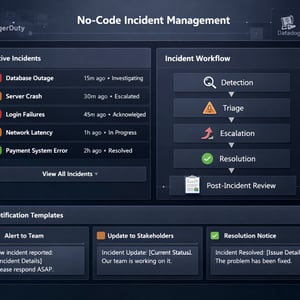
A no-code incident management workflow automates the complete incident lifecycle — from detection and triage through escalation, resolution, and post-incident review — without custom development. Using Kissflow, IT ops and service management teams can design severity-tiered response workflows, configure automatic escalation chains, manage stakeholder communication, and trigger post-incident learning processes — all within a single, auditable platform that non-technical teams can own and modify.
The Incident Management Lifecycle: A Practical Framework
Before automating incident management, it is worth being precise about what incident management covers. An incident is any unplanned interruption or degradation in service quality. Incident management is the structured process for detecting, classifying, responding to, resolving, and learning from incidents — to restore service as quickly as possible and reduce the frequency and impact of future incidents.
The lifecycle has six stages: detection and logging, severity classification, notification and escalation, investigation and diagnosis, resolution and recovery, and post-incident review. Manual incident management handles each of these stages through ad hoc communication — Slack messages, phone calls, email threads — with inconsistent documentation and no structured learning mechanism. Automated incident management enforces the structure without slowing down the response.
Where Manual Incident Management Breaks Down
The three most common failure points in manual incident management are detection latency, communication chaos, and learning decay. Detection latency: incidents that surface through user complaints rather than monitoring alerts are already causing impact before the response begins. Communication chaos: during a major incident, the Slack thread becomes unmanageable — responders are answering the same questions multiple times, stakeholders are asking for updates that someone has already posted three messages earlier, and the timeline of actions is impossible to reconstruct afterward. Learning decay: post-incident reviews happen inconsistently, their outputs are not tracked, and the same incidents recur because the corrective actions were never implemented.
No-code incident management workflow automation addresses all three. Monitoring integration enables automatic incident creation and classification before manual detection. Structured communication templates and stakeholder notification workflows reduce communication overhead. And automated post-incident review triggers ensure that learning happens systematically rather than when someone remembers to schedule it.
What to Automate in Your Incident Response Process
Detection and Ticket Creation
Integrate your monitoring tools — PagerDuty, Datadog, Nagios, CloudWatch — with Kissflow to automatically create incident records when alert thresholds are breached. The incident record is created with the monitoring alert data pre-populated: affected system, alert type, time of detection, and initial severity assessment. This eliminates the manual step of someone seeing a monitoring alert and creating a ticket — which introduces latency and inconsistency in the response start time.
Severity Classification
Severity determines the response protocol: who is notified, how quickly, and through which channels. Automated severity classification based on affected system tier, user impact estimate, and alert type ensures that every incident is classified consistently — not based on which engineer happens to be on duty and how they personally assess criticality.
Escalation Chains
Severity-tiered escalation chains ensure that the right people are engaged at the right stage of the response. A Severity 1 incident automatically notifies the on-call engineer, the engineering manager, and the customer communications lead simultaneously. A Severity 3 incident notifies only the assigned technician, with escalation to the team lead if unresolved after two hours. The escalation logic runs automatically without requiring a coordinator to manage the notification sequence.
Communication Workflows
Stakeholder communication during incidents is a coordination challenge that automated workflows handle elegantly. Configure a communication workflow that sends structured status updates to defined stakeholder groups at defined intervals: initial incident notification, 30-minute status update if the incident is unresolved, resolution notification, and post-incident summary. Stakeholders receive consistent, structured information without the responders needing to context-switch from the resolution work.
Post-Incident Review Trigger
When an incident is marked resolved in Kissflow, a post-incident review workflow automatically triggers — assigning the incident owner to complete a structured post-incident report within 48 hours, scheduling the review meeting, and routing the completed report to the relevant leadership for acknowledgment. The post-incident learning loop runs systematically rather than depending on someone's memory.
Building Your Incident Management Workflow Without Code
-
Design the incident record structure. The incident record should capture: incident title and description, affected system and business impact, detection time and source, severity classification, assigned responders, timeline of key actions, and resolution details. This structure is the foundation for both the operational response and the post-incident analysis.
-
Set up the detection integrations. Connect Kissflow to your monitoring and alerting tools using webhooks. When an alert fires, the monitoring tool sends a webhook to Kissflow, which creates an incident record with the alert data and initiates the appropriate response workflow based on the alert severity mapping.
-
Configure the communication workflow. Design the stakeholder notification templates for each communication touchpoint: initial notification, regular status updates at defined intervals, and resolution notification. Stakeholder groups (leadership, customer success, customer communications) receive the appropriate template at the appropriate trigger.
-
Build the post-incident review workflow. Create a structured post-incident report form covering: timeline of events, root cause analysis, contributing factors, customer impact assessment, corrective actions, and preventive measures. Configure the 48-hour trigger and the routing to leadership for acknowledgment.
Configuring Severity Levels and Escalation Logic
The escalation logic is the most technically specific part of incident management workflow configuration — and the part that most directly impacts response quality. The principle is: escalation should always precede the need for it. The goal is to have the right people engaged before the incident reaches a point where their involvement is urgent.
For P1 incidents (complete service outage): immediate notification to the on-call engineer and team lead; 15-minute escalation to the engineering manager if no acknowledgment; 30-minute escalation to the VP Engineering if no resolution progress; 60-minute escalation to the CTO with customer impact summary.
For P2 incidents (significant partial outage): notification to the on-call engineer; 30-minute escalation to the team lead if unresolved; 2-hour escalation to the engineering manager. No CTO notification unless the incident degrades to P1.
Configure these escalation paths explicitly in Kissflow using timer nodes and conditional escalation routes. Test the escalation timing in a staging environment using fast-forwarded clocks before enabling in production.
Communication Automation: Stakeholder Updates Without Manual Emails
The most appreciated change for responders in automated incident management is the elimination of the 'can you send an update to the leadership team?' interruption during active response. Automated communication workflows send structured updates to stakeholder groups at defined intervals without any responder action.
The update template structure should be consistent: incident name and severity, current status (Investigating / Mitigating / Resolved), affected systems, user impact estimate, latest action taken, estimated time to resolution, and next update expected. Consistency in update format allows stakeholders to scan quickly and reduces the volume of follow-up questions.
Post-Incident Review Workflow: Automating the Learning Loop
The post-incident review (also called a post-mortem or retrospective, depending on organizational culture) is the mechanism by which teams prevent incident recurrence. In organizations without automated triggers, post-incident reviews happen for major incidents and are skipped for the smaller ones that, cumulatively, represent more total customer impact.
Automating the post-incident review trigger for every incident above a defined severity threshold ensures that learning happens systematically. The 48-hour window creates urgency without forcing a rushed review during the immediate recovery period. The structured template ensures that the analysis covers root cause, contributing factors, and concrete corrective actions — not just a timeline description.
In Kissflow, completed post-incident reports are tracked in a report register that provides the incident management team with a searchable history of all incidents, their root causes, and the status of corrective actions. This register is the evidence base for improving system reliability over time — and the documentation that regulators or customers may request after a significant outage.
Related Topics
How to Build Internal Tools Without IT: A Practical Guide for Business Teams
How to Build an Employee Self-Service Portal Without Code
No-Code Vendor Management System: Take Control of Your Supplier Relationships