No-code purchase order automation lets finance and procurement teams design, deploy, and manage the complete PO lifecycle — from requisition to payment — using visual workflow tools that require no developer involvement. With a platform like Kissflow, organizations can eliminate paper-based PO processes, enforce spending controls automatically, and reduce approval cycle times from days to hours.
Manual PO processing is not just slow. It is expensive in ways most finance teams never fully measure. This guide breaks down the real cost, maps the complete workflow, and shows you exactly how to build a no-code PO automation process that your team can operate independently.
The Hidden Cost of Manual Purchase Order Processing
APQC research consistently shows that the average cost to process a single purchase order manually ranges from $50 to over $1,000, depending on complexity and the number of manual touchpoints. For an organization processing 500 POs per month, that is a meaningful operational expense — and it does not count the soft costs that never appear on a P&L.
Delayed POs cause vendor friction. When a supplier does not receive a confirmed PO within their expected window, relationships erode and terms harden. Duplicate payments happen when someone re-enters a PO that was already processed but not properly closed out in the system. Unauthorized purchases occur when employees bypass the process entirely because it is too slow — a compliance risk that most CFOs find unacceptable.
The most insidious cost is invisible: the opportunity cost of finance staff spending hours on manual data entry, email chasing, and spreadsheet reconciliation instead of strategic work. That is not an abstraction — it is a real drain on team capacity that limits what your finance function can accomplish.
What No-Code PO Automation Actually Looks Like
No-code PO automation is not a magic button that replaces procurement judgment. It is a structured digital workflow that ensures every purchase request follows the right path: captured in a consistent format, routed to the correct approvers, confirmed to the vendor, matched against receipts and invoices, and closed in the accounting system — with a complete audit trail throughout.
The 'no-code' distinction matters because it means the procurement or finance team owns the workflow. When a policy changes — new spending thresholds, new vendor approval requirements, a new budget category — they update the workflow themselves in minutes. They do not file an IT ticket and wait weeks.
The Standard Purchase Order Workflow: Step by Step
Understanding the complete PO process before you automate it is essential. Here is how a well-designed PO workflow flows from start to finish:
Requisition: An employee submits a purchase request with item details, quantity, estimated cost, vendor, and business justification. In a no-code system, this is a structured form — not an email.
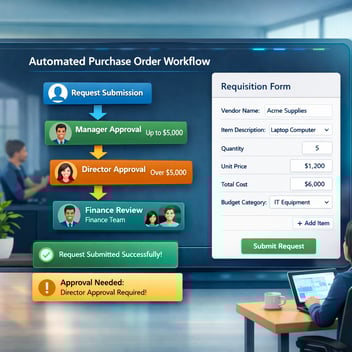
Approval Routing: The request is automatically routed to the relevant manager based on department and dollar amount. Requests above a secondary threshold escalate to VP or CFO level. Parallel routing sends financial and operational approvals simultaneously when both are required.
Vendor PO Generation: Once approved, the system generates a formatted PO document with a unique PO number, sends it to the vendor by email, and logs the transaction in the workflow record.
Goods/Service Receiving: When goods arrive or services are delivered, a receiving confirmation is entered against the PO. This is the first check in the three-way matching process.
Invoice Matching: The vendor invoice is matched against the PO and the receiving confirmation. Discrepancies trigger an exception workflow for resolution rather than being manually caught — or missed.
Payment Authorization: A matched invoice routes to finance for payment approval and processing. The complete audit trail — from original request to payment — is captured and searchable.
How to Build a No-Code PO Workflow in 5 Steps
- Map your current process and identify every decision point. Who approves what? At what thresholds? Which vendors require special handling? Document this before touching the platform.
- Build the requisition form in Kissflow. Include fields for department, vendor name, item description, quantity, unit cost, total amount, GL code, and business justification. Required fields enforce data completeness at submission — eliminating incomplete requests that waste approver time.
-
Configure approval routing rules. Set up manager-level approval for requests under $5,000, director-level for $5,000-$25,000, and CFO-level above $25,000. Add a parallel finance review for any purchase requiring budget code verification. These thresholds are adjustable settings — not hard-coded rules.
-
Set up vendor notification and PO generation. Configure an automated email to the vendor upon approval, including the PO number and line item details. Kissflow's document generation feature can produce a formatted PO PDF automatically.
- Connect to your accounting or ERP system. Kissflow integrates with QuickBooks, Xero, SAP, NetSuite, and other common systems via API or native connectors. Approved POs can automatically create purchase order records in the ERP, eliminating duplicate data entry.
Essential Features to Look For in a No-Code PO Tool
Not all workflow platforms are built equally for procurement use cases. When evaluating no-code PO automation tools, these capabilities should be non-negotiable:
Multi-Level Approval Routing
The platform must support conditional routing based on multiple criteria simultaneously — amount, department, vendor type, and GL code — not just a single field. Real procurement processes are rarely linear.
Vendor Integration and Notification
Automated vendor communication is the difference between a PO workflow and a procurement automation system. Look for platforms that can send structured notifications directly from the workflow upon approval.
Budget Threshold Alerts
Some platforms can check available budget against a specified budget center before routing for approval, flagging requests that would exceed the department budget. This prevents over-commitment before it happens.
Three-Way Match Support
For organizations that process invoices against POs, the platform should support linking PO records, receiving confirmations, and invoices to enable matching and exception management within the same system.
Audit Trail and Reporting
Every PO event — submission, approval, rejection, modification, completion — should be logged with a timestamp and user attribution. This is non-negotiable for any organization subject to external audit.
Kissflow PO Automation: A Practical Walkthrough
In Kissflow, building a purchase order workflow starts with the Process Designer. You begin with the requisition form — Kissflow provides a PO template that includes all standard fields, which you can customize for your organization's requirements in minutes.
The approval stages are configured visually on the canvas. Drag in an approval node, name it 'Manager Approval,' assign it to the submitter's line manager dynamically, and set a 48-hour SLA with escalation to the department director. Repeat for each stage.
Routing rules are set in the connection logic between stages. Click the connector, select 'Add Condition,' and choose the field and threshold. 'If Total Amount is greater than 10000, route to CFO Approval.' If not, the workflow skips that stage automatically.
Once a PO is approved, Kissflow can trigger a webhook to your ERP to create the PO record, send a formatted notification to the vendor, and update the requester with a confirmation — simultaneously. The entire sequence takes seconds.
Real Results: Before and After PO Automation
A regional manufacturing company processing approximately 300 POs per month reported the following results after implementing Kissflow PO automation: average approval cycle time dropped from 4.7 days to 18 hours, the duplicate payment rate fell to zero (from three to four incidents per quarter), and the finance team recovered approximately 12 hours per week previously spent on manual tracking and follow-up.
A professional services firm found that automating PO approvals reduced maverick spend — unauthorized purchases made outside the formal process — by over 40% in the first six months, simply because the automated process was faster and easier than the workarounds employees had developed around the old manual system.
Common PO Workflow Mistakes and How to Fix Them
Mistake: Building a workflow that mirrors the broken manual process. Automation amplifies whatever process you design. If the existing process has unnecessary steps or redundant approvals, fix them before automating.
Mistake: No exception handling. Emergency purchases, split orders, and vendor credit notes are inevitable. Build exception paths into the workflow from day one rather than handling them manually outside the system.
Mistake: Ignoring the receiving step. Many teams automate the approval side but leave goods receipt as a manual process. This breaks the three-way match and reintroduces the bottlenecks you were trying to eliminate.
Get Your PO Workflow Running This Week
Kissflow's no-code PO automation platform includes pre-built templates, approval routing logic, vendor notification, and ERP integration — all configurable without a developer. Finance teams that follow the setup process outlined in this guide routinely have their first PO workflow live within two to three business days.
Related Topics: