Kissflow's no-code Slack integration delivers workflow approval notifications, status updates, and escalation alerts directly into Slack channels and direct messages — allowing approvers to review and act on workflow requests without leaving Slack. For teams where Slack is the primary communication hub, this integration is the fastest path to higher approval completion rates and shorter cycle times.
Why Email Notifications Kill Approval Speed
Approval workflows that notify approvers by email are working against the way most people actually manage their attention in 2026. The average knowledge worker receives 100+ emails per day. An approval request email from a workflow system — even an important one — competes with customer messages, internal discussions, calendar invites, and marketing subscriptions for attention in an overcrowded inbox.
Approval requests that arrive in Slack, by contrast, appear in the context where the approver is already engaged. They surface in the team channel or the direct message thread that the approver is monitoring throughout the day. The cognitive load of finding and acting on the approval is significantly lower — and the completion rate is measurably higher.
Organizations that switch approval notifications from email to Slack consistently report faster average approval completion times, particularly for routine approvals where the decision is straightforward and the bottleneck was simply the approver not seeing the request promptly.
What a No-Code Slack Integration Enables
The Kissflow + Slack integration covers four categories of workflow interaction:
Approval notifications: Structured Slack messages with request details and action buttons when a workflow stage requires a decision.
Status updates: Automated notifications to relevant channels when workflow milestones are reached — request submitted, approved, rejected, or escalated.
Escalation alerts: SLA breach warnings and escalation notifications delivered to the approver and their manager in Slack, with context attached.
Workflow kick-off: Slash commands or message actions in Slack that initiate a Kissflow workflow directly from the Slack interface — without navigating to the Kissflow platform.
Setting Up Kissflow + Slack: The 10-Minute Setup
-
Map Kissflow users to Slack users. Kissflow matches users by email address — if the same email is used in both platforms, the mapping is automatic. For cases where email addresses differ, manual mapping takes a few minutes in the admin settings.
-
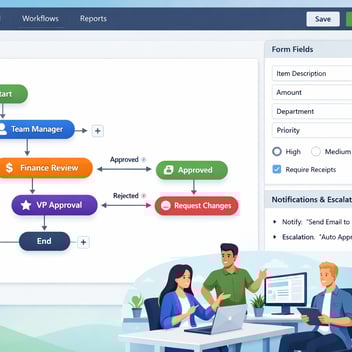
Configure notification routing per workflow. In each Kissflow workflow's settings, specify which Slack channel or user receives which type of notification — submission alerts, approval requests, escalation warnings, and completion confirmations.
-
Test with a real request. Submit a test workflow and verify that the Slack notification arrives correctly, that the approve/reject buttons function, and that the action taken in Slack updates the Kissflow workflow status.
Approval Notifications: How They Appear in Slack
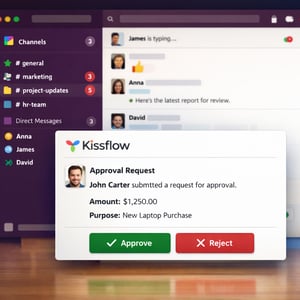
Kissflow approval notifications in Slack are structured messages — not plain text notifications. They include the requestor's name and profile picture, the request type and key details (amount, dates, description), the current stage and remaining SLA time, and interactive buttons for Approve and Reject. Reject actions open a dialog requesting a mandatory comment.
The notification design is intentionally compact — enough information for the approver to make a decision without needing to navigate to the Kissflow platform, but with a 'View Details' link for cases where additional context is needed.
Approve or Reject Directly From Slack — No App Switching
The core value of the Slack integration is the ability to complete an approval action entirely within Slack. When an approver clicks 'Approve' on the Kissflow Slack notification, the workflow advances to the next stage immediately, the requester receives a confirmation notification, and the approver receives a brief acknowledgment — all within the Slack interface.
For rejections, the Slack dialog captures the rejection reason before submitting — maintaining the same quality of feedback that the full Kissflow interface provides, without requiring the approver to leave Slack.
Escalation Alerts and SLA Reminders in Slack
When an approval request approaches its SLA deadline without action, Kissflow sends an escalation alert to the approver in Slack — not buried in an email inbox, but surfaced in the active channel where the approver is working. At the SLA deadline, a second alert goes to both the approver and their manager, with the workflow status and the time elapsed.
These escalation alerts are the mechanism that ensures SLA compliance without manual chasing. The operations manager who previously sent three 'gentle reminder' emails for every overdue approval request no longer needs to — the system handles escalation automatically, in the right channel, at the right time.
Best Practices: Which Workflows Belong in Slack
Not every workflow notification type benefits from Slack delivery. High-frequency, routine approval decisions — expense reports under $500, standard leave requests, IT access requests — are ideal Slack workflow candidates: the decision is typically straightforward, and reducing the friction of the approval action has a measurable impact on cycle time.
Complex approvals that require reviewing attached documents, reading contract terms, or consulting with colleagues before deciding are better handled in the full Kissflow interface — where document viewing, comment threads, and detailed audit trail review are available. The Slack notification for these cases serves as an alert and a link, not a complete approval interface.
Related Topics