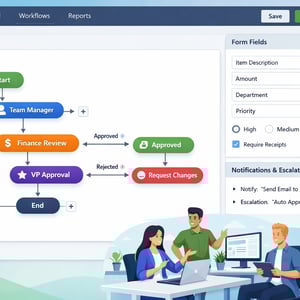
A no-code approval workflow is a structured, automated process that routes requests — purchase orders, leave applications, expense claims, contract sign-offs — through a defined chain of approvers without requiring a developer to build or maintain it. Using a no-code platform like Kissflow, operations teams can design, test, and launch multi-step approval flows in hours using drag-and-drop interfaces, conditional logic, and built-in notification rules.
If you are still routing approvals by email or managing them in shared spreadsheets, you already know the pain: requests get lost, SLAs get missed, and nobody has a clear picture of where anything stands. This guide will show you exactly how to change that.
Why Traditional Approval Processes Break Down
Most approval processes were not intentionally designed — they evolved organically. Someone needed a purchase approved, so they sent an email. The manager replied, copied in finance, and a chain started. Six months later, no one remembers the original process, the rules are unwritten, and the outcome depends entirely on who happens to check their inbox first.
Three failure points come up repeatedly across organizations of every size:
Email Chains That Dissolve Into Chaos
Email-based approvals have no structure. There is no enforced sequence, no escalation when a decision sits idle for three days, and no central record of who approved what and when. Auditors hate this. Finance teams hate this. Yet it persists because it feels easier than building something.
Missed SLAs and Invisible Bottlenecks
When an approval request sits with one person, the entire process stalls. Without automatic escalation or visibility into queue depth, managers do not know there is a problem until someone chases them down in a hallway. By then, the vendor shipment is delayed, the new hire's equipment is not set up, or the contract has expired.
No Audit Trail, No Accountability
Compliance requirements in most industries demand that organizations prove who approved what and when. A thread of forwarded emails is not an audit trail. When someone disputes a purchase or a regulator asks for documentation, organizations running email-based approvals scramble. No-code approval workflows generate a complete, timestamped record of every action automatically.
5 Types of Approval Workflows You Can Build Without Code
The beauty of a no-code platform is that the same underlying approval engine handles nearly every use case. Here are the five most common ones organizations automate first — because the ROI is immediate and the configuration time is minimal.
1. Purchase Approval Workflows
Every purchase above a threshold needs sign-off. A no-code approval workflow handles the requisition form, routes to the right manager based on spend amount, escalates to VP-level if the request is above a secondary threshold, notifies finance once approved, and creates a PO — all without a single email. Teams that automate purchase approvals routinely report cutting approval cycle times from five days to under 24 hours.
2. Leave Request Approvals
Leave management is deceptively complex. You need manager approval, HR verification, calendar integration, and sometimes a backup coverage check. A no-code workflow handles the sequence, enforces blackout periods, and sends the employee a confirmation automatically — eliminating the back-and-forth that wastes HR time every single week.
3. Contract Sign-Off Workflows
Contract approvals frequently involve multiple stakeholders: the business owner, legal, finance, and sometimes an executive. No-code platforms let you configure parallel review tracks so legal and finance can review simultaneously, with the executive stage only opening once both teams have cleared their review. This cuts contract cycle times significantly.
4. IT Access Request Approvals
Granting system access without proper approval is a security risk. A no-code IT access request workflow ensures every request is reviewed by the relevant manager, logged for compliance, and only provisioned after approval — creating an audit trail that your IT security team will actually thank you for.
5. Expense Claim Approvals
Expense reimbursements delayed by slow approvals erode employee trust quickly. A no-code expense approval workflow captures receipt images, checks against policy rules automatically, routes to the manager, and triggers the reimbursement process in finance — with zero manual handoffs.
How to Design an Approval Workflow: The 6-Step Framework
Before you open any platform and start dragging things around, spend 30 minutes mapping your current process on paper. This upfront thinking prevents the most common mistake in workflow automation: digitizing a broken process instead of fixing it.
-
Identify every trigger. What event starts the approval? A form submission, a budget threshold breach, a new hire offer letter — the trigger defines the workflow entry point.
-
Map every decision point. At each stage, who needs to approve? What are the conditions that determine routing? A $500 purchase may go to a team manager; a $15,000 purchase goes to a VP. Capture these explicitly.
-
Define escalation rules. What happens if an approver does not respond within 48 hours? Who does it escalate to? Escalation logic is the most overlooked part of approval workflow design — and the most critical for SLA compliance.
-
Specify notifications and communications. Requesters need to know their request was received. Approvers need a clear call to action. Finance needs confirmation when an approval is complete. Map each notification to its trigger.
-
Identify exceptions. Half-day leave requests, emergency purchase orders, international contracts — every process has edge cases. Define them now so the workflow handles them gracefully instead of breaking.
-
Define the completion state. What does 'done' look like? A PO created in the ERP? An email to the requester? A record updated in your HR system? The completion state determines what integrations you need to build.
Building Your First Approval Workflow in Kissflow
Kissflow's no-code approval workflow builder uses a visual process designer that reflects the framework above. Here is what building a standard purchase approval looks like in practice.
Step 1: Create the Request Form
Every approval starts with a form. In Kissflow, drag fields onto the form canvas: item description, cost, vendor name, department, justification. Set field types — text, currency, dropdown — and mark required fields. The form is the structured data layer that replaces the unstructured email.
Step 2: Define the Approval Stages
Add approval stages to the workflow canvas. For a purchase approval, this might be: Team Manager, then Finance Review, then VP if over $10,000. Each stage is a node on the visual canvas. Drag a connection between them to define the flow sequence.
Step 3: Configure Conditional Routing
Click into the routing logic between stages and add conditions. 'If Amount is greater than $10,000, route to VP Approval. Otherwise, skip to Finance.' Kissflow's condition builder uses plain-language dropdowns — no formulas, no code. This is where the intelligence of the workflow lives.
Step 4: Set Up Parallel Approvals
For contract approvals where legal and finance must review simultaneously, add a parallel branch. Both tracks open at the same time and the workflow only advances once both are complete. This alone can cut multi-stakeholder approval cycles in half.
Step 5: Configure Escalations
Inside each approval stage, set a due date and escalation rule. '48 hours. If no action, escalate to [Manager's Manager].' Kissflow handles the clock and the escalation notification automatically. You never have to chase an approver again.
Step 6: Test With a Real Request
Submit a test request yourself. Walk through the workflow as the approver, check that notifications arrive correctly, verify that conditional routing fires as expected, and confirm that the completion state triggers properly. Fix any issues before you go live.
Common Approval Workflow Mistakes and How to Avoid Them
After helping thousands of organizations automate their approvals, certain mistakes appear with remarkable consistency:
Over-engineering the first version. The most successful teams launch a simple three-stage workflow and iterate. They do not try to handle every edge case before go-live. Perfect is the enemy of shipped.
Forgetting the requester experience. Teams focus on the approver journey and neglect to configure status notifications for the person who submitted the request. Requesters who cannot see status will email their manager anyway — defeating the purpose.
No escalation logic. A workflow without escalation is not automated — it is just a digital email chain. Always configure escalation rules, even if you never expect to need them.
Skipping the audit trail review. Kissflow logs every action. Set a monthly reminder to review the audit log for the first 90 days. You will identify bottlenecks you did not know existed.
Approval Workflow Template: Download and Customize
Kissflow provides pre-built approval workflow templates for the most common use cases: purchase orders, leave requests, expense claims, IT access, and contract approvals. Each template includes the form structure, approval stages, routing logic, and notification rules — ready to customize in minutes.
To access the template library, log into your Kissflow account and navigate to the Template Gallery. Select the approval workflow that matches your use case, click 'Use This Template,' and you will have a working draft in under five minutes. From there, adjust the form fields, routing conditions, and escalation rules to match your organization's specific requirements.
The ROI of Automating Approval Workflows
The business case for no-code approval automation is not difficult to make. Consider a mid-sized organization processing 200 purchase approvals per month. If each approval cycle averages five days manually and can be reduced to one day with automation, that is 800 person-days per month recovered. At a conservative blended cost of $200 per person-day, that is $160,000 in recaptured productivity — every month.
Beyond cycle time, the compliance value is significant. Organizations with automated approval workflows have a complete audit trail for every decision. During audits, finance teams retrieve complete approval histories in seconds rather than hours. For companies in regulated industries, this capability alone often justifies the platform investment.
Late payment penalties are another often-overlooked cost center. When invoice approvals are delayed, early payment discounts are missed and late fees accrue. Automating the approval chain ensures invoices reach finance within the payment window consistently.
Start Building Your Approval Workflow
Kissflow's no-code approval workflow platform lets you build and launch your first workflow without writing a line of code. Start with a template, customize it to your process, and go live in hours. Your approvers will work from email, Slack, or the Kissflow mobile app — no training required.
Related Topics