Leave request workflow automation replaces email chains, spreadsheet trackers, and manual calendar updates with a structured, automated process that handles every step — from employee submission to manager approval, HR verification, and calendar sync — without HR chasing anyone down. With a no-code platform like Kissflow, HR teams can build and launch a complete leave management workflow in under 30 minutes.
If your HR team spends meaningful time every week managing leave requests manually, you already understand the problem. Here is the solution.
Why Leave Request Management Is Still Broken at Most Companies
Ask any HR manager about their leave request process and you will hear a familiar story. An employee emails their manager. The manager approves in a reply — or forgets to reply. The employee emails HR. HR checks a spreadsheet that is three days out of date. Someone manually updates a shared Google calendar. At month end, payroll reconciles against a different spreadsheet that may or may not match.
This is not a small company problem. Organizations with hundreds of employees manage leave this way because the alternative — implementing an HRIS leave module or building a custom system — felt too complex or too expensive. Neither is true anymore. No-code workflow automation fills this gap elegantly and affordably.
The downstream consequences of broken leave management are real: inaccurate payroll calculations (leave taken not matched against leave balance), compliance failures in jurisdictions that require documented leave records, and the slow erosion of employee trust when requests are lost, delayed, or inconsistently handled.
What a Proper Leave Request Workflow Looks Like
A well-designed leave request workflow has five stages, each with clearly defined actions, owners, and timeframes:
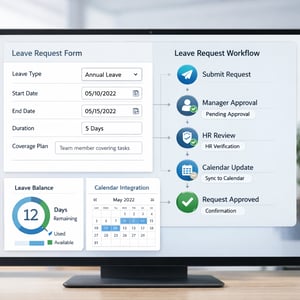
Request Submission: The employee submits a structured form specifying leave type (annual, sick, family, bereavement), start date, end date, and a coverage plan if required. The form automatically calculates duration and checks the available balance for the requested leave type.
Manager Approval: The request routes automatically to the employee's direct manager with all relevant details. The manager approves or rejects with a mandatory comment. A 24-hour SLA is enforced with an automatic reminder at hour 20 and escalation to the department director if no response is received.
HR Verification: Once manager-approved, the request routes to HR for policy compliance verification. HR checks leave balance, confirms no blackout period violation, and verifies documentation for extended leave types. This step is automatic for standard requests and manual for exception cases.
Calendar Sync: Upon HR verification, the workflow triggers an update to the shared team calendar and the HRIS leave balance record. No one has to manually update a spreadsheet.
Confirmation: The employee receives an automated confirmation with the approved dates, remaining balance, and any relevant policy reminders. This closes the loop without requiring HR to send a manual email.
Building a No-Code Leave Request Workflow: Step by Step
-
Create the leave request form. Build a structured intake form with fields for leave type, dates, duration (auto-calculated), coverage plan, and supporting documentation upload for medical or bereavement leave. Pull leave balance data from your HRIS to display current entitlement in the form itself.
-
Configure manager routing. Set up automatic routing to the submitter's direct manager using the organizational hierarchy in Kissflow. Add a 24-hour SLA with a reminder at hour 20 and escalation to the department director at hour 24.
-
Add the HR verification stage. Route approved requests to the HR team for policy compliance check. For standard annual leave requests with sufficient balance and no blackout conflict, consider auto-approving this stage to reduce HR workload.
-
Connect to your HRIS and calendar. Configure the integration to update leave balance records in your HRIS upon approval and add the approved leave period to the team calendar. This is the step that eliminates the manual spreadsheet update that HR currently does after every approval.
-
Build the confirmation notification. Configure a confirmation email and in-app notification to the employee upon final approval, including approved dates, remaining balance, and return-to-work reminder.
Rules, Conditions, and Edge Cases to Configure
Leave management has more edge cases than most HR processes, and handling them automatically is where the real efficiency gains come from:
Half-Day Requests
Configure the form to accept half-day requests with a morning/afternoon selection. The duration calculation adjusts automatically and the calendar entry reflects the correct period.
Carry-Over Rules
Set up automatic carry-over calculations at the start of the leave year, with any carry-over caps enforced by the system. Employees see their updated balance in the request form without having to ask HR.
Blackout Periods
Define blackout dates — year-end close for finance teams, peak season for retail operations — and configure the workflow to automatically flag or reject requests that overlap with these periods, with a message explaining the policy.
Overlapping Requests
When two team members request leave for the same period, the workflow can flag the overlap to the manager for consideration. Some organizations configure a maximum concurrent leave allowance per team — the workflow enforces this automatically.
Leave Request Workflow Template
Kissflow provides a pre-built leave request workflow template that includes the intake form, manager approval stage, HR verification stage, HRIS integration configuration, and confirmation notification. HR teams that start with the template typically complete their initial configuration in under 30 minutes.
The template handles the five most common leave types out of the box: annual leave, sick leave, family leave, bereavement leave, and study leave. Additional leave types can be added by duplicating a category and adjusting the policy parameters.
Kissflow Leave Workflow Setup in Under 30 Minutes
The Kissflow leave request template is configured in four actions: add your leave types and entitlements, connect your HRIS for balance data, configure the approval routing hierarchy, and set up the calendar integration. The platform guides you through each step with contextual help.
Once live, employees access the leave request form via the Kissflow employee portal or a link embedded in your intranet. Managers receive approval requests in email and can approve or reject with one click from their phone. HR has a dashboard view of all pending and approved requests — no spreadsheet required.
Automate Your Leave Process Today
Manual leave management is one of those processes that never feels urgent enough to fix until it causes a payroll error, a compliance finding, or an employee complaint that lands on the CHRO's desk. Do not wait for the crisis.
The Kissflow leave request workflow template is available at kissflow.com/no-code. Start your free trial, configure the template, and have your HR team running automated leave management before the end of the week.
Related Topics