No-code IT helpdesk automation lets IT managers design and deploy ticket routing, triage, escalation, and SLA enforcement workflows without writing a single line of code. Using platforms like Kissflow, IT teams can move beyond shared inboxes and spreadsheet queues to a structured workflow system that automatically categorizes requests, routes them to the right technician, enforces SLAs, and generates performance dashboards — all without filing a development request.
If your IT team is still managing helpdesk tickets by email, you are not running a helpdesk. You are running a reactive fire-fighting operation. Here is how to change that.
The Helpdesk Ticket Problem That Does Not Go Away
IT helpdesk teams face a structural problem: demand is unpredictable, ticket complexity varies wildly, and the expectation of fast resolution is universal. Without automation, the response to increased ticket volume is to add headcount — but headcount is expensive and does not scale as smoothly as demand.
The real issue is not volume; it is friction. Tickets get stuck because they were sent to the wrong technician. They get lost because they arrived by email and no one logged them in the system. They breach SLAs because no one noticed the 47-hour-old ticket sitting in a queue. These are process failures, not capacity failures — and they are solvable with workflow automation without hiring a single additional person.
There is also a shadow IT dimension. When users find that submitting a helpdesk ticket results in slow or inconsistent responses, they solve their problems by installing unapproved software, sharing admin credentials, or working around security controls. Automating the helpdesk makes the official process faster and more reliable — which is the most effective way to reduce shadow IT risk.
What No-Code IT Helpdesk Automation Actually Covers
Helpdesk automation is broader than most IT managers initially assume. It covers not just ticket routing but the full lifecycle of a service request or incident:
-
Ticket intake and categorization — capturing requests in a consistent structured format and automatically categorizing by type (hardware, software, access, network) and priority
-
Assignment and routing — sending each ticket to the right technician or team based on category, skill set, or workload
-
SLA monitoring and escalation — tracking time-to-first-response and time-to-resolution against defined SLA targets, with automatic escalation when thresholds are approached
-
Approval workflows for access and provisioning requests — ensuring that system access and software installation requests follow the required approval path before provisioning
-
Status notifications to requesters — keeping employees informed of ticket status without requiring them to follow up manually
-
Resolution and closure — structured resolution capture, requester satisfaction survey, and knowledge base contribution prompts
-
Reporting and dashboards — real-time visibility into queue depth, SLA compliance, technician workload, and ticket trend analysis
Key Workflows to Automate in Your IT Helpdesk
Request Triage and Categorization
When a ticket is submitted, automated triage assigns a category and priority based on keywords in the subject line, the selected issue type, and the requester's role. A password reset request from a standard user routes to the level-1 queue. A system outage report from the CTO routes directly to a senior engineer and triggers an incident response protocol. The same workflow handles both — intelligently.
Asset Provisioning
New employee equipment requests, laptop replacements, and peripheral orders all require routing to IT procurement, vendor ordering, and delivery tracking. A no-code provisioning workflow captures the request, routes it through the required approval stages, tracks the order status, and notifies the requester automatically when equipment is ready for collection.
Access Request Approval
System access requests — particularly for sensitive systems — require documented, auditable approval. A no-code access workflow captures the request, routes it to the manager and the system owner for approval, logs every decision with timestamp and user attribution, and triggers provisioning only after both approvals are received. This satisfies SOC 2, ISO 27001, and most industry-specific compliance requirements.
SLA Escalation
Every ticket should have an SLA target. No-code helpdesk platforms let you define SLA policies by ticket category and priority, and configure automatic escalation at defined intervals. A critical ticket unresolved after two hours escalates to the senior technician. Unresolved after four hours, it escalates to the IT manager with a status alert. The escalation chain operates automatically, 24/7.
Password Reset Workflows
Password resets represent a disproportionate share of helpdesk ticket volume at most organizations — estimates suggest 20-50% of all tickets. Automating the reset process — with identity verification built into the workflow — reduces level-1 workload significantly and resolves one of the most time-sensitive user frustrations quickly.
How to Build a No-Code IT Helpdesk Workflow
-
Design the ticket intake form. Create a structured submission form with fields for issue type (dropdown), affected system, priority (user-assessed, with IT override capability), description, and attachments. A structured form eliminates the ambiguous one-line email requests that waste technician time.
-
Configure the categorization and routing rules. Map issue types to teams or technicians. Set priority escalation rules — if a user selects 'Critical' and the affected system is in the tier-1 system list, automatically notify the on-call engineer regardless of time of day.
-
Set SLA timers for each ticket category. Define first response SLAs (15 minutes for critical, 2 hours for high, 8 hours for standard) and resolution SLAs. Configure warning notifications at 50% and 80% of the SLA window, with escalation at 100%.
-
Build the approval sub-workflows for access requests. Create a separate workflow for access and provisioning requests that requires manager approval, system owner approval, and IT security sign-off. Link this sub-workflow to the main ticket record for unified tracking.
-
Configure automated requester updates. Set up status notifications at key stages: ticket received, ticket assigned, work in progress, pending requester information, resolved. Employees who receive proactive updates stop chasing the helpdesk — reducing the noise that interrupts IT work.
-
Set up the resolution and closure sequence. When a technician marks a ticket resolved, automatically send a satisfaction survey to the requester. If no response in 48 hours, automatically close. If the requester responds that the issue is unresolved, reopen and escalate.
Integrations: Active Directory, JIRA, Slack, Email
An IT helpdesk workflow that operates in isolation from your existing infrastructure is limited in value. The most impactful integrations to configure:
Active Directory / Azure AD: Enable automated user account lookups, password reset execution, and group membership changes directly from the workflow. This allows technicians to take action within the workflow interface without switching to separate admin tools.
JIRA or ServiceNow: For organizations already running JIRA Service Management or ServiceNow, Kissflow can integrate as the front-end intake and routing layer while tickets are tracked in the existing ITSM system — giving you the flexibility of no-code workflow design without requiring a full platform migration.
Slack or Microsoft Teams: Send ticket assignment notifications, SLA warnings, and escalation alerts directly to Slack or Teams channels. This meets IT teams where they work rather than requiring them to monitor a separate portal.
Email: Configure an IT helpdesk email address that automatically converts incoming emails into structured workflow tickets. This provides a familiar submission channel for end users while capturing data in a format the workflow can act on.
SLA Tracking and Escalation Rules Without Code
SLA management is the area where no-code helpdesk automation delivers the most immediate operational improvement. When SLA compliance depends on individual technicians manually tracking time and remembering to escalate, it will always be inconsistent. Automated SLA enforcement is not optional for teams that take service commitments seriously.
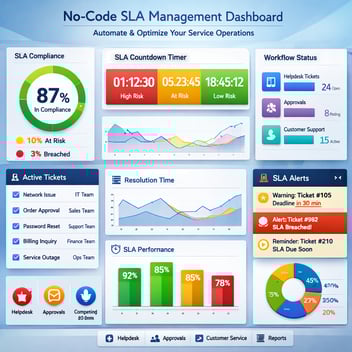
In Kissflow, SLA rules are configured per ticket category. You set the target time, the warning threshold, and the escalation recipient at each stage. The platform handles the clock from the moment the ticket is submitted. No one has to remember to check — the system does.
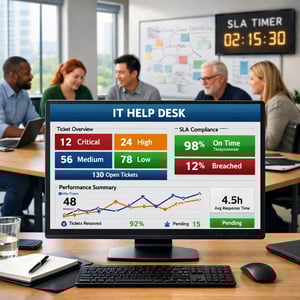
Critically, SLA data accumulates over time into reportable metrics. You can see which ticket categories most frequently breach SLA, which technicians are most overloaded, and which issue types have the longest resolution times. This is the operational intelligence that drives team improvement — and it is only available when your helpdesk is running on an automated, data-capturing platform.
Measuring Helpdesk Performance After Automation
The metrics that matter most for IT helpdesk performance post-automation:
First Response Time (FRT): How quickly does a requester receive acknowledgment that their ticket has been received and assigned? Target under 15 minutes for critical, under 2 hours for standard.
Mean Time to Resolution (MTTR): The average time from ticket submission to confirmed resolution. Track by category and priority to identify where investment is needed.
SLA Compliance Rate: What percentage of tickets are resolved within their defined SLA window? Industry benchmarks vary, but 95%+ for critical tickets and 85%+ overall are reasonable targets.
Ticket Deflection Rate: As you add self-service capabilities and automated resolutions (password resets, common request types), track what percentage of tickets are resolved without technician involvement.
Set Up Your IT Helpdesk Automation This Week
IT directors who are skeptical of no-code platforms often assume that 'no-code' means limited. Kissflow's IT helpdesk automation includes conditional routing logic, SLA enforcement, multi-level escalation, access request approval workflows, and full integration with Active Directory, Slack, and JIRA — capabilities that rival dedicated ITSM platforms at a fraction of the implementation cost and timeline.
Related Topics