No-code invoice processing automation gives accounts payable teams the ability to design, deploy, and manage the complete invoice-to-payment workflow without writing a line of code. Using platforms like Kissflow, finance teams can capture invoice data, route approvals based on predefined rules, perform three-way matching, and trigger payment processing — all within a single, auditable workflow that operates continuously without manual oversight.
If your AP team is still processing invoices manually — receiving by email, re-entering data into a spreadsheet, chasing managers for approvals via Slack — this guide will show you a better path. One that pays for itself in late payment penalties avoided in the first 90 days.
The Real Cost of Manual Invoice Processing
Research from the Institute of Finance and Management (IOFM) puts the average cost of manually processing a single invoice between $12 and $30 for straightforward invoices and significantly higher for complex or exception-requiring ones. For an organization processing 1,000 invoices per month, that is $12,000 to $30,000 in processing costs alone — before accounting for the downstream costs of slow approvals.
Late Payment Penalties
When an invoice sits in an email inbox waiting for a manager's attention, early payment discounts are forfeited and, in some cases, late payment penalties accrue. A 2/10 Net 30 discount on a $50,000 invoice is worth $1,000 — money left on the table because the approval chain was too slow. Across hundreds of invoices per year, this adds up quickly.
Duplicate Payments
Manual processing is error-prone. When an invoice is received twice — once by email, once by paper mail — and both are processed without a system to detect the match, the vendor gets paid twice and recovery is administratively painful. Automated invoice workflows flag potential duplicates before payment is triggered.
Fraud Risk
Invoice fraud — including vendor impersonation and fictitious invoice schemes — relies on weak controls in manual AP processes. When invoices are reviewed against a verified vendor master, matched against POs and delivery confirmations, and require multi-level approval, the attack surface for fraud narrows dramatically.
How No-Code Invoice Processing Works
A no-code invoice processing workflow digitizes and automates the sequence of steps that AP teams currently perform manually. The visual workflow builder in Kissflow lets your finance team configure the process — without IT involvement — and update it whenever policies change.
The workflow handles three broad categories of work: data capture (getting invoice information into the system in a structured format), routing and approval (ensuring the right people review and approve the right invoices), and matching and payment (verifying that what was ordered, received, and invoiced aligns before payment is released).
The Invoice-to-Payment Workflow Mapped Out
Receipt: Invoices arrive by email, supplier portal, or manual upload. In automated systems, email inboxes can be monitored by OCR tools that extract vendor name, invoice number, date, line items, and total before routing to the workflow.
Data Extraction and Validation: Extracted data is validated against the vendor master — is this a known vendor? Does the bank account match the record? Any discrepancy triggers an exception for manual review before the invoice advances.
Three-Way Match: The invoice is matched against the purchase order (what was authorized) and the goods receipt (what was delivered). If all three align within defined tolerance thresholds, the invoice advances automatically. If they do not, it routes to an exception workflow.
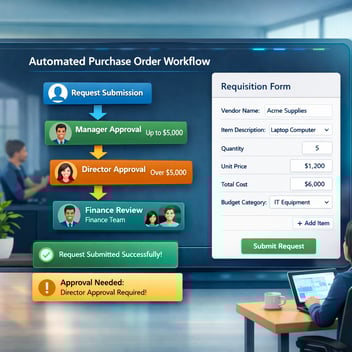
Approval Routing: Invoices that clear the matching step are routed for approval based on amount and category. A $2,000 IT invoice might need only the department manager; a $150,000 vendor payment requires the CFO.
Payment Processing: Approved invoices are released to the payment run and recorded in the accounting system. Kissflow integrates with QuickBooks, Xero, NetSuite, and SAP to eliminate duplicate data entry between systems.
Archiving: Every invoice, with its complete approval history, is archived automatically. This is the audit trail your external auditors will ask for — and it will take seconds to retrieve, not hours.
Step-by-Step: Build Your Invoice Processing Workflow
-
Set up your invoice intake form. In Kissflow, create a form that captures all required invoice fields: vendor name, invoice number, invoice date, due date, line items, GL codes, and total amount. For high-volume AP teams, connect an OCR integration to pre-populate fields from PDF invoices.
-
Configure the vendor validation check. Add a validation step that cross-references the submitted vendor name and account details against your approved vendor master. Flag discrepancies automatically for review before the invoice advances.
-
Build the three-way matching logic. Connect the invoice record to the corresponding PO number and goods receipt record. Set tolerance thresholds — for example, accept invoices within 2% of the PO value automatically; flag larger variances for review.
-
Set up approval routing by amount and category. Define the approval matrix: who approves what, at what dollar thresholds, and with what SLA. Configure escalation so that invoices approaching due dates get expedited routing automatically.
-
Connect to your accounting system. Configure the integration so that approved invoices create payment records in your ERP or accounting software automatically. This eliminates the re-entry step that is the source of most AP data errors.
-
Configure the exception workflow. Not all invoices will match cleanly. Build a structured exception path for PO discrepancies, unrecognized vendors, and missing receipts — so exceptions are handled systematically, not dropped into someone's email inbox.
Must-Have Features in a No-Code Invoice Automation Tool
When evaluating platforms for AP automation, these capabilities separate purpose-built solutions from generic workflow tools:
Three-way match support: The platform must be able to link invoice, PO, and receiving records within the same data structure and perform automated comparison.
Exception management: When a match fails or a validation check flags an issue, the exception must route to the appropriate team member with full context — not generate an email notification and leave the resolution open-ended.
Vendor master integration: Validated vendor data prevents fraud and reduces payment errors. The workflow should be able to check against a vendor master in real time.
ERP and accounting integration: The AP workflow that stops before the accounting system still requires manual reconciliation. Native or API-based integration with your ERP is essential.
Audit trail and reporting: Complete logs of every action on every invoice — who reviewed it, when, what they decided, and what happened next — are a compliance requirement, not a feature.
AP Automation Results: What Finance Teams Actually See
Organizations that automate invoice processing with Kissflow consistently report three categories of measurable improvement. Processing time per invoice falls from several days to hours or less. Exception rates drop as data capture improves and matching catches discrepancies before they become payment errors. And the AP team's time allocation shifts from transaction processing to vendor management, reconciliation, and cash flow planning — work that has strategic value.
One mid-market manufacturing company reported that automating AP workflows with Kissflow eliminated four full-time-equivalent hours of daily manual processing, recovered $45,000 in early payment discounts in the first quarter, and reduced the time to respond to audit document requests from three days to under 30 minutes.
Automate Your Invoice Process Today
Kissflow's no-code invoice processing automation platform gives AP teams full ownership of their workflow — from intake to payment — without waiting on IT. The platform includes pre-built invoice workflow templates, approval routing logic, exception management, and ERP integration.
Related Topics