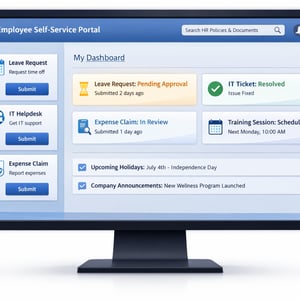
An employee self-service portal built on a no-code platform like Kissflow gives employees a single interface to submit leave requests, raise IT tickets, claim expense reimbursements, access HR policies, and track the status of their requests — without calling HR or emailing IT. Organizations that implement self-service portals consistently see 30-40% reductions in HR and IT support ticket volume. This guide shows you exactly how to build one.
What Is an Employee Self-Service Portal?
An employee self-service portal is a digital hub where employees initiate and track their own HR and IT service requests — replacing the email, phone call, or in-person visit that currently stands between an employee and the service they need. It is not an intranet or a communication platform; it is an action-oriented interface that connects employee requests to the workflows that fulfill them.
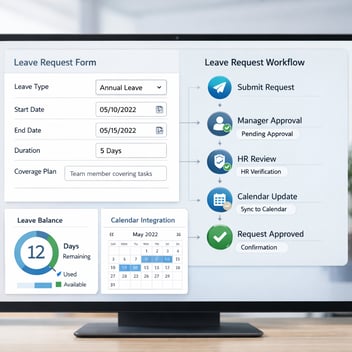
The distinction matters. An intranet houses information; a self-service portal initiates processes. When an employee submits a leave request through the portal, they are not just filling out a form — they are starting a workflow that routes to their manager for approval, updates the HR record upon approval, sends a calendar notification, and confirms the outcome back to the employee automatically.
The Business Case: What Self-Service Solves
The cost of employee-initiated service requests is higher than most HR and IT leaders realize. An HR coordinator spending 20 minutes handling each leave request — receiving by email, checking the balance in the HRIS, routing to the manager, updating the record, confirming back to the employee — processes perhaps 15-20 leave requests per day. That is three to four hours of coordinator time per day on a single request type.
Self-service reduces that to near zero for standard requests. The employee submits; the workflow handles the routing, checking, and confirmation automatically; the HR coordinator reviews only exception cases. The coordinator's time shifts from transaction processing to employee experience work — mentoring, policy clarification, complex case management.
For IT, the ROI is similar. Password resets, software access requests, and equipment issues represent the majority of helpdesk volume at most organizations. Self-service channels for these request types — with automated triage and routing — reduce the volume reaching human technicians significantly.
What to Include in Your Employee Self-Service Portal
The portal modules to prioritize are determined by where employee-initiated contact with HR and IT is highest. The universal must-haves:
Leave requests: Submit, track status, view remaining balances by leave type. This is the highest-frequency use case at most organizations.
IT helpdesk tickets: Submit IT issues, track resolution status, access self-help resources for common problems before submitting a ticket.
Expense submissions: Upload receipts, submit expense reports, track approval status and reimbursement timeline.
Payslip and payroll information: Access pay stubs, tax documents, and payroll history without contacting HR. This typically requires HRIS integration rather than a Kissflow-built module.
HR policy library: Searchable access to employee handbook, policy documents, and FAQs — reducing the volume of policy clarification requests to HR.
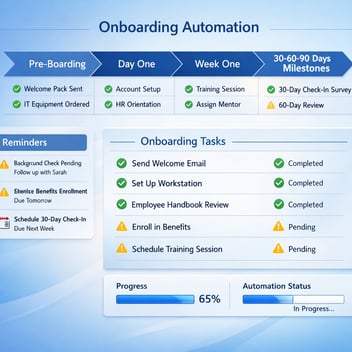
Onboarding status: New hire visibility into their onboarding task list and completion status — reducing the 'what do I need to do next?' questions that arrive in HR's inbox the week before start date.
Planning Your Portal: Architecture and Access Control
Before building, define the portal's scope and access model. Which employee groups will have access to which modules? All employees access leave and expense modules; only managers see their direct reports' request history; IT administrators see the full helpdesk queue. These access distinctions must be reflected in the Kissflow RBAC configuration before any forms are built.
Decide on the authentication model. For most enterprise portals, SSO using the corporate identity provider (Azure AD, Okta, Google Workspace) is the right answer — employees access the portal with the same credentials they use for all other work applications, with no additional password to manage.
Determine the integration requirements for each module. The leave module needs HRIS integration for balance data; the expense module needs accounting system integration for reimbursement processing; the IT helpdesk module may need Active Directory integration for user lookup. Map these integrations before starting to build.
Building the Portal Step by Step in Kissflow
-
Build each module as a separate workflow. The leave request module is a workflow; the expense submission module is a workflow; the IT helpdesk module is a workflow. Each has its own form, approval stages, and integration connections. Build and test each module independently before connecting them in the portal interface.
-
Configure the portal home page. Kissflow's portal view allows you to create a home page that surfaces the modules available to each employee based on their role. Design the home page to make the most frequent actions immediately visible — leave request, expense submission, IT ticket — with less frequent actions accessible through a navigation menu.
-
Set up the status tracking view. Every employee should be able to see the status of all their open requests from a single dashboard. Configure this view to show request type, submission date, current stage, and expected resolution timeline for each active request.
-
Connect the integrations. For each module requiring integration — HRIS for leave balances, accounting for expense reimbursement, Active Directory for IT provisioning — configure the connections and test data flows before enabling the module for employee use.
Integrating the Portal With HRIS, IT, and Finance Systems
Integration depth determines how much of the administrative work the portal actually eliminates. A portal that captures requests but requires manual data entry into other systems has reduced coordination overhead without eliminating it.
The priority integrations for maximum impact: HRIS integration (Workday, BambooHR, SAP HCM) for leave balance lookup and approval result write-back; Active Directory integration for IT access request processing; accounting system integration (QuickBooks, Xero, NetSuite) for expense reimbursement processing. These three integrations cover the majority of the portal's operational value.
Launching and Driving Employee Adoption
Portal launches fail when employees are not given a compelling reason to change their behavior. If submitting a leave request by email has worked for five years, employees will not switch to a portal without a clear prompt. The launch communication must answer: why is this better for me?
The honest answer: the portal is faster, gives you status visibility without following up, and ensures your request does not get lost in a coordinator's inbox. Lead with this in the launch communication. Back it up with the change in experience for the first request — if the portal delivers a faster, more transparent experience on the first use, adoption follows naturally.
Measuring Portal Success: Adoption and Deflection Metrics
Adoption rate: Percentage of employees who have submitted at least one request through the portal in the first 30 days. Target 60%+ adoption within the first month.
Deflection rate: Reduction in HR and IT email or phone inquiry volume attributable to self-service. This is the primary ROI metric.
Average request cycle time: From submission to resolution. Compare to pre-portal baseline to quantify the speed improvement.
Employee satisfaction score: A simple 1-5 satisfaction rating at the close of each portal request. Declining scores indicate experience issues that adoption numbers will not show until it is too late.
Related Topics