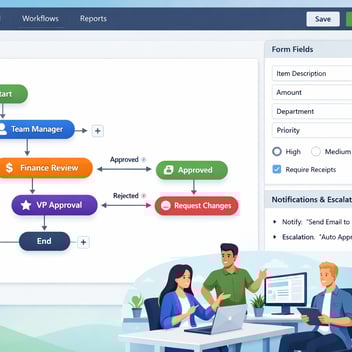
Contract approval automation using no-code tools lets legal ops, sales ops, and procurement teams build structured review and approval workflows for contracts — without involving developers. With Kissflow, organizations can route contracts through legal review, redlining, multi-party approval, and e-signature in a single workflow, reducing average contract cycle times from weeks to days.
Every day a contract sits waiting for approval is a day of recognized revenue deferred. For sales teams, it is a deal that could go cold. For procurement, it is a vendor relationship that cannot start. This guide shows you how to eliminate the bottleneck.
How Slow Contract Approvals Kill Revenue
The World Commerce and Contracting association estimates that poor contract management costs organizations up to 9% of annual revenue. A significant portion of that loss comes not from bad contracts, but from slow ones — deals that erode because the approval process took three weeks when the buyer expected three days.
The typical manual contract approval process looks like this: a salesperson finishes negotiating terms, creates a contract document, attaches it to an email, and sends it to legal. Legal responds with redlines five days later. The salesperson incorporates changes and sends to the customer. The customer responds with counter-redlines. Eventually a final version is reached and the salesperson emails it to the legal team, their VP, finance, and the customer for signatures — in separate email chains that may or may not reach everyone in the right order.
No step in that process is automated. Every handoff is manual. Every delay is invisible. And the sales rep is fielding daily check-ins from the buyer who wants to know where the contract stands.
The Anatomy of a Contract Approval Workflow
Draft: The contract initiator (sales, procurement, or legal) creates or uploads the contract document and submits it through the workflow with metadata: contract type, counterparty, value, term length, and business owner.
Legal Review: The workflow routes the contract to the legal team with all context attached. Legal reviewers access the document through the workflow interface, add comments or redlines using their preferred tool (Word, Google Docs), and return the reviewed version within the workflow — not by email.
Redline Management: Redline rounds are tracked within the workflow record. Each version is logged with a timestamp and the identity of who made which changes. The workflow advances only when legal marks the document as ready for the next stage.
Approval Routing: Depending on contract type and value, different stakeholders must approve before execution. A standard vendor contract might require business unit approval. An enterprise customer agreement might require VP, CFO, and legal sign-off. The workflow routes to each in the defined sequence — or in parallel where allowed.
Execution: Once all approvals are received, the workflow triggers the e-signature sequence via DocuSign or Adobe Sign. Signatories receive automated notifications with a direct link to the signing interface.
Storage and Compliance: Executed contracts are automatically archived with their complete approval history, redline record, and metadata. Contract renewal alerts can be triggered from the same record months in advance.
What to Automate in Your Contract Process
Not every part of contract management benefits equally from automation. Focus first on the coordination and routing elements that create the most delay:
Automate: Review routing and notifications, approval stage sequencing, e-signature triggering, status notifications to the initiator, deadline enforcement with escalation, contract archiving, and renewal reminders.
Keep human: Legal judgment on risk clauses, negotiation strategy, commercial terms decisions, and relationship management with the counterparty. Automation accelerates these human decisions — it does not replace them.
Building a No-Code Contract Approval Workflow
-
Define contract types and approval matrices. Different contract types require different approval paths. A standard NDA might need only legal sign-off. A multi-year software license requires legal, finance, and executive approval. Map these matrices before building the workflow.
-
Create the contract submission form. Capture contract metadata at submission: type, counterparty, value, business unit, requested execution date, and key terms summary. Good metadata makes filtering, searching, and reporting on your contract portfolio possible.
-
Configure legal review routing. Route submitted contracts to the legal team (or individual counsel based on contract type or business unit). Set a review SLA — five business days is typical for standard contracts — with escalation to the General Counsel if the SLA is approaching.
-
Build multi-stage approval routing with conditions. After legal clearance, route based on contract value and type. Configure conditional logic so that contracts above defined value thresholds automatically add the CFO approval stage. Below the threshold, skip to execution.
-
Connect e-signature tools. Kissflow integrates natively with DocuSign and Adobe Sign. Once the final approval is received, the workflow automatically initiates the signature sequence and tracks completion status in real time.
-
Configure post-execution archiving and alerts. Set up automatic archiving of the executed contract with all workflow metadata attached. Configure renewal reminder triggers at 90 days, 60 days, and 30 days before expiry.
Multi-Party Approval Routing: How to Handle It
Enterprise contracts frequently require approval from multiple stakeholders across different functions. The challenge in manual processes is sequencing these approvals correctly — ensuring that finance does not approve before legal has reviewed and that the executive signature only happens after all other approvals are complete.
In Kissflow, multi-party approval routing is configured using sequential and parallel stages on the workflow canvas. Legal and the business unit owner can review in parallel (saving time), but the CFO and executive approval stages only open once both parallel reviews are complete. This structure mirrors the organization's actual decision-making logic without requiring a developer to code it.
For contracts requiring counterparty approval at any stage — for example, submitting a redlined version for the customer's legal review — the workflow can notify the counterparty contact by email and record their response when they return the document. This keeps the external review loop within the workflow record rather than in a separate email thread.
Integration with E-Signature Tools
E-signature integration is the most visible efficiency gain in contract automation. When an approval workflow triggers a DocuSign envelope automatically — with the correct signatories, signing order, and deadline — what previously took two days of manual coordination takes minutes.
Kissflow's DocuSign integration allows you to define the signer list, signing sequence, and envelope settings within the workflow configuration. When the final approval stage completes, Kissflow creates and sends the DocuSign envelope without any manual action. Signing status updates automatically in the Kissflow workflow record — you can see in real time whether signatories have opened, signed, or declined.
Adobe Sign integration works equivalently. If your organization uses both (common in larger enterprises where different business units have different tool preferences), Kissflow can route to the appropriate e-signature platform based on contract type or counterparty.
Compliance and Audit Trail Requirements
Contract compliance requirements vary by industry, but the underlying need is universal: prove that the right people reviewed and approved each contract, under what conditions, and when. Manual email-based processes cannot reliably satisfy this requirement. Automated contract workflows generate the audit trail automatically.
In Kissflow, every contract's workflow record includes a complete history: who submitted, when; which reviewers accessed the document and when; every approval and rejection with timestamp and comment; every version of the document; and the execution record. This history is immutable and retrievable in seconds.
For industries with specific contract management compliance requirements — financial services, healthcare, government contracting — this automated audit capability is often the primary driver of the automation investment decision.
Start Closing Contracts Faster
Contract delays are a silent revenue drain that most organizations tolerate because the alternative — building a proper contract management system — seemed complex. No-code contract approval automation removes that complexity. Sales can close faster. Legal can review without becoming a bottleneck. Finance and executives can approve with complete context. And every contract is archived with a complete, defensible audit trail.
Related Topics