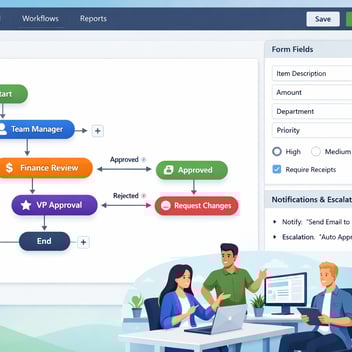
Business teams can build internal tools — approval apps, status dashboards, intake forms, data entry interfaces, and self-service portals — without developers using no-code platforms like Kissflow. The process requires mapping the workflow, designing the form and interface, configuring routing logic, connecting to existing data sources, and testing before rollout. This guide gives you the practical steps to go from idea to working tool without filing a single IT ticket.
Why Building Internal Tools Usually Gets Stuck
The development bottleneck is the standard explanation for why internal tools do not get built. But the actual bottleneck is often upstream: business teams do not submit tool requests because they expect them to be rejected, deprioritized, or queued behind more urgent projects. The tools that would save hours every week never reach the development queue because the process of requesting them feels more painful than the problem they would solve.
No-code platforms remove the dependency on IT for the class of tools that business teams actually need most: structured forms that capture consistent data, approval workflows that route decisions to the right people, status dashboards that surface what is happening without manual data assembly, and self-service portals that let employees or vendors initiate processes without emailing a coordinator.
These are not complex applications. They do not require database design expertise, front-end development skills, or API programming knowledge. What they require is clear thinking about the process they support — which is exactly the domain expertise that business teams already have.
What Counts as an Internal Tool — And What Doesn't
For the purposes of this guide, an internal tool is any digital interface or automated process built to support an internal business operation — not a customer-facing product or a core system of record.
Internal tools that no-code platforms handle well: approval and authorization apps (purchase approvals, leave requests, expense claims), intake and request forms (IT helpdesk, facilities requests, vendor onboarding), status and tracking dashboards (project progress, open approval queue, SLA compliance), self-service portals (employee HR requests, vendor document submission), and coordination workflows (task assignment, escalation management, deadline tracking).
Internal tools that require development: applications with complex data models or custom database schemas, tools requiring real-time computation or data processing at scale, interfaces that must integrate deeply with legacy systems lacking modern APIs, and applications requiring custom UI components beyond what no-code platforms offer.
Before You Build: Map the Process First
The single most important pre-build activity is process mapping — and it should happen before you open the no-code platform. Spend 30-60 minutes with the people who currently perform the process manually. Walk through a real example from start to finish. Ask: who initiates the process, what information do they provide, who receives it next, what decision do they make, what happens after each decision, what are the edge cases, what does 'done' look like?
Write this on a whiteboard or a piece of paper. Draw boxes for each step, arrows for the flow, diamonds for decisions. You will likely discover steps that no one had articulated before, handoffs that are unclear, and edge cases that everyone handles differently. Resolve these questions before building — they are much cheaper to fix on paper than in the tool.
Step-by-Step: Building Your First Internal Tool
Step 1: Define the Workflow and Data Inputs
From your process map, identify the structured information the tool needs to capture at the start (the form inputs), the decisions that need to be made and by whom (the approval stages), and the outputs the tool should produce (notifications, records, downstream actions). Write these down explicitly — this is your build specification.
Step 2: Design the Form and Interface
In Kissflow, open the Process Designer and start with the intake form. Add fields for each piece of information the process needs. Choose field types that enforce data quality: dropdowns for categorical selections, number fields for monetary amounts, date pickers for scheduling, file upload for attachments. Mark required fields to prevent incomplete submissions from entering the workflow.
Step 3: Set Up Logic and Routing Rules
Add the workflow stages to the canvas: the approval stages, the review stages, the notification stages. Connect them in sequence. Then configure the routing logic: which conditions determine the path a request takes? A $500 expense routes to the team manager; a $2,000 expense routes to the department director. These conditions are configured in plain language through a dropdown interface — no code required.
Step 4: Integrate With Existing Data Sources
Connect the tool to the data sources it needs to function. If the form should auto-populate the submitter's department from the organizational directory, connect to the HRIS. If approved records should create entries in the accounting system, configure the API integration. If documents should be stored in SharePoint, connect the document storage integration. Start with the integrations that are truly essential; add the rest incrementally.
Step 5: Test With a Small Group
Before rolling out to the organization, test with five to ten people who represent the different user types — submitters, approvers, administrators. Have them run real scenarios through the tool. Watch where they hesitate or make mistakes — those are UX issues to fix before broad rollout. Ask for feedback on what is missing or confusing. Incorporate the changes.
Step 6: Roll Out and Train
Announce the tool to its intended users with a brief explanation of what it replaces and why. Provide a one-page quick reference guide covering the submitter journey and the approver journey. Schedule a 20-minute live demonstration for any user group with low digital confidence. Make the person who built the tool available for questions for the first two weeks — most questions are procedural, not technical, and are easy to answer quickly.
When to Involve IT — Even With No-Code
No-code does not mean IT-free. Involve IT when the tool integrates with enterprise systems (ERP, HRIS, CRM) — IT needs to authorize the API credentials and review the integration architecture. Involve IT when the tool handles sensitive data — PII, financial records, health information — to ensure compliance with data handling requirements. Involve IT when the tool needs to be available to the entire organization — provisioning, SSO, and organizational directory integration require IT's involvement.
For most internal tools used by a single team or department, IT involvement is minimal: a conversation to ensure the tool is built on the approved platform and follows the governance framework. That conversation takes 15 minutes, not three months.
Governance: Making Sure Your Tool Doesn't Become Shadow IT
A tool built on an unapproved platform, handling data IT does not know about, with no documentation or succession plan, is shadow IT regardless of who built it. Avoiding this is straightforward: build on IT's approved platform list, register the tool in the organization's application inventory (however informal), document the process the tool supports and the integrations it uses, and ensure that someone other than the original builder knows how to maintain it.
3 Internal Tools You Can Build in Under an Hour With Kissflow
Vendor onboarding form: Capture vendor contact information, tax ID, bank details, and insurance certificates through a structured form. Route to procurement for approval. Simple to build; immediately valuable for organizations bringing on new suppliers regularly.
IT access request app: Replace the email chain for system access requests with a structured form capturing the system requested, the business justification, and the requester's manager. Route automatically to manager approval and then IT provisioning. Builds an audit trail for compliance.
Meeting room and resource booking tool: A simple form capturing the date, time, room preference, and number of attendees — with a confirmation notification and a calendar event generation. Eliminates the Slack-based back-and-forth that currently passes for room booking at many organizations.
Related Topics