
What Is No-Code? The 2026 Complete Guide for Enterprises
No-code is a way to build software and applications without writing code. Business users create apps, automate workflows, and manage processes through visual drag-and-drop tools. It removes the dependency on developers, so enterprises cut IT backlogs, deliver faster, and lower development costs.
The reality for most enterprises in 2026 is not a lack of ideas, but a lack of capacity.
No-code development exists to solve a math problem: organizations need more software than their developers can build. No-code tools put the power of software creation into the hands of the people who will use it.
Gartner projects that 75 percent of new enterprise applications will use no-code or low-code technologies by 2026, up from less than 25 percent in 2020. That's a structural shift in how companies build the tools they will rely on.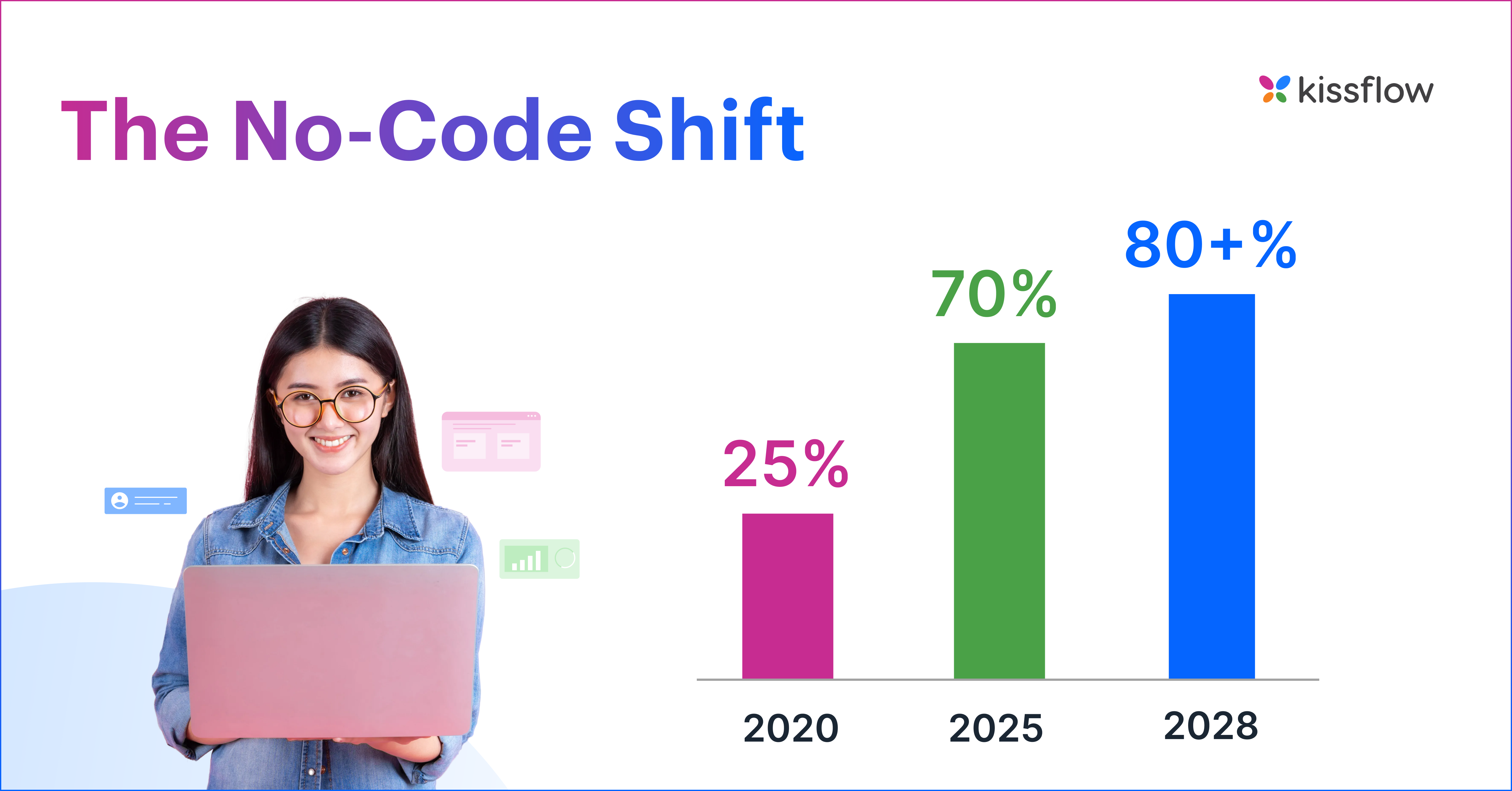
What no-code actually means (and what it doesn't)
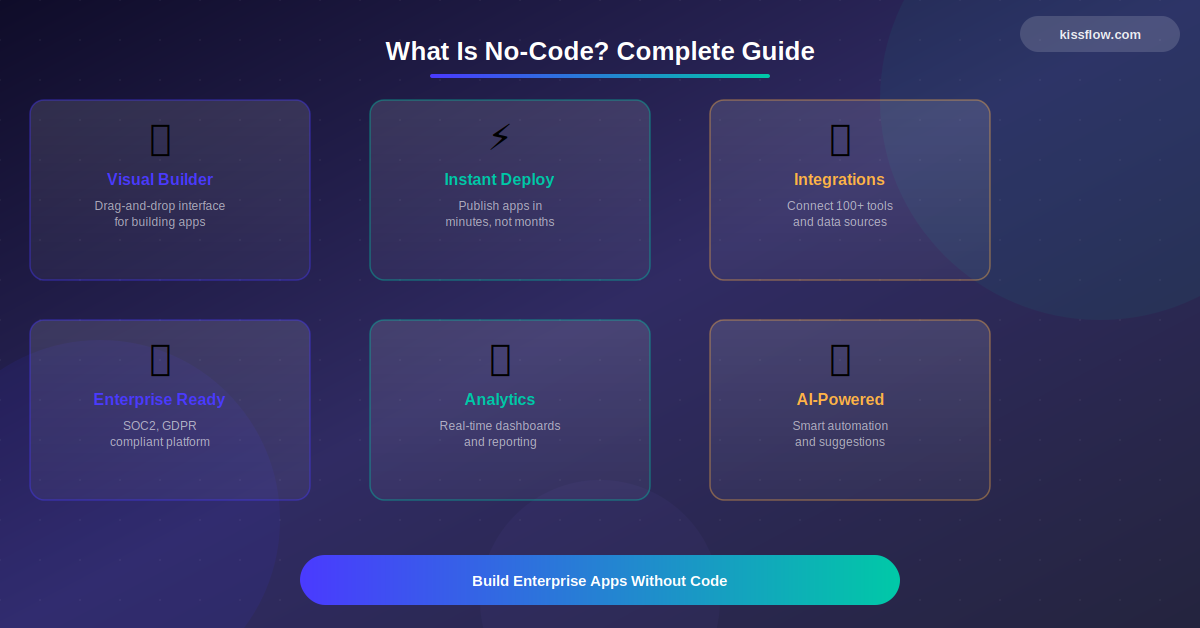
No-code development is a way of building software applications using visual interfaces instead of programming languages. You drag components onto a canvas, configure logic through dropdowns and rules, connect data sources with clicks, and publish a working application without writing a single line of code.
Traditional software development is like building a house from raw lumber, wiring, and plumbing. You need architects, electricians, plumbers, and a general contractor. No-code is more like building with prefabricated modules. The plumbing and wiring are already inside the walls. You decide the layout, the floor plan, and the flow.
That analogy matters because it clarifies what no-code is not. It's not a toy. The prefabricated walls still hold weight. Modern enterprise no-code platforms handle multi-level approval workflows, cross-department process automation, real-time dashboards, and direct integrations with SAP, Salesforce, and Microsoft 365. They come with SOC 2 Type II certifications, role-based access controls, and audit trails that satisfy even the most paranoid compliance officer.
But no-code is also not magic. It won't build you a custom machine learning pipeline or a high-frequency trading system. It won't replace your core ERP. It handles 80 percent of business applications that don't need custom code, so your developers can focus on the 20 percent that do.
Looking for the Kissflow No-Code Platform? → Visit the main platform page
Why this matters now more than it did five years ago
There are three factors that have turned no-code development into a necessity rather than a convenience.
The developer shortage is real and getting worse. The U.S. alone faces a projected shortage of 1.2 million developers by 2026. Korn Ferry estimates the global skilled worker gap will hit 85 million by 2030, risking $8.5 trillion in unrealized revenue. You can't hire your way out of a backlog when there aren't enough developers to hire.
The demand for internal software exploded. Every department now needs custom tools. Marketing wants a campaign tracker. Procurement needs a vendor onboarding portal. Compliance needs an audit management system. Finance needs 14 different approval workflows. These aren't vanity projects. They're operational necessities that used to live in spreadsheets, emails, and shared drives.
Enterprise adoption is no longer early-stage. 87 percent of enterprise developers already use low-code platforms for at least some of their work. Microsoft Power Platform alone has 56 million monthly active users.
How no-code development actually works
Behind every drag-and-drop interface is real software doing real work. Here's what happens when you build a no-code application.
You design in a visual environment. Instead of writing HTML, CSS, and JavaScript, you work on a canvas. You drag form fields, buttons, data tables, and navigation elements into position. Every action you take triggers code generation behind the scenes. You never see the code, but it's there.
You define logic through rules, not syntax. This is where no-code gets genuinely powerful. Instead of writing if-else statements in Python, you use visual rule builders to set conditions. If a purchase request exceeds $5,000, route it to a VP. When an invoice is approved, notify accounting and update the ERP. If an onboarding form is submitted, trigger parallel tasks across IT, HR, and Facilities. The logic is identical to what a developer would write. The interface is just different.
You connect to existing systems through pre-built integrations. Most enterprise no-code platforms offer native connectors to the systems you already run: Salesforce, SAP, Microsoft 365, Google Workspace, Slack, and QuickBooks. For everything else, REST API support and webhooks handle custom connections. The goal is not to replace your tech stack. It's to build the connective tissue between systems that currently require email and manual data entry.
You publish instantly. No server provisioning, no DevOps pipeline, no deployment scripts. You click "publish," and the application goes live on a cloud environment. Updates work the same way. Change a field, adjust a workflow rule, and hit publish. The new version is live.
The entire lifecycle lives in one place. Build, test, deploy, monitor, update. It all happens in the same environment. This closed-loop approach is one of the biggest practical advantages over traditional development, where moving from development to staging to production involves multiple tools, teams, and handoffs.
→ No-Code Automation: Build Workflows Without Code
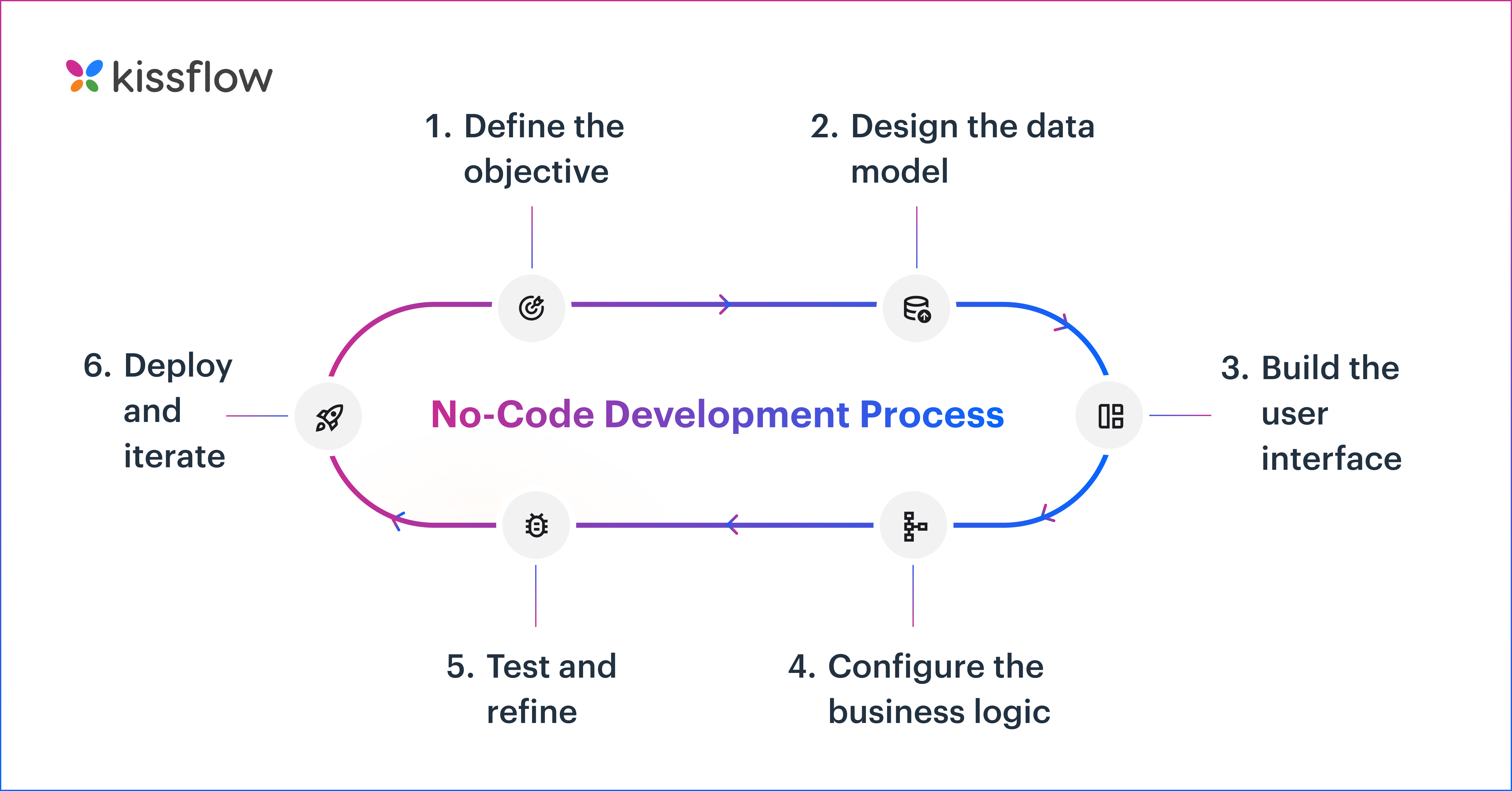
The No-Code development process: Step by Step
Step 1: Define the objective. What problem are you solving? Reducing approval cycle time? Centralizing scattered data? Automating manual handoffs?
Step 2: Design the data model. Define what information the application will collect. Create fields, set data types, establish relationships.
Step 3: Build the user interface. Using drag-and-drop builders, design screens and forms. Arrange input fields, buttons, and navigation all without code.
Step 4: Configure the business logic. Set up workflows, automations, and rules through visual editors. Define triggers, routing, notifications, and data flows.
Step 5: Test and refine. Preview features let you simulate user journeys, verify logic, and adjust instantly.
Step 6: Deploy and iterate. Publish with a click. As requirements evolve, modify and redeploy without development cycles.
What you can actually build with no-code
Most people think no-code means simple forms and basic approvals. That was true five years ago. In 2026, the range of what business teams build without writing code would surprise most developers.
Workflow automation
This is where most teams start and is the easiest to imagine. Think of expense approval workflows where requests auto-route based on amount thresholds. Or it could be employee onboarding portals that coordinate IT provisioning, facility setup, benefits enrollment, and training across departments. The logic is familiar, the pain is obvious, and the ROI shows up fast.
Internal business systems
This is where no-code starts to get underestimated: building full internal applications. Vendor management systems that replace spreadsheets with a single system of record for registration, compliance, and contract tracking. Budget and spend management apps that track departmental budgets in real time. Deal and pipeline approval systems that give sales ops visibility without slowing velocity.
Cross-functional and field operations
The real power shows up when processes cut across teams. Procure-to-pay systems where finance, procurement, and legal operate in one application instead of disconnected tools. Supply chain coordination apps that track inventory and delivery timelines across locations. Safety inspection apps with mobile checklists, photo capture, GPS tagging, and instant reports. Permit-to-work systems are used in energy, manufacturing, and construction for safety approvals, regulatory tracking, and audit trails.
Case management, portals, and dashboards
Not all processes are linear. No-code handles incident management, customer complaints, and compliance investigations where work bounces between stakeholders and evolves over time. It also powers external-facing systems: vendor portals, employee self-service hubs, and customer dashboards. And it provides the visibility layer that ties everything together through operational dashboards tracking bottlenecks, SLA performance, and cycle times.
Legacy replacement and AI
A lot of no-code ROI doesn't come from building something new. It comes from replacing email-based processes, spreadsheet trackers, SharePoint workflows, and aging internal tools that nobody wants to maintain but everyone depends on. And increasingly, no-code platforms are adding AI-assisted app generation, intelligent routing, document extraction, and embedded AI agents within workflows, reducing build time even further.
No-code vs. low-code vs. vibe coding
No-code is fully visual. Zero programming. Designed for business users, process owners, HR leads, finance analysts, and operations managers who understand their problems deeply but don't write code. It’s best for workflows, approvals, departmental apps, and internal tools. Learning curve: days to weeks.
Low-code minimizes coding but doesn't eliminate it. Designed for professional developers and technically inclined users who need to extend functionality through scripting. Best for complex enterprise applications, custom integrations, and scenarios where visual configuration hits its limits. Learning curve: weeks to months.
Vibe coding is the new kid. Coined by Andrej Karpathy (OpenAI co-founder) in February 2025, it refers to using AI to generate application code from natural-language descriptions. You describe what you want in plain English. An AI model writes the code. The term went viral, and Google searches for "vibe coding" jumped by more than 6,000 percent in early 2025.
Vibe coding tools nail Day 1. The demo is impressive. You describe an app in plain English, and working code appears in minutes. But enterprises don't run on Day 1. They run on Day 2, Day 30, Day 90, and Day 365. And that's where vibe coding falls apart.
By Day 2, a simple config change breaks features silently because nobody fully understands the generated code. By Day 30, compliance wants to audit the business logic, but the codebase is opaque. By Day 90, a critical bug forces a rebuild from scratch. By Day 365, you've done three rebuilds, lost months of work, and have nothing stable to show for it. Code-gen tools make impressive demos, not enterprise apps.
The data backs this up. Veracode's 2025 GenAI Code Security Report found that 45 percent of AI-generated code has security vulnerabilities. A METR study showed that experienced developers were actually 19 percent slower with AI coding tools, even though they believed they were faster.
The deeper problem is structural. Vibe coding covers the visible layers of an application: frontend, authentication, basic business logic, and database. But it doesn't cover the layers enterprises actually depend on: security and compliance, workflow orchestration, access controls, event handling, monitoring, business rules engines, or API integrations with governance. Those aren't features you can bolt on after the fact. They need to be part of the foundation.
Enterprises don't need more code. They need blueprints. Vibe-coded applications are non-deterministic, opaque, fragile, and disposable. A well-built no-code application is deterministic, transparent, stable, and permanent. Every rule is visible. Every change is versioned. Every decision is auditable. That's the difference between a prototype and a production system.
The practical takeaway: no-code gives you speed with governance built in. Low-code adds flexibility with some coding. Vibe coding gives you speed without governance. For most enterprise applications, no-code or a no-code/low-code hybrid is the right answer. Vibe coding works for prototypes, not for production.
The honest case for no-code
Speed. No-code reduces development time by up to 90 percent. In practical terms, an expense approval system that might take a development team 6 to 8 weeks can be built, tested, and deployed by a business user in 1 to 2 weeks.
Cost. Forrester found that companies using no-code avoided hiring 2 additional IT developers, resulting in approximately $4.4 million in business value over 3 years.
ROI. SN Aboitiz Power, an energy company in the Philippines, documented a 451 percent ROI with a 2.8-month payback period using Kissflow. That's among the fastest returns documented on any enterprise no-code deployment.
IT backlog relief. By 2026, developers outside formal IT departments will account for at least 80 percent of low-code tool users, up from 60 percent in 2021. When business users can build their own departmental tools, IT stops being a bottleneck and starts being a strategic function again.
Business alignment. No-code eliminates what the industry calls the "translation layer." In traditional development, a business user explains what they need to a BA, who writes requirements for a developer, who builds something that may or may not match the original intent. With no-code, the person who understands the process builds the solution. Fewer handoffs. Fewer misinterpretations. Solutions that actually match real needs.
The honest case against no-code
No-code is not a universal solution. Here are the real constraints.
Customization has boundaries. No-code platforms excel at structured business applications. But if you need pixel-perfect custom UIs, complex backend algorithms, or real-time data processing at extreme scale, you'll hit platform limits. The smart approach: use no-code for the 80 percent of applications that fit its model, and use low-code or traditional development for the 20 percent that don't. Kissflow, for example, offers both no-code and low-code on a single platform, so teams don't have to switch tools when complexity increases.
Vendor dependency is a real concern. 47 percent of organizations worry about vendor lock-in with no-code platforms. The mitigation: choose platforms with open APIs, data export capabilities, and strong financial stability. Ask about data portability before you sign.
Shadow IT can spiral. The very accessibility that makes no-code powerful can also create governance problems. When anyone can build an app, you can end up with dozens of unsanctioned, unmonitored tools processing sensitive data. The solution is not to restrict access. It's to establish a Center of Excellence that sets standards, provides training, and maintains oversight. The best no-code platforms include centralized admin dashboards, usage analytics, and role-based access that prevent sprawl.
Integration with legacy systems isn't always seamless. Pre-built connectors cover common enterprise systems, but connecting to older, proprietary applications often requires API development or middleware. If your tech stack includes mainframe systems or heavily customized ERPs, factor in integration complexity when evaluating.
Security needs scrutiny, not assumptions. Not all no-code platforms are built with enterprise security in mind. Verify certifications (SOC 2 Type II, ISO 27001, HIPAA, GDPR). Check for data encryption at rest and in transit. Confirm SSO and MFA integration. Inspect audit trail capabilities. The platform should strengthen your security posture, not weaken it.
Who actually uses no-code
No-code isn't a tool for one persona. It's a collaboration model.
IT teams use it to reduce application backlogs and redirect developer time toward high-value, complex projects. Instead of building another approval workflow, your engineering team can focus on the API integration or data platform that actually needs their skills.
Process owners and functional heads in HR, finance, operations, and procurement use it to build the department-specific tools that IT doesn't have bandwidth for. These are the people who know exactly how a vendor onboarding process should work or where the bottlenecks live in purchase order routing.
Professional developers use it for routine tasks. Why spend a sprint building an internal request form when a no-code platform can produce one in a day? Developers who use no-code for simple builds consistently report more time for the complex, interesting work they were hired to do.
Digital transformation teams use it to prototype and deploy rapidly. When you can build a working application in days instead of months, you can test ideas faster, fail cheaper, and iterate in real time.
Gartner predicts that by 2026, developers outside formal IT departments will account for at least 80 percent of no-code tool users. The term for these builders is "citizen developers," and they're not replacing professional developers. They're expanding the organization's software development capacity.
What to look for when evaluating a no-code platform
If you've read this far, you're considering a no-code platform for your organization. Here's what separates enterprise-grade platforms from tools that look impressive in a demo but fail at scale.
Unified no-code and low-code. Business users build with no-code. IT extends with low-code. One platform, one governance framework. If you have to buy separate tools for different user types, you're creating the same silos that no-code was supposed to eliminate.
Workflow automation that handles real complexity. Not just linear step-by-step approvals. Look for conditional routing, parallel branches, escalation rules, SLA tracking, and dynamic form behavior. Your processes aren't simple, and your platform shouldn't force them to be.
Enterprise governance from day one. Centralized admin, role-based access control down to the field level, audit trails, application lifecycle management, and usage analytics. If governance is an afterthought, you'll spend more time managing the platform than using it.
Integration depth. Native connectors for Salesforce, SAP, and Microsoft 365. REST API support for everything else. Webhook capabilities for real-time data exchange. The platform should play well with your existing tech stack, not demand you rearrange it.
Proven scale. Ask for case studies from organizations of your size. Check how many users the platform supports in production. Cloud-native architecture, multi-tenancy with isolation, and geographic distribution aren't negotiable for enterprise deployments.
Compliance certifications. SOC 2 Type II, ISO 27001, GDPR, HIPAA. If the vendor can't produce these, walk away.
The bottom line
No-code development solves a specific, urgent problem: enterprises need more software than their developers can build, and the gap is widening. It does this by putting intuitive building tools in the hands of the people who understand business processes best, within guardrails approved and governed by IT.
It won't replace traditional development. Complex applications, custom algorithms, and deep technical integrations still need developers. But the routine workflows, approval systems, internal tools, and departmental applications that make up the bulk of enterprise IT backlogs? Those don't need a developer. They need a platform that lets the right people build the right solutions, quickly and safely.
The organizations that figure this out aren't just saving money. They're moving faster, responding to change in weeks rather than months, and freeing their technical talent for work that actually requires it.
Frequently Asked Questions
1. What is a no-code platform?
A no-code platform is software that provides visual builders, prebuilt components, and integrations so business users can create apps and workflows without programming.
2. What is the difference between no-code and low-code?
No-code platforms are designed for business users with zero programming knowledge — everything is built through visual interfaces. Low-code platforms, on the other hand, offer a visual foundation but still require some hand-coding for customization, integrations, or complex logic, making them better suited for professional developers or power users. The simplest way to think about it: no-code is "build without any code," while low-code is "build with minimal code." Many enterprises adopt both — no-code for department-level apps and quick automation, and low-code for complex, IT-managed projects.
3. Who can use no-code platforms?
Virtually anyone. No-code platforms are built for "citizen developers" — people in operations, HR, finance, procurement, or any other business function who understand their processes deeply but don't have coding skills. That said, professional developers also use no-code platforms to speed up routine tasks, build internal tools faster, or prototype before committing to full-scale development. In enterprise settings, no-code bridges the gap between what business teams need and what IT has the bandwidth to deliver.
4. Who is a no-code developer?
A no-code developer builds applications using visual platforms. They may come from business, operations, HR, finance, or IT backgrounds. Their expertise is in translating business processes into digital solutions, not writing code.
5. What types of applications can you build with no-code?
No-code platforms support a wide range of applications across the enterprise. Common use cases include workflow automation (approvals, purchase requests, employee onboarding), custom dashboards and reporting tools, customer portals, project trackers, inventory management systems, data collection forms, and case management apps. While no-code started with simpler applications, modern enterprise-grade platforms now support multi-step workflows with conditional logic, role-based access controls, and integrations with ERP, CRM, and other core business systems.
6. How does no-code accelerate digital transformation?
No-code directly attacks the two biggest bottlenecks in digital transformation: time and talent. Traditional app development cycles take weeks or months; no-code can cut that down by 50–90%. Instead of waiting in IT backlogs, business teams can build, test, and deploy their own solutions in days. This speed isn't just about efficiency — it creates a culture of continuous improvement where teams iterate on processes in real time rather than filing tickets and waiting. For enterprises, this means faster time-to-value on automation initiatives and the ability to respond to market changes without lengthy development cycles.
7. Is no-code secure enough for enterprise use?
Yes — when you choose the right platform. Leading enterprise no-code platforms now offer SOC 2 Type II, ISO 27001, and HIPAA-compliant security certifications. They include features like data encryption (at rest and in transit), role-based access controls, audit trails, and single sign-on (SSO) integration. In fact, no-code can actually reduce certain security risks because users aren't writing custom code that might introduce vulnerabilities. The key is ensuring your chosen platform meets your industry's compliance standards and that your organization has proper governance policies in place.
8. Can no-code platforms scale for large organizations?
This is one of the most common concerns — and the answer is yes, with the right platform. Cloud-native no-code platforms are built to handle thousands of users, large data volumes, and complex workflows across departments and geographies. Over 60% of Fortune 100 companies have already adopted no-code or low-code tools for business-critical processes. The important factor is choosing a platform designed for enterprise scale, not a tool built primarily for individual creators or small teams. Look for platforms that offer multi-environment deployment, high-availability architecture, and robust API integration capabilities.
9. What are the limitations of no-code platforms?
No-code has its boundaries. Highly complex applications requiring advanced backend logic, real-time data processing at extreme scale, or pixel-perfect custom UIs may push beyond what pure no-code can deliver. Other common limitations include potential vendor lock-in (where migrating apps between platforms is difficult), restricted debugging tools, and customization constraints within predefined templates. That said, the gap is narrowing rapidly — modern no-code platforms increasingly offer extensibility through APIs, plugins, and hybrid no-code/low-code modes that let you add custom logic when needed.
10. Will no-code replace traditional software development?
No. No-code isn't here to eliminate developers — it's here to free them from repetitive, low-complexity work. Enterprise IT teams are overwhelmed with backlogs, and no-code allows business teams to handle straightforward app development independently while developers focus on complex, mission-critical systems. Think of it as redistribution of effort, not replacement. With a projected 1.2 million developer shortage in the U.S. alone by 2026, no-code is becoming essential for organizations that need to move faster than their IT capacity allows.
11. How is AI changing the future of no-code?
AI is supercharging no-code in multiple ways. The most visible shift is AI-assisted app creation, where users describe what they need in natural language and the platform generates a working application or workflow — sometimes called "vibe coding." Beyond app building, AI is being embedded into no-code platforms for intelligent workflow automation (predictive routing, anomaly detection), smarter data analysis, and auto-generated business logic. Rather than making no-code obsolete, AI is making it more powerful — turning no-code platforms from simple visual builders into intelligent automation hubs that learn and adapt alongside your business.
.webp)

Related Articles
14 MINUTES READ
No-Code vs Low-Code vs Pro-Code: Choose the Right Approach
14 MINUTES READ
Low-Code No-Code Architecture Guide for Enterprises
14 MINUTES READ
Vibe Coding vs No-Code vs Low-Code: Enterprise Guide 2026









