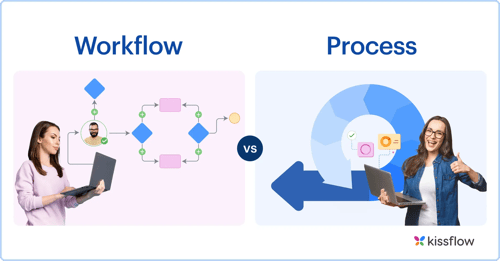
A process is the big-picture, goal-oriented system of activities, people, and resources that delivers a repeatable business outcome. A workflow is the tactical, step-by-step sequence of tasks, rules, and handoffs that completes one specific job within that process. One process contains multiple workflows, and each workflow carries out one part of the larger system.
Key takeaways on workflow vs process
- A stuck task or handoff points to a workflow. A failure to scale or align points to the process.
- Employee onboarding is a process, and IT provisioning, HR documentation, and payroll setup are workflows inside it.
- Design the process first. Then standardize and automate the workflows inside it.
- The team doing the work owns the workflow. A process owner answers for the whole outcome, from the first trigger to the final result.
The label you put on a breakdown decides who is asked to fix it. If you call slow hiring a workflow problem, recruiters tune the interview-scheduling step. If you call it a process problem, someone redesigns how resume screening, interviews, and background checks hand work to each other. If you pick the wrong label, the team that could fix the problem never sees it.
That is why the difference between workflow and process matters beyond vocabulary. A process works at the macro level. It is cross-functional and tied to an organizational objective. A workflow works at the micro level, inside one team or one system, and runs the same tasks in the same order every time.
This guide also covers the operating layer underneath those definitions: who owns each level, which metric each owner reads, and what record proves which step failed.
Workflow vs process: side-by-side comparison
A process sits one level above a workflow on every dimension below, from scope to the evidence an auditor asks for.
| Dimension | Process | Workflow |
|---|
| Scope | A process covers an entire business function and serves an organizational objective. | A workflow covers one specific job, such as routing a single invoice for approval. |
| Hierarchy | A process contains multiple workflows as its building blocks. | A workflow belongs to a process and executes one part of it. |
| Purpose | A process defines what needs to happen and why. | A workflow defines how the tasks get done, and in what order. |
| Flexibility | A process adapts when business goals change. | A workflow stays standardized so every run produces the same result with fewer errors. |
| Span | A process is cross-functional and spans departments, systems, and people. | A workflow runs inside one team or one system. |
| Failure signal | The outcome misses its target, or the business cannot scale or align. | A task gets stuck, rejected, or dropped at a handoff. |
| Improvement | A process improves through redesign, governance, and measurement. | A workflow improves through automation and fewer steps. |
| Ownership and change control | A process owner accountable for the outcome approves design changes. | The team doing the work owns the steps and changes them within set permissions. |
| Audit evidence | A record that spans the whole process shows whether the outcome was met and how long it took. | A timestamped, attributed record shows who acted on each step and when. |
| Example | Accounts payable and employee onboarding are processes. | Invoice approval and IT provisioning are workflows. |
Core differences between a workflow and a process
Every difference in the table above comes down to altitude.
Why a process is more than a bigger workflow
Adding steps to a workflow never turns it into a process. A process also carries the business outcome, the people accountable for it, and the rules that decide which workflow runs next. A 40-step workflow is still one job done one way. A process with three short workflows is still the system that decides whether the job was worth doing.
How workflows and processes work together
Think of a restaurant. The restaurant is the process. It sources ingredients, seats guests, runs the kitchen, takes payment, and aims to put a good meal on every table. Each recipe is a workflow: a fixed sequence of tasks that produces one dish the same way every time.
Rewriting a recipe improves one dish. Redesigning the restaurant changes how every dish reaches the table. Neither replaces the other. A restaurant with no recipes serves inconsistent food, and a stack of recipes with no restaurant feeds nobody.
The same containment holds in business. A business process coordinates people, systems, and several workflows toward one outcome. Each workflow has its own trigger, ordered steps, and defined output. The process decides the order the workflows run in and what counts as done.
Watch the short explainer, or read its transcript below.
Video transcript: workflow vs process explained
A process is the macro view. It is the cross-functional system that turns people, tools, and resources into a business outcome, and it answers what needs to happen and why. A workflow is the micro view. It is one sequence of tasks that answers how a specific job gets done. Take employee onboarding. The process runs from the signed offer to the end of the first 90 days. Inside it sit separate workflows for HR paperwork, IT provisioning, and payroll. Each workflow is a building block. When one block jams, fix that block. When every block runs and the new hire still is not productive, redesign the process.
Workflow vs process example: employee onboarding
Onboarding crosses several departments, which makes it a clear place to see both levels at once.
What the onboarding process includes
The onboarding process runs from offer acceptance to the end of a new hire’s first 90 days. It involves HR, IT, finance, the hiring manager, and the new employee. Its goal is a productive, compliant team member. Four workflows run inside it:
- The HR documentation workflow collects the new hire’s employment forms and checks that each one is complete.
- The IT provisioning workflow starts when HR marks the hire as confirmed, then requests system access, assigns equipment, and sends credentials.
- The payroll setup workflow adds the new hire to payroll before the first pay date.
- The orientation and access setup workflow schedules orientation and issues building access.
The process also needs an exceptional route. If a start date moves after IT has already ordered equipment, the change has to reach HR, IT, and finance together. No single workflow owns that change. The process does.
Workflow faults and process faults in onboarding
A form is forgotten, and the HR documentation workflow stalls. That is a workflow fault. You fix it inside the step, with a required field or a reminder rule.
New hires wait weeks before they can do productive work, even though every task closes. That is a process fault. The workflows run in the wrong order, or nobody owns the timeline from first task to last.
Workflow vs process example: accounts payable
The accounts payable process runs from receiving a vendor invoice to paying it and recording the payment in the general ledger, and its goal is accurate, on-time payment. Inside it, the invoice approval workflow routes each invoice to the right budget owner and returns a decision. An accounts payable function that keeps missing payment terms has a process problem, even if it also has slow approvers.
When to fix a workflow and when to redesign a process
Applying a fix at the wrong level wastes effort and leaves the real cause in place. The signals below sort a breakdown into the level where it actually sits.
How to tell a workflow problem from a process problem
Fix the workflow when
- One task keeps getting stuck at the same handoff.
- The same step keeps producing errors or rejections.
- One part runs slowly while the rest move at normal speed.
- Task-level data points to the cause, such as one long queue or one slow step.
Redesign the process when
- The outcome stays off target even when every task completes correctly.
- Several teams keep solving the same problem on their own.
- Volume growth requires a matching rise in headcount, so the business cannot scale.
- Stakeholders disagree on what the process should produce, so the teams cannot align.
- Compliance or quality requirements have changed, and the current design no longer meets them.
Process design before workflow automation
Process design comes first, because automating a broken workflow produces a faster broken workflow. Once the design is stable, start workflow automation with the workflows that run most often or produce the most errors, because that is where a fixed step pays back on every run.
Workflow vs process ownership, change control, and audit evidence
The fastest way to settle “workflow problem or process problem” is to ask whose number moved. Every diagnostic in the previous section becomes a matter of evidence once each level has a named owner and a named metric.
Workflow ownership and process ownership
Workflow ownership sits at the team level: the HR coordinator who runs document collection, for example, owns that workflow’s steps, rules, and handoffs. A manager or process owner is accountable for the process outcome, such as a new hire who is productive by day 90. The two owners need different data, and they should have different rights to change things.
The metric each owner reads
Each owner reads a different set of numbers:
- The process owner reads overall cycle time and success rate across the whole process.
- The team owner reads task completion time, errors, and bottlenecks inside one workflow.
That split gives you the decision rule. If overall cycle time or success rate slips while every team’s task metrics hold steady, the fault is in the process design, and the process owner acts. If one team’s completion time or error count spikes and drags the overall number with it, the fault is in that workflow, and its team owner acts. Workflow analytics covers how to track both sets of numbers.
How change control keeps the two levels apart
Ownership only holds if changes go through the system rather than email threads. A team owner changes the steps of a workflow, and a change that alters how workflows connect goes to the process owner. Every change should be logged so the team can see what the process looked like before and after it.
The record that shows which onboarding step failed
A record of every action, timestamped and attributed, settles which step failed. In onboarding, that record shows when HR confirmed the hire, when the IT provisioning request opened, who assigned equipment, and when credentials went out. If the gap sits between two steps inside IT provisioning, the workflow fails. If every step closed on time and the new hire still was not productive, the process failed. The record turns that judgment call into evidence.
How to choose a tooling approach for workflows and processes
Match the size of the tool to the level of the problem.
- A single trigger-based integration between two apps, such as sending a form submission to a spreadsheet, may be better served by a lighter integration tool.
- A cross-functional approval process with audit requirements needs a governed layer around the systems of record, such as SAP, Oracle, Salesforce, and Workday.
- Neither kind of tool designs the process for you. People still have to decide the outcome, the owner, and the order of the workflows.
The second case is where Kissflow fits. Kissflow is an AI-powered enterprise application platform, founded in 2012, that serves over 1,200 customers worldwide. It lets business teams and IT build, automate, and govern their core work, driven by business logic, not code. It works as the governed execution and exception layer around systems of record, and it handles the structured work at the edges of those systems without replacing them. An admin controls what goes live, and every action is timestamped and attributed in the audit log. For processes that span many teams, workflow orchestration coordinates several workflows into one governed run.
Frequently asked questions about workflows and processes
What makes up a workflow?
A workflow is made up of a trigger that starts it, an ordered set of tasks, the rules that route work between those tasks, the handoffs between people or systems, and a defined output. It runs inside one team or one system. The process it belongs to supplies the business outcome and decides which workflow runs next.
How many workflows should a process have?
There is no fixed number. Split a workflow out when a part of the process has its own trigger, its own team owner, and its own defined output. If a step has no owner or output of its own, keep it inside the neighboring workflow.
Book a demo to see how Kissflow builds and governs workflows with every action timestamped and attributed in the audit log.