Task Assignment with Shift Management System for Retail Stores
Kissflow assigns a planogram reset, a cycle count, or lunch-rush register coverage to whoever is actually scheduled on the floor that shift, requires them to accept it, tracks completion in real time, and gives a manager a true record of what got done, not just who clocked in.
Trusted by leading retailers worldwide


Being on the schedule and knowing what to do that shift are two different things.
Ask a store manager who is covering the lunch-rush register or resetting the end-cap planogram this afternoon, and the honest answer is often a shrug. A shift roster proves someone is scheduled to be in the building; it says nothing about which of that day's specific tasks, a planogram reset, a cycle count, register coverage during the lunch rush, belongs to which person on the floor. Without that layer connecting people to tasks, work gets picked up by whoever happens to remember or whoever gets asked verbally in the aisle, and a task that nobody claims quietly does not happen. A manager reviewing the day afterward has a punch clock record and a to-do list, but no record connecting the two.
Kissflow assigns each task against the specific people scheduled for that shift, requires the assignee to accept it so the assignment is a commitment and not just a notification sitting unread, tracks progress while the shift is underway, and gives the manager a clear picture of what actually got covered by the end of the day, not just who clocked in and out.
Where a shift's tasks get lost between the roster and the floor
Tasks are assigned verbally
A manager tells someone what to do, with no record of the assignment.
No link to the schedule
Task assignment is disconnected from who is actually on shift right now.
Acceptance is assumed
Nobody confirms an assigned task was actually seen and accepted.
Completion is not tracked
A manager has no record of which shift tasks actually got done.
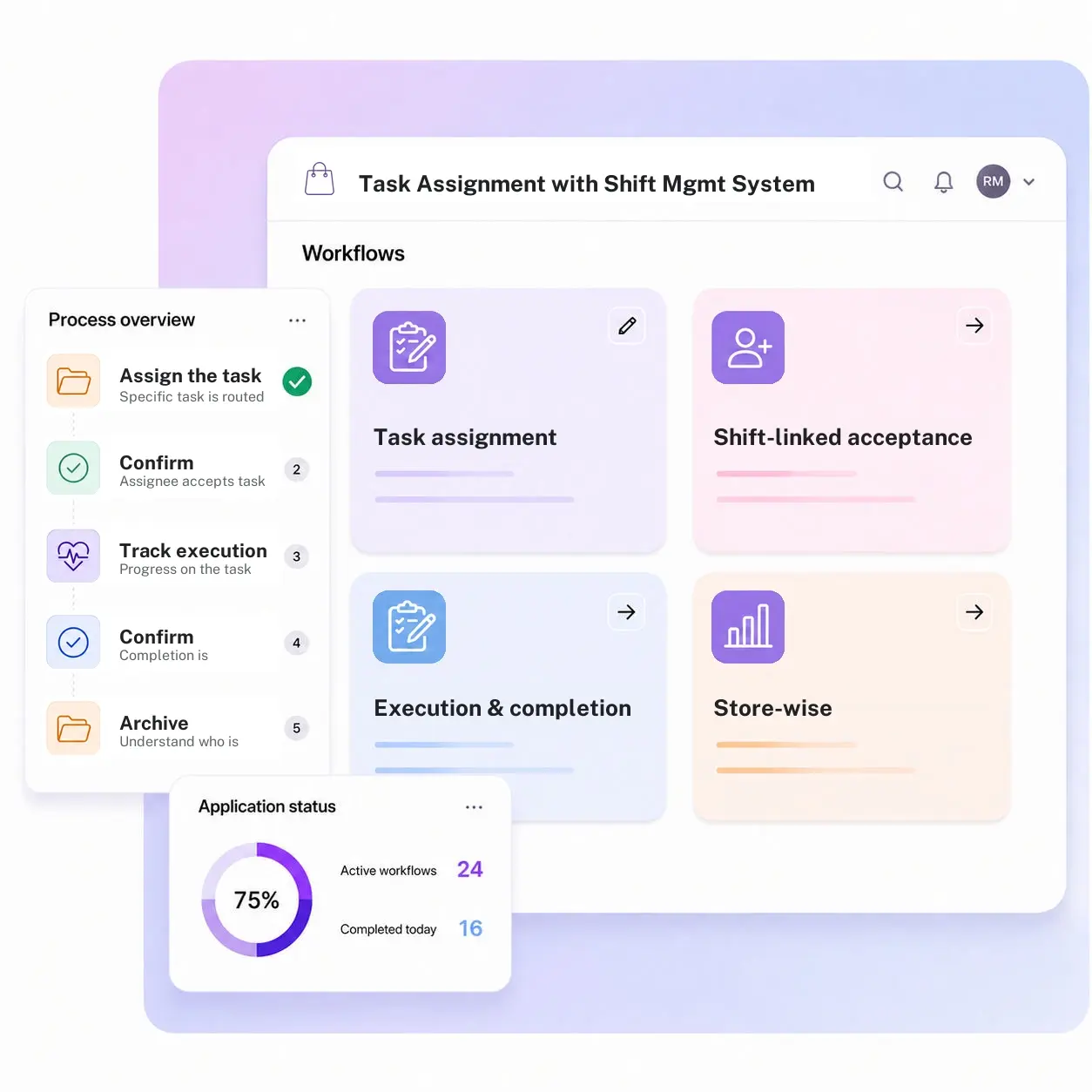
Three modules. Every task tied to a scheduled shift and a confirmed completion.
Configure task templates and shift-linking rules by store.
Task assignment
Every task is assigned directly to the specific people scheduled and present for that shift, not the store generally.
Shift-linked acceptance
The assignee has to accept the task, tying the commitment to their scheduled shift rather than a silent notification.
Execution and completion tracking
Progress moves in real time through the shift and completion is confirmed, so nothing goes unclaimed or unfinished.
From request to system of record in four steps
Plan

A specific task, a planogram reset, a cycle count, or lunch-rush register coverage, is defined for the shift.
Assign

The task is routed to a person actually scheduled and clocked in for that shift, who accepts it, converting it from a notification into a tracked commitment.
Execute

Progress on the task stays visible in real time as the shift moves toward completion.
Close-out

Completion is confirmed and logged against that person and shift, giving the manager a true record of what got done.
What changes when task assignment runs on Kissflow
| Process | Before Kissflow | On Kissflow |
|---|---|---|
| Task assignment | Verbal, no record | Assigned formally and tied to the shift |
| Link to schedule | Disconnected | Directly tied to who is on shift |
| Acceptance | Assumed | Confirmed by the assignee |
| Completion tracking | None | Tracked and confirmed |
| Manager visibility | Who clocked in, not what got done | A clear record of tasks completed each shift |
| Accountability | Unclear | Tied to a specific person and shift |
Connects to your scheduling system; Kissflow does not replace your workforce management system of record
Kissflow runs the task-assignment and completion-tracking layer, tied to your existing shift schedule.
.svg)



.svg)
.svg)
.svg)
.svg)

.svg)
.svg)
.svg)
.svg)
.svg)

.svg)

.svg)

.svg)
.svg)
.svg)
.svg)
.svg)
.svg)
.svg)
.svg)
.svg)

.svg)
Built for how in-store tasks actually need to tie to a real shift
Assignment that requires acceptance
A task is not just a notification; someone confirms they saw and accepted it.
Completion, confirmed
A manager sees what actually got done, not just who was scheduled.
Tied directly to the shift
Tasks are assigned to who is actually on the floor right now.
Live in weeks
Configure task templates in the visual builder, or describe the use case to the AI Builder.
Governed from day one
Role-based access on every task and completion record.
One view for the store manager
Every shift's tasks and their status in one place.
Related apps
Real-Time Shift Adjustments Management System
Reassign tasks automatically when the shift itself changes.
Employee Availability & Preference Management
Availability record creation, updates, change approval, and reporting for retail staff scheduling preferences.
Store-wise Maintenance Performance Dashboard
Goal setting, performance measurement, review, calibration, and reporting for store-level maintenance performance.
We help store managers know what actually got done each shift
.gif)

“If a company cannot enable everybody to use AI, they will never get the true benefit of AI. Platforms like Kissflow allow us to put that capability in the hands of our users in a safe way.”
Vagesh Dave
GVP & CIO at McDermott International, Ltd
See The Full Story

“Advanced automation of all processes is easy to set up. I cannot imagine how to manage workflows without this software.”
Tanay Tiwary
Global Head - Digitalization & Business Improvement
See the Full Story

“Kissflow supports rapid application development by building a working application prototype in the shortest amount of time.”
Maria Theresa Cabigon
CIO, SN Aboitiz Power Group
See The Full Story
See what Kissflow can do for you
Talk to usGot questions? We're here to help.
Get SupportNo. Kissflow runs the task-assignment and completion-tracking layer, tied to your existing shift schedule.
Yes, the assignee confirms they have seen and accepted the task.
Yes, completion is tracked and visible per shift.
That app handles a coverage gap in who is on shift. This app assigns and tracks specific tasks to whoever is on shift.
Yes, standard task templates are configured once and reused.
Yes, task assignment and completion tracking are mobile-friendly.
Configuration and AI-assisted app generation move delivery from a multi-month program to a matter of weeks.
Kissflow is certified to SOC 1, SOC 2, SOC 3, and ISO/IEC 27001, with role-based access on every record.











