Build App Faster With
Kissflow's Pre-Built Low-Code Apps
Building enterprise-grade low-code applications with Kissflow requires minimal ramp-up time, enabling IT teams and business units to collaborate without bottlenecks. Kissflow’s visual development environment empowers process owners to rapidly design and deploy both simple and mission-critical applications—while IT retains full governance and security oversight.
Enterprises can also deploy fully functional, pre-built low-code apps to accelerate modernization, automate complex workflows, and standardize operations across departments. With reusable components, built-in compliance controls, and seamless integration capabilities, Kissflow helps organizations streamline internal processes at scale—without rebuilding systems from scratch.



CapEx Expenditure App
Orchestrate procurement, logistics, and delivery from one seamless platform. With our Supply Chain Management app, you can coordinate procurement, manage vendors, track shipments, and confirm deliveriesall in a centralized, automated workflow. Designed for efficiency and transparency, this app keeps your supply chain moving at the speed of business.
Creator

Language
English
Category
Retail
Trusted by finance, operations, and project teams to manage CapEx requests and approvals across all business units.



CapEx Expenditure Application with Low-Code
Our app digitizes the entire supply chain workflow. Raise purchase requests, automate PO approvals, manage vendors, monitor shipments, and confirm receiptsall while tracking every milestone, document, and approval in one place.
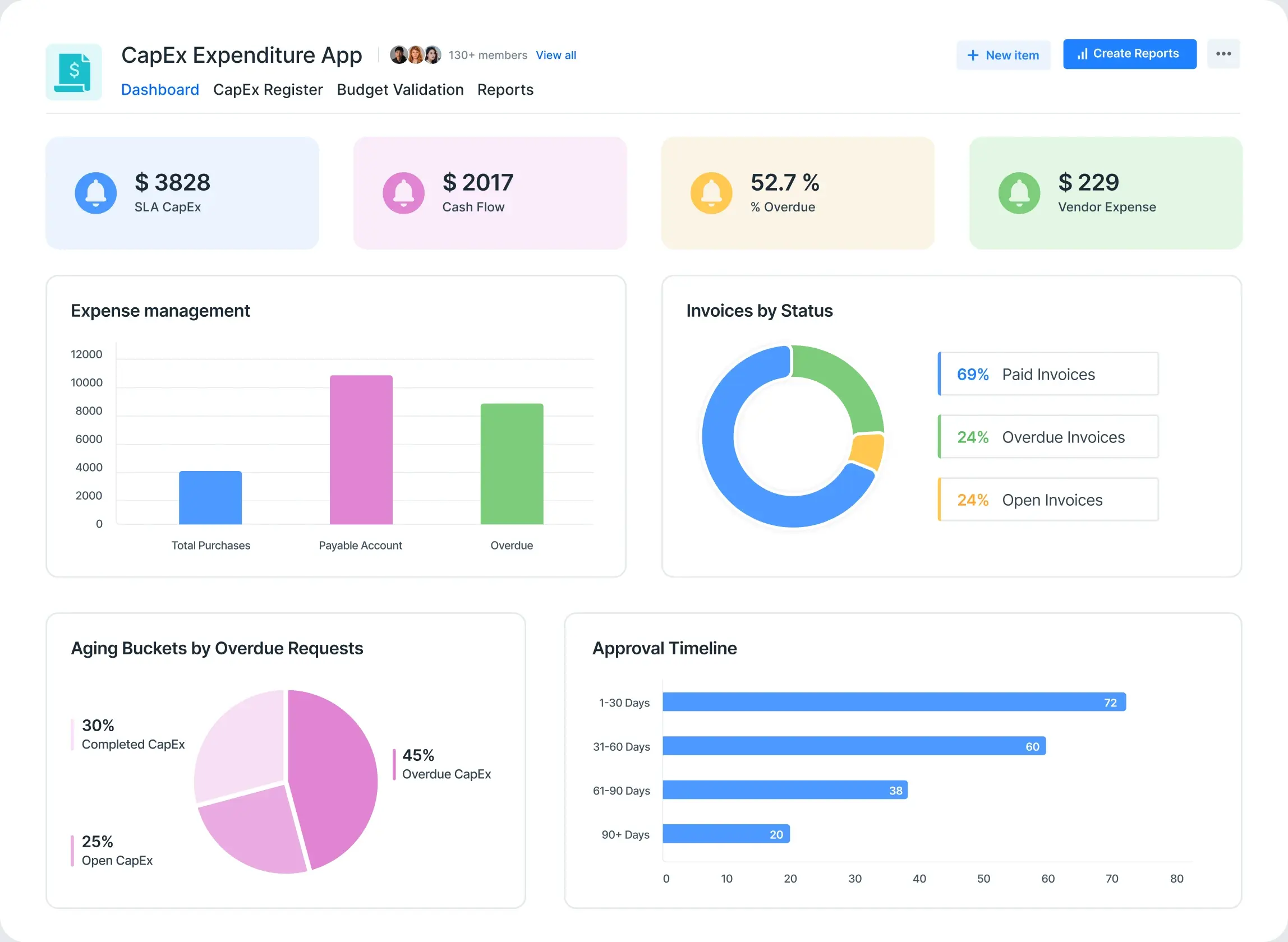
What Is a CapEx Expenditure System?
A CapEx Expenditure system is a digital tool that automates the process of requesting, reviewing, and approving capital expenses. Instead of emails, spreadsheets, and manual tracking, you get a single workflow for CapEx intake, documentation, budget validation, and approval routing.
It ensures:
-
All CapEx requests are tracked and never lost
-
Budget checks are enforced before approvals
-
Approvals are documented and audit-ready
-
Spend data is visible and reportable in real-time
Why Do Businesses Need a CapEx Expenditure App?
Without a structured system, CapEx management often leads to:
-
Untracked or unauthorized spend
-
Manual budget errors or overruns
-
Delayed or missed approvals
-
Lack of audit trails for compliance
A CapEx Expenditure app centralizes the process, speeds up decisions, and ensures every spend is approved and justified.
Key Benefits of Using CapEx Expenditure Software
-
Standardize and digitize CapEx requests
-
Enforce budget checks and policy compliance
-
Track approvals and status in real time
-
Support internal and external audits with full documentation
Simplify CapEx Requests With a Smart, Low-Code App
Managing CapEx shouldn't mean chasing emails or missing approvals. Kissflow's CapEx Expenditure App automates every stepfrom request to approvalso finance teams and managers can focus on outcomes, not paperwork.
Why Choose a CapEx Expenditure App Built on Low-Code?
Kissflow lets you:
Design custom request and approval workflows for different CapEx types
Automate budget validation and multi-level approvals
Gain real-time dashboards for spend tracking and analysis
Modify forms, workflows, or rules instantlyno IT help needed
With Kissflow's low-code platform, your CapEx process stays compliant and flexible.
Who Is This For?
-
Finance, operations, and project teams
-
Department heads managing capital spending
-
Compliance and audit teams
-
Enterprises seeking visibility and control over CapEx
Ready to Automate CapEx Approvals?
Don't risk manual errors or unauthorized spend. Move to digital, transparent CapEx management today.
Modules
-
CapEx Request Submission
Employees submit requests with spend justification, supporting documents, and budget impact. -
Budget Validation
Automated checks against department or project budgets before routing. -
Multi-Level Approval Workflow
Route requests to department heads, finance, and leadership as needed. -
CapEx Register
Central dashboard for all requests, approvals, and spend history. -
Document Repository
Attach and store proposals, approvals, quotes, and invoices. -
CapEx Dashboard
Real-time view of spend by project, department, or business unit.
Features
-
Custom request forms
-
Automated budget checks
-
Multi-stage approvals
-
Role-based permissions
-
Spend tracking dashboards
-
Document uploads and storage
-
Audit trail for every request
-
Automated notifications and reminders
-
Policy compliance reporting
- Click the Enquire button on the app tile or landing page.
- Fill in your CapEx workflow and requirements on the enquiry form.
- Click Submit.
Kissflow's support team will configure your CapEx approval app and guide you to go live.
Controlling spend: Our customers' speak
See how finance teams manage capital expenses and ensure compliance with Kissflow's CapEx app.


This is so easy, even my mom could do this. It was extremely intuitive and straightforward. The watermark was, 'I don't need to call IT to do this. I can do it myself.
Renee Villarreal
Senior IT Manager
Industry
Energy
HeadQuaters
USA
Key Highlights
450+
Process
10x
ROI
10,000+
Users


The beauty of Kissflow is how quick and easy it is to create the apps I need. It's so user-friendly that I made exactly what I needed in 30 minutes.
Oliver Umehara
IT Manager
Industry
Telecom & Media
HeadQuaters
Japan
Key Highlights
28+
Processes
42
Group Companies
70+
Users


We seek to go beyond incremental efforts not only in sustainability but also in everything we do. With Kissflow, FPH and its subsidiaries were able to digitize dramatically major operations, especially in their finance and accounts operations.
Joseph Arnel Chavez
Assistant Manager
Industry
Energy & Utilities
HeadQuaters
Philippines
Key Highlights
100+
Office Processes Automated
1,000+
Monthly Paperless Processes
10,000+
Employees
Frequently Asked Questions
Explore other related apps

Purchasing and Inventory Management App
By Kissflow
Optimize your retail operations with streamlined purchasing processes and real-time inventory control
Custom Quote
Warehouse Management App
By Kissflow
See our warehouse management app in action
Custom Quote

Accelerate and scale app development with Kissflow



Didn’t find what you're looking for?
Let us know what we can build for you
Thank you! Our team will get in touch with you shortly.











