Document and Data Management for Oil & Gas
Kissflow runs document and data management for oil and gas as a governed record system, not a shared drive: one master dataset, role-based access, renewal alerts, version history, and reporting that shows what's current, what's expiring, and who touched it last.
Trusted by energy operators worldwide






Ask five people where the current version of a permit lives and you get five different answers, three of which are wrong.
Ask five people at a single operating site where the current environmental permit lives and there's a real chance of five different answers. Well files, right-of-way agreements, inspection certificates, and safety data sheets pile up the same way, each one critical, each one saved wherever the last person who touched it happened to leave it. A shared drive can hold a PDF. It cannot tell you which copy is current, who is allowed to see a given contract, or that a permit renewal is six weeks out.
When a document goes missing or a version gets overwritten, the cost shows up later, at an audit or a regulatory inspection, or when a contractor's expired certification surfaces only after they're already on site. Nobody sets out to lose the paper trail; it happens one overwritten file at a time, across sites each generating a version of the same records.
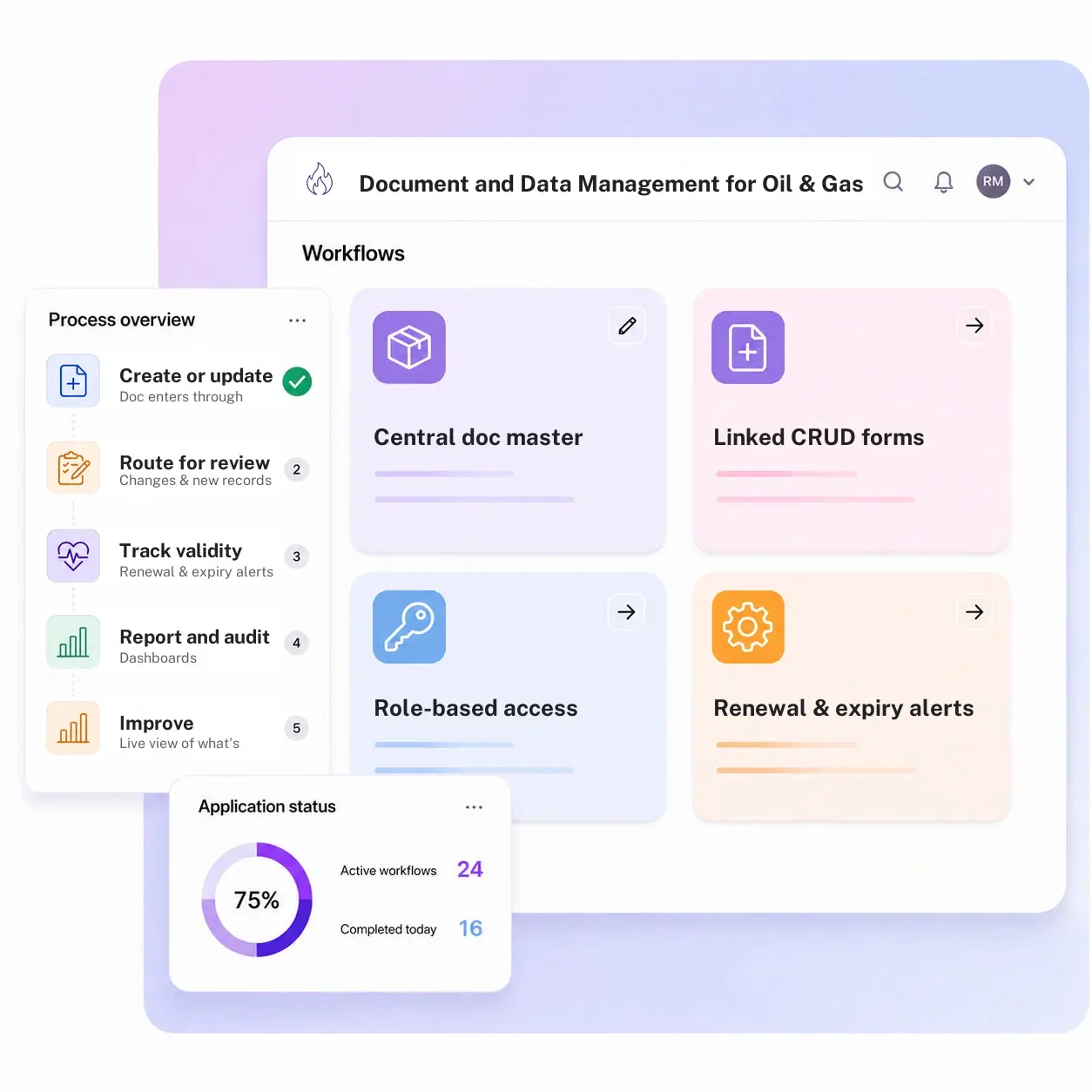
Kissflow runs document and data management as a governed record system: a central master dataset, linked forms for creating and updating records, role-based access so a contractor sees only their scope, renewal and expiry alerts, version history, and reporting on what's current and expiring.
Where document control breaks down before it ever reaches an audit
No single master record
The same permit exists as a scan in one inbox, a printout in a site binder, and a slightly older version on someone's desktop, and nobody can say which one is authoritative.
Access isn't controlled
Shared drives and email attachments don't distinguish a contractor's scope from an operator's full document library, so everyone ends up with everyone else's files.
Renewals get missed
A certificate or permit lapses because nothing on the drive knows its own expiry date, and the first sign of trouble is a stop-work order.
Audits start from zero
Every audit becomes a scramble to reconstruct which version was in effect on a given date, instead of pulling a ready record.
Six modules. One governed document system.
Every module ships with default forms, access rules, alerts, and dashboards. Configure each one to the document types your sites actually manage.
Central document master
One system of record for permits, contracts, certificates, and technical files, indexed by site, asset, and document type.
Linked CRUD forms and processes
Create, update, and retire a document through a structured process instead of overwriting a file in place.
Role-based access
Contractors, field staff, and corporate reviewers each see the scope of documents their role requires, nothing more.
Renewal and expiry alerts
Every document with a validity window is tracked against its expiry date, with alerts running weeks ahead of the deadline.
Version history and audit trail
Every change, approval, and access event is logged against the document, so the current and prior versions are both provable.
Reporting dashboards
A live view of what's current, what's expiring in the next 30, 60, and 90 days, and where a document is missing entirely.
From request to system of record in four steps
Capture

A document enters through a structured form tied to its type, site, and asset, not an email attachment.
Validate

Changes and new records route to the right reviewer based on document type and site, with the prior version preserved, so what enters the record is the approved, current version.
Track

Renewal and expiry alerts fire on a schedule tied to each document's own validity window, so what is current and what is expiring stays visible.
Report

The master dataset is itself the record system, so dashboards and exportable logs show what is current, what is due, and the full history behind every record.
What changes when document control runs on Kissflow
| Document type | Before Kissflow | On Kissflow |
|---|---|---|
| Permits and licenses | Scanned copies scattered across drives and inboxes | One indexed master record per site and asset |
| Access control | Shared drives with no scope distinction | Role-based access matched to contractor or employee scope |
| Renewals | Tracked in someone's calendar, if at all | Automated alerts ahead of every expiry date |
| Version control | The newest file on the drive wins, right or wrong | A logged, approved version history for every record |
| Contractor documents | Emailed in, filed loosely, hard to verify later | Submitted through a structured intake with review and approval |
| Audit prep | Reconstructed from drives and inboxes under deadline | Pulled directly from a maintained, current record set |
Connects to SAP or your ERP and document/content systems; each stays the system of record for its own domain
Kissflow does not replace SAP, your ERP, or a dedicated content management system. It runs the record creation, access control, and renewal workflow that keeps documents current and reportable.
.svg)



.svg)
.svg)
.svg)
.svg)

.svg)
.svg)
.svg)
.svg)
.svg)

.svg)

.svg)

.svg)
.svg)
.svg)
.svg)
.svg)
.svg)
.svg)
.svg)
.svg)

.svg)
Built for how document control actually runs across a site
A governed record, not a shared drive
Every document type has its own master record with an owner, a status, and a validity window, not just a file name.
Access matched to role
Contractors, field teams, and corporate reviewers see exactly the scope their role requires.
Renewals tracked automatically
Expiry dates drive alerts on their own schedule, so nothing lapses because someone forgot to check a calendar.
Live in weeks, not a multi-year program
Configure the document types and access rules in the visual builder, or describe the use case and let the AI Builder draft the app.
Governed from day one
Single sign-on, role-based access, and a full audit log are built into every record, not bolted on later.
Reporting that's always current
Dashboards pull from the live record set, not a snapshot someone exported before the audit.
Related apps
Management of Change (MOC) App
Route a change through impact assessment and CAB approval before it's implemented and documented.
Job Safety Analysis (JSA) Management System
Break a job into its steps, name the hazard in each one, and route it for sign-off before work starts.
Site Onboarding and Commissioning Management System
Coordinate the stage-gate tasks and document collection that get a new site ready to produce.
We help operations teams keep every document current and provable
.gif)

“If a company cannot enable everybody to use AI, they will never get the true benefit of AI. Platforms like Kissflow allow us to put that capability in the hands of our users in a safe way.”
Vagesh Dave
GVP & CIO at McDermott International, Ltd
See The Full Story

“Advanced automation of all processes is easy to set up. I cannot imagine how to manage workflows without this software.”
Tanay Tiwary
Global Head - Digitalization & Business Improvement
See the Full Story

“Kissflow supports rapid application development by building a working application prototype in the shortest amount of time.”
Maria Theresa Cabigon
CIO, SN Aboitiz Power Group
See The Full Story
See what Kissflow can do for you
Talk to usGot questions? We're here to help.
Get SupportNo. Kissflow is ERP and content-system adjacent. SAP, your ERP, or a dedicated content management system stays the system of record for financial and technical data; Kissflow runs the record creation, access control, renewal alerts, and reporting workflow around it.
Permits, licenses, right-of-way agreements, contracts, certificates, technical files, and any other document type your sites need indexed, access-controlled, and tracked against an expiry date.
Access is role-based. A contractor sees the scope tied to their contract, field staff see what's relevant to their site, and corporate reviewers see the full library, all configured to your access policy.
Every document with a validity window is tracked against its own expiry date, with alerts firing on a configurable schedule ahead of the deadline, not left to someone's memory.
Yes. Documents are indexed by site and asset, so a multi-site operator gets one system instead of a separate drive per location.
It can run alongside one, or replace ad hoc drive-and-email document handling, depending on your setup. Kissflow adds the workflow, access rules, and alerts that a plain file store doesn't provide.
Configuration and AI-assisted app generation move delivery from a multi-month program to a matter of weeks.
Kissflow is certified to SOC 1, SOC 2, SOC 3, and ISO/IEC 27001, with role-based access and a full audit log on every record.











